

JalViGo User Manual Explore connections. Interpret performance. AUTHORS Manupati Vijay Kumar Goran Putnik EDITION 1.0 | 2026
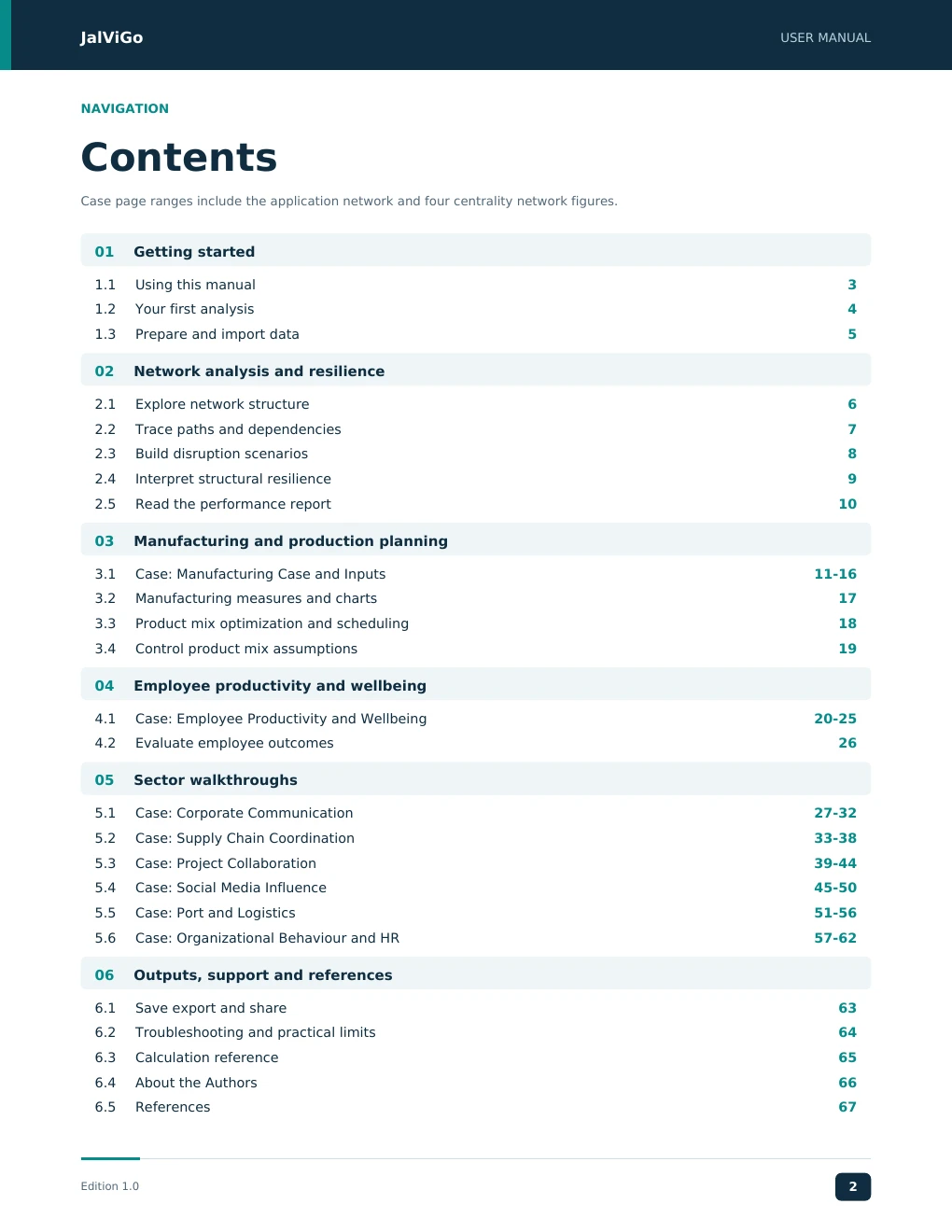
JalViGo USER MANUAL NAVIGATION Contents Case page ranges include the application network and four centrality network figures. 01 Getting started 1.1 Using this manual 3 1.2 Your first analysis 4 1.3 Prepare and import data 5 02 Network analysis and resilience 2.1 Explore network structure 6 2.2 Trace paths and dependencies 7 2.3 Build disruption scenarios 8 2.4 Interpret structural resilience 9 2.5 Read the performance report 10 03 Manufacturing and production planning 3.1 Case: Manufacturing Case and Inputs 11-16 3.2 Manufacturing measures and charts 17 3.3 Product mix optimization and scheduling 18 3.4 Control product mix assumptions 19 04 Employee productivity and wellbeing 4.1 Case: Employee Productivity and Wellbeing 20-25 4.2 Evaluate employee outcomes 26 05 Sector walkthroughs 5.1 Case: Corporate Communication 27-32 5.2 Case: Supply Chain Coordination 33-38 5.3 Case: Project Collaboration 39-44 5.4 Case: Social Media Influence 45-50 5.5 Case: Port and Logistics 51-56 5.6 Case: Organizational Behaviour and HR 57-62 06 Outputs, support and references 6.1 Save export and share 63 6.2 Troubleshooting and practical limits 64 6.3 Calculation reference 65 6.4 About the Authors 66 6.5 References 67 Edition 1.0 2
JJJJaaaallllVVVViiiiGGGGoooo UUUUSSSSEEEERRRR MMMMAAAANNNNUUUUAAAALLLL JalViGo User Manual 1.1 GETTING STARTED Using this manual JalViGo helps users examine directed networks, compare disruption scenarios and interpret sector-specific performance. This manual explains how to prepare a network, use the four workspaces, evaluate results and retain an auditable analysis record. It is intended for analysts, educators, researchers and domain managers. The examples cover manufacturing, organizational behaviour and human resources, corporate communication, supply chain coordination, project delivery, social media and port logistics. All bundled cases are illustrative. Employee observations in the two organizational cases are synthetic; they are not findings about an actual workforce. Edition and scope Item Coverage Manual edition 1.0 Software basis Local JalViGo source snapshot inspected Core workspaces Explore; Paths; What-if & resilience; Report Specialist functions Serial manufacturing schedules, integer product mix and separate employee outcome measures Method evidence Implementation definitions, reproducible examples and cited primary references This edition describes the inspected implementation. It does not imply external certification, clinical validation, or endorsement by the organizations cited. The reference section distinguishes methodological sources from the software conventions used here. The meaning of JALVIGO The name JALVIGO carries a special meaning: JAL – Derived from the Sanskrit word Jāla, meaning a web or network of connections. VI – Represents Vijay. GO – Represents Goran. Thus, JALVIGO symbolizes the integration of network science, academic collaboration, and our shared commitment to advancing scientific research. Edition 1.0 3 EEEEddddiiiittttiiiioooonnnn 1111....0000 3333
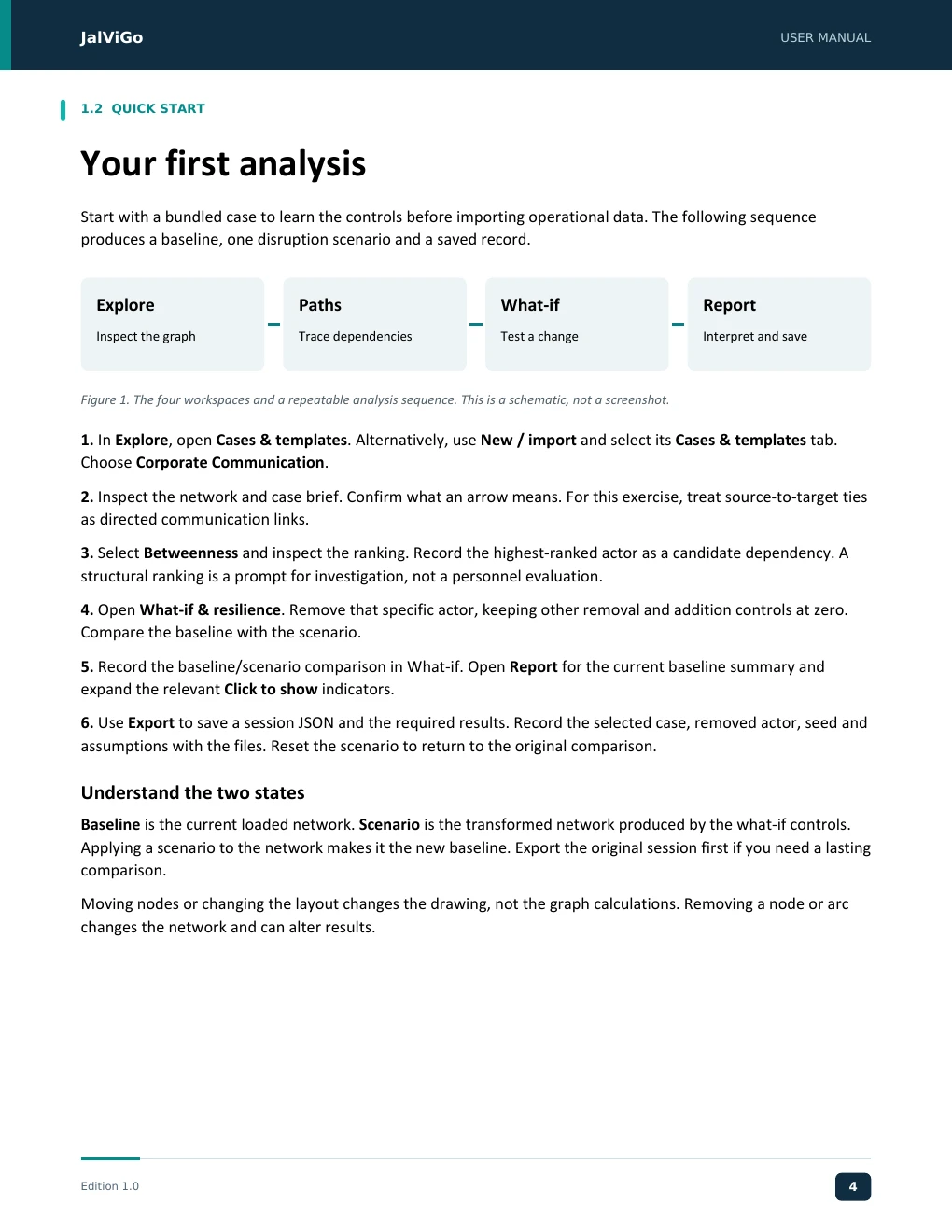
JJJJaaaallllVVVViiiiGGGGoooo UUUUSSSSEEEERRRR MMMMAAAANNNNUUUUAAAALLLL JalViGo User Manual 1.2 QUICK START Your first analysis Start with a bundled case to learn the controls before importing operational data. The following sequence produces a baseline, one disruption scenario and a saved record. Explore Paths What-if Report Inspect the graph Trace dependencies Test a change Interpret and save Figure 1. The four workspaces and a repeatable analysis sequence. This is a schematic, not a screenshot. 1. In Explore, open Cases & templates. Alternatively, use New / import and select its Cases & templates tab. Choose Corporate Communication. 2. Inspect the network and case brief. Confirm what an arrow means. For this exercise, treat source-to-target ties as directed communication links. 3. Select Betweenness and inspect the ranking. Record the highest-ranked actor as a candidate dependency. A structural ranking is a prompt for investigation, not a personnel evaluation. 4. Open What-if & resilience. Remove that specific actor, keeping other removal and addition controls at zero. Compare the baseline with the scenario. 5. Record the baseline/scenario comparison in What-if. Open Report for the current baseline summary and expand the relevant Click to show indicators. 6. Use Export to save a session JSON and the required results. Record the selected case, removed actor, seed and assumptions with the files. Reset the scenario to return to the original comparison. Understand the two states Baseline is the current loaded network. Scenario is the transformed network produced by the what-if controls. Applying a scenario to the network makes it the new baseline. Export the original session first if you need a lasting comparison. Moving nodes or changing the layout changes the drawing, not the graph calculations. Removing a node or arc changes the network and can alter results. Edition 1.0 4 EEEEddddiiiittttiiiioooonnnn 1111....0000 4444
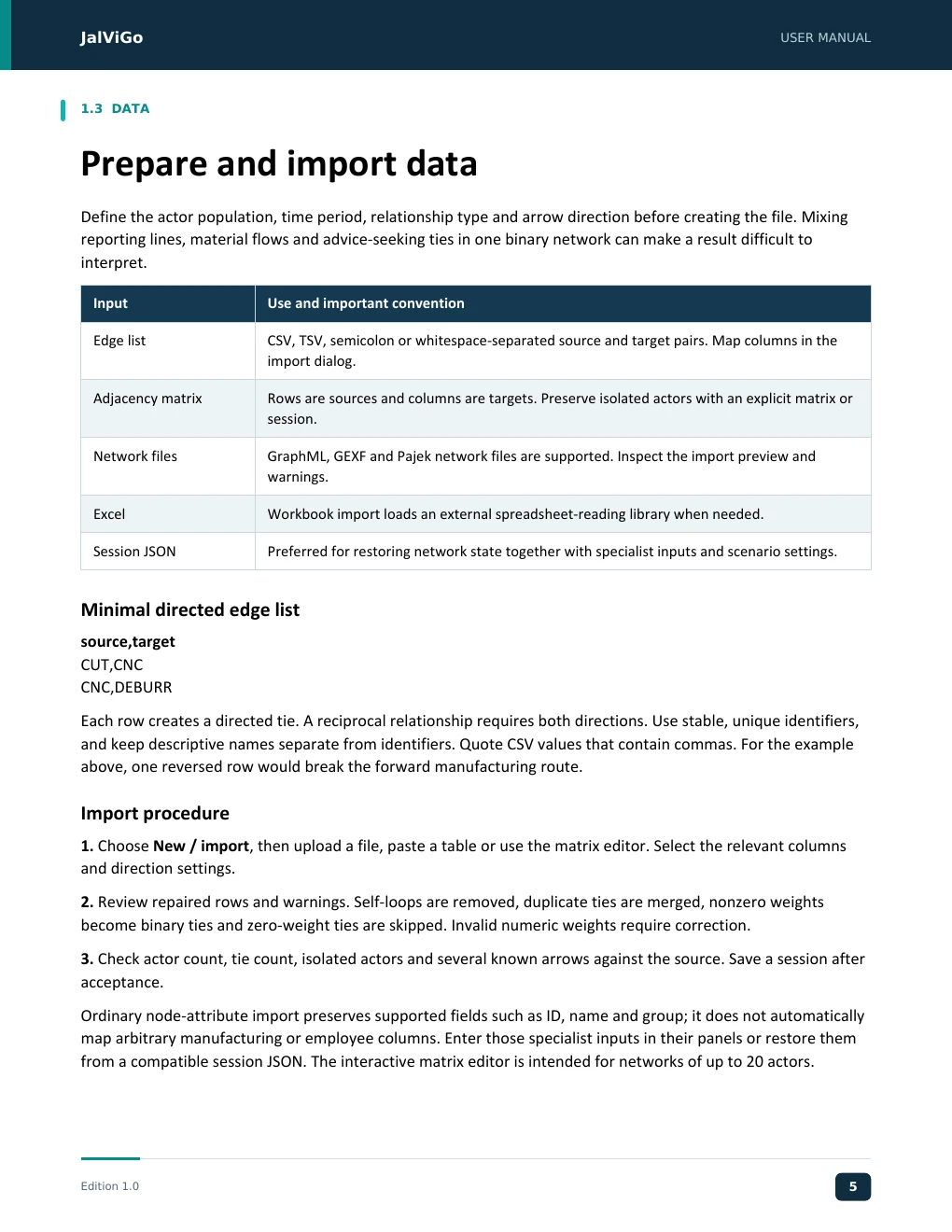
JJJJaaaallllVVVViiiiGGGGoooo UUUUSSSSEEEERRRR MMMMAAAANNNNUUUUAAAALLLL JalViGo User Manual 1.3 DATA Prepare and import data Define the actor population, time period, relationship type and arrow direction before creating the file. Mixing reporting lines, material flows and advice-seeking ties in one binary network can make a result difficult to interpret. Input Use and important convention Edge list CSV, TSV, semicolon or whitespace-separated source and target pairs. Map columns in the import dialog. Adjacency matrix Rows are sources and columns are targets. Preserve isolated actors with an explicit matrix or session. Network files GraphML, GEXF and Pajek network files are supported. Inspect the import preview and warnings. Excel Workbook import loads an external spreadsheet-reading library when needed. Session JSON Preferred for restoring network state together with specialist inputs and scenario settings. Minimal directed edge list source,target CUT,CNC CNC,DEBURR Each row creates a directed tie. A reciprocal relationship requires both directions. Use stable, unique identifiers, and keep descriptive names separate from identifiers. Quote CSV values that contain commas. For the example above, one reversed row would break the forward manufacturing route. Import procedure 1. Choose New / import, then upload a file, paste a table or use the matrix editor. Select the relevant columns and direction settings. 2. Review repaired rows and warnings. Self-loops are removed, duplicate ties are merged, nonzero weights become binary ties and zero-weight ties are skipped. Invalid numeric weights require correction. 3. Check actor count, tie count, isolated actors and several known arrows against the source. Save a session after acceptance. Ordinary node-attribute import preserves supported fields such as ID, name and group; it does not automatically map arbitrary manufacturing or employee columns. Enter those specialist inputs in their panels or restore them from a compatible session JSON. The interactive matrix editor is intended for networks of up to 20 actors. Edition 1.0 5 EEEEddddiiiittttiiiioooonnnn 1111....0000 5555
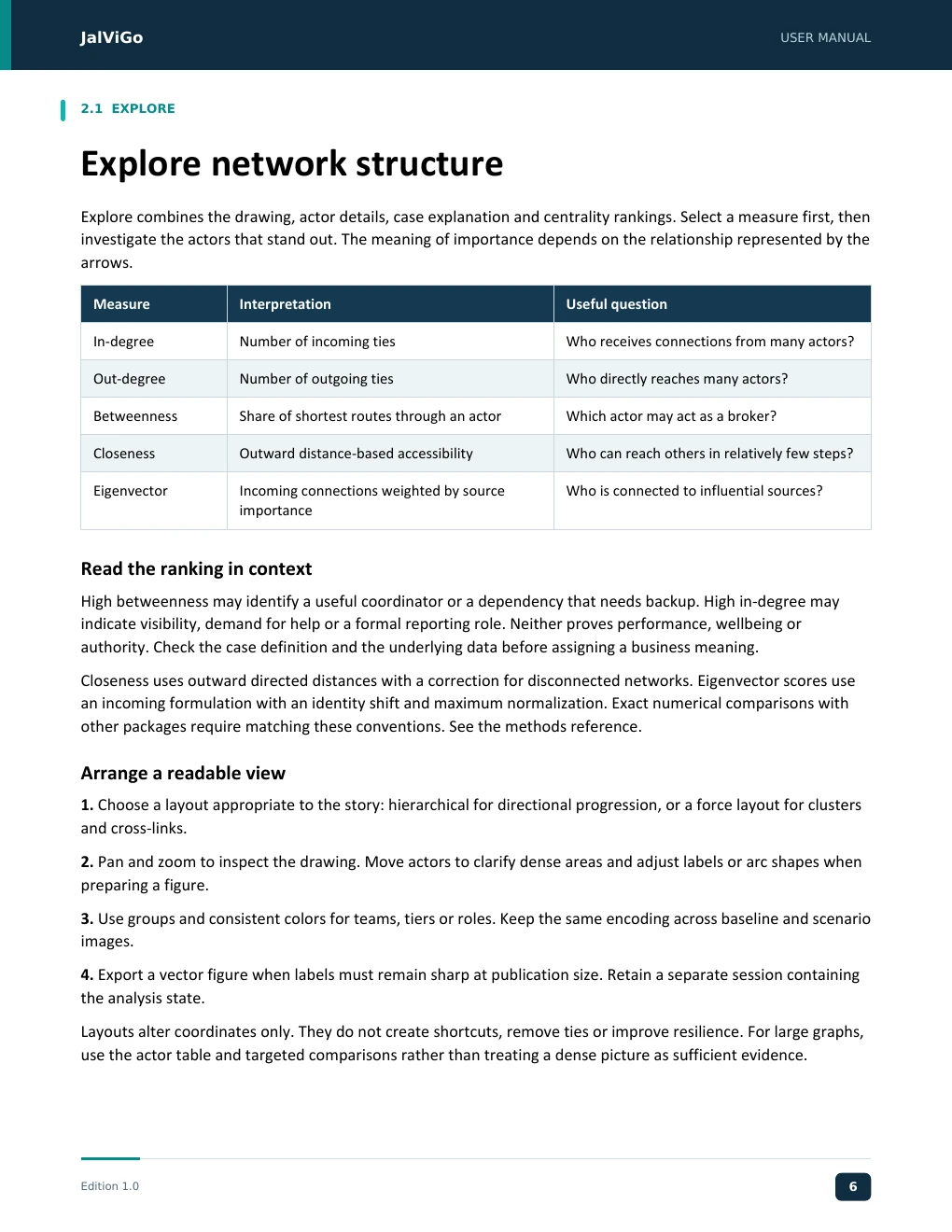
JJJJaaaallllVVVViiiiGGGGoooo UUUUSSSSEEEERRRR MMMMAAAANNNNUUUUAAAALLLL JalViGo User Manual 2.1 EXPLORE Explore network structure Explore combines the drawing, actor details, case explanation and centrality rankings. Select a measure first, then investigate the actors that stand out. The meaning of importance depends on the relationship represented by the arrows. Measure Interpretation Useful question In-degree Number of incoming ties Who receives connections from many actors? Out-degree Number of outgoing ties Who directly reaches many actors? Betweenness Share of shortest routes through an actor Which actor may act as a broker? Closeness Outward distance-based accessibility Who can reach others in relatively few steps? Eigenvector Incoming connections weighted by source Who is connected to influential sources? importance Read the ranking in context High betweenness may identify a useful coordinator or a dependency that needs backup. High in-degree may indicate visibility, demand for help or a formal reporting role. Neither proves performance, wellbeing or authority. Check the case definition and the underlying data before assigning a business meaning. Closeness uses outward directed distances with a correction for disconnected networks. Eigenvector scores use an incoming formulation with an identity shift and maximum normalization. Exact numerical comparisons with other packages require matching these conventions. See the methods reference. Arrange a readable view 1. Choose a layout appropriate to the story: hierarchical for directional progression, or a force layout for clusters and cross-links. 2. Pan and zoom to inspect the drawing. Move actors to clarify dense areas and adjust labels or arc shapes when preparing a figure. 3. Use groups and consistent colors for teams, tiers or roles. Keep the same encoding across baseline and scenario images. 4. Export a vector figure when labels must remain sharp at publication size. Retain a separate session containing the analysis state. Layouts alter coordinates only. They do not create shortcuts, remove ties or improve resilience. For large graphs, use the actor table and targeted comparisons rather than treating a dense picture as sufficient evidence. Edition 1.0 6 EEEEddddiiiittttiiiioooonnnn 1111....0000 6666
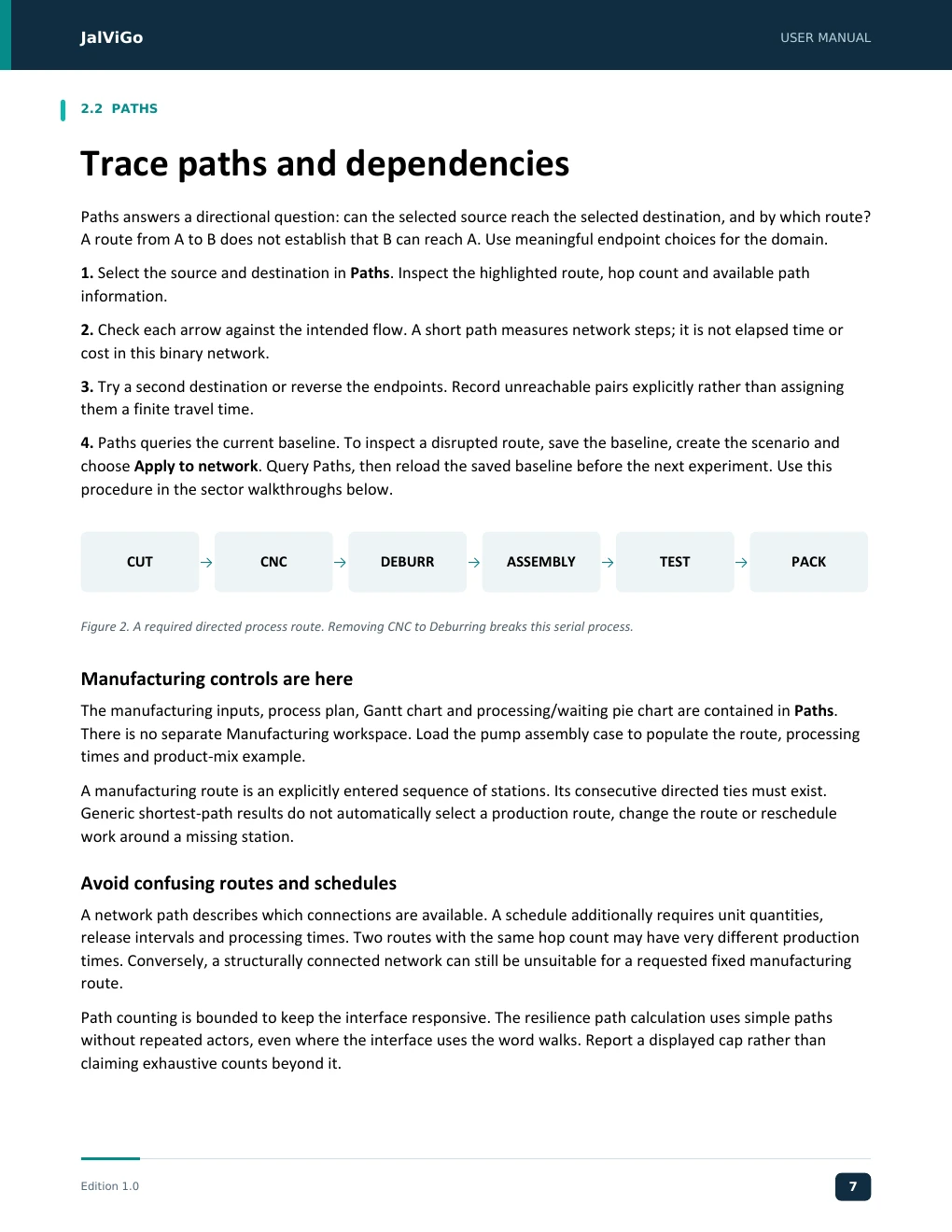
JJJJaaaallllVVVViiiiGGGGoooo UUUUSSSSEEEERRRR MMMMAAAANNNNUUUUAAAALLLL JalViGo User Manual 2.2 PATHS Trace paths and dependencies Paths answers a directional question: can the selected source reach the selected destination, and by which route? A route from A to B does not establish that B can reach A. Use meaningful endpoint choices for the domain. 1. Select the source and destination in Paths. Inspect the highlighted route, hop count and available path information. 2. Check each arrow against the intended flow. A short path measures network steps; it is not elapsed time or cost in this binary network. 3. Try a second destination or reverse the endpoints. Record unreachable pairs explicitly rather than assigning them a finite travel time. 4. Paths queries the current baseline. To inspect a disrupted route, save the baseline, create the scenario and choose Apply to network. Query Paths, then reload the saved baseline before the next experiment. Use this procedure in the sector walkthroughs below. CUT CNC DEBURR ASSEMBLY TEST PACK Figure 2. A required directed process route. Removing CNC to Deburring breaks this serial process. Manufacturing controls are here The manufacturing inputs, process plan, Gantt chart and processing/waiting pie chart are contained in Paths. There is no separate Manufacturing workspace. Load the pump assembly case to populate the route, processing times and product-mix example. A manufacturing route is an explicitly entered sequence of stations. Its consecutive directed ties must exist. Generic shortest-path results do not automatically select a production route, change the route or reschedule work around a missing station. Avoid confusing routes and schedules A network path describes which connections are available. A schedule additionally requires unit quantities, release intervals and processing times. Two routes with the same hop count may have very different production times. Conversely, a structurally connected network can still be unsuitable for a requested fixed manufacturing route. Path counting is bounded to keep the interface responsive. The resilience path calculation uses simple paths without repeated actors, even where the interface uses the word walks. Report a displayed cap rather than claiming exhaustive counts beyond it. Edition 1.0 7 EEEEddddiiiittttiiiioooonnnn 1111....0000 7777
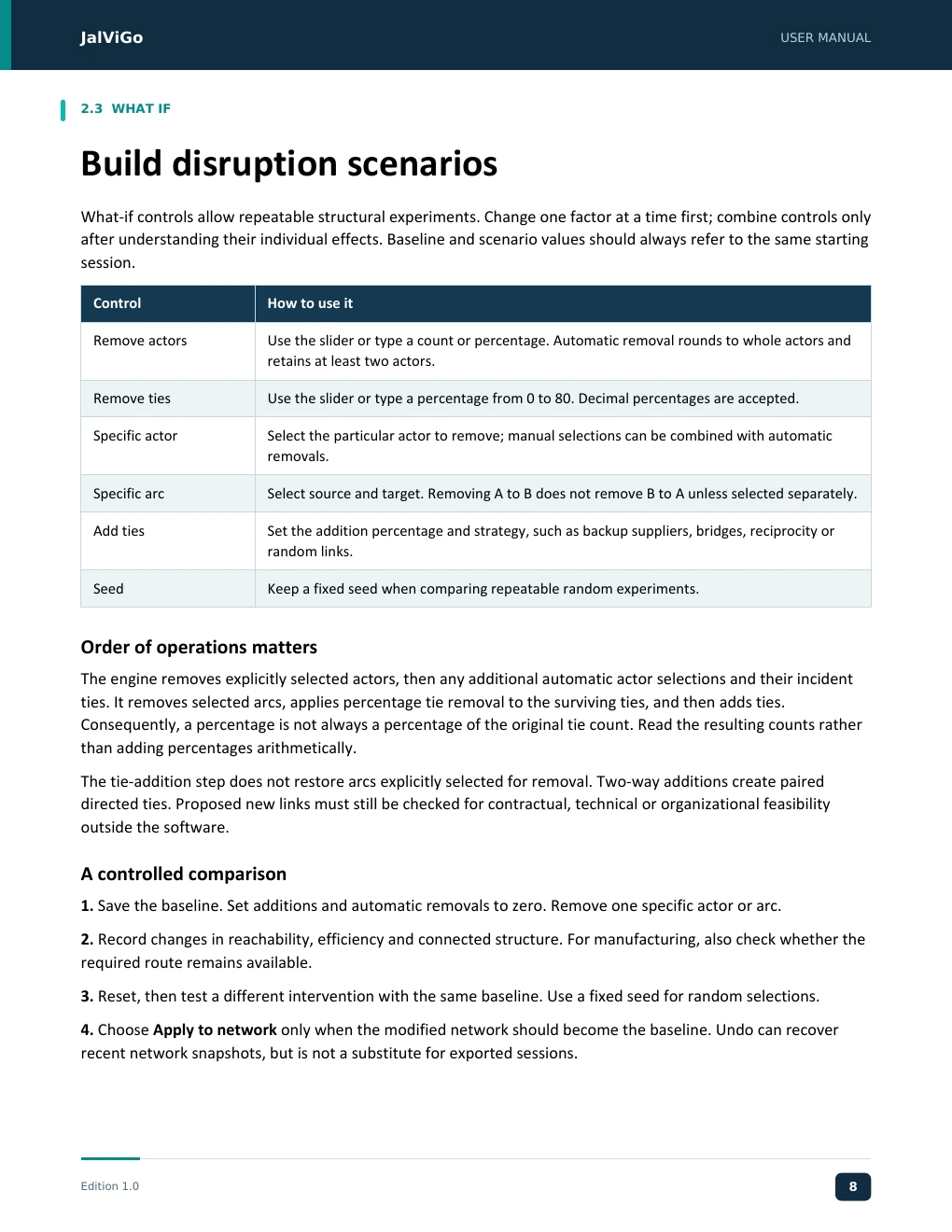
JJJJaaaallllVVVViiiiGGGGoooo UUUUSSSSEEEERRRR MMMMAAAANNNNUUUUAAAALLLL JalViGo User Manual 2.3 WHAT IF Build disruption scenarios What-if controls allow repeatable structural experiments. Change one factor at a time first; combine controls only after understanding their individual effects. Baseline and scenario values should always refer to the same starting session. Control How to use it Remove actors Use the slider or type a count or percentage. Automatic removal rounds to whole actors and retains at least two actors. Remove ties Use the slider or type a percentage from 0 to 80. Decimal percentages are accepted. Specific actor Select the particular actor to remove; manual selections can be combined with automatic removals. Specific arc Select source and target. Removing A to B does not remove B to A unless selected separately. Add ties Set the addition percentage and strategy, such as backup suppliers, bridges, reciprocity or random links. Seed Keep a fixed seed when comparing repeatable random experiments. Order of operations matters The engine removes explicitly selected actors, then any additional automatic actor selections and their incident ties. It removes selected arcs, applies percentage tie removal to the surviving ties, and then adds ties. Consequently, a percentage is not always a percentage of the original tie count. Read the resulting counts rather than adding percentages arithmetically. The tie-addition step does not restore arcs explicitly selected for removal. Two-way additions create paired directed ties. Proposed new links must still be checked for contractual, technical or organizational feasibility outside the software. A controlled comparison 1. Save the baseline. Set additions and automatic removals to zero. Remove one specific actor or arc. 2. Record changes in reachability, efficiency and connected structure. For manufacturing, also check whether the required route remains available. 3. Reset, then test a different intervention with the same baseline. Use a fixed seed for random selections. 4. Choose Apply to network only when the modified network should become the baseline. Undo can recover recent network snapshots, but is not a substitute for exported sessions. Edition 1.0 8 EEEEddddiiiittttiiiioooonnnn 1111....0000 8888
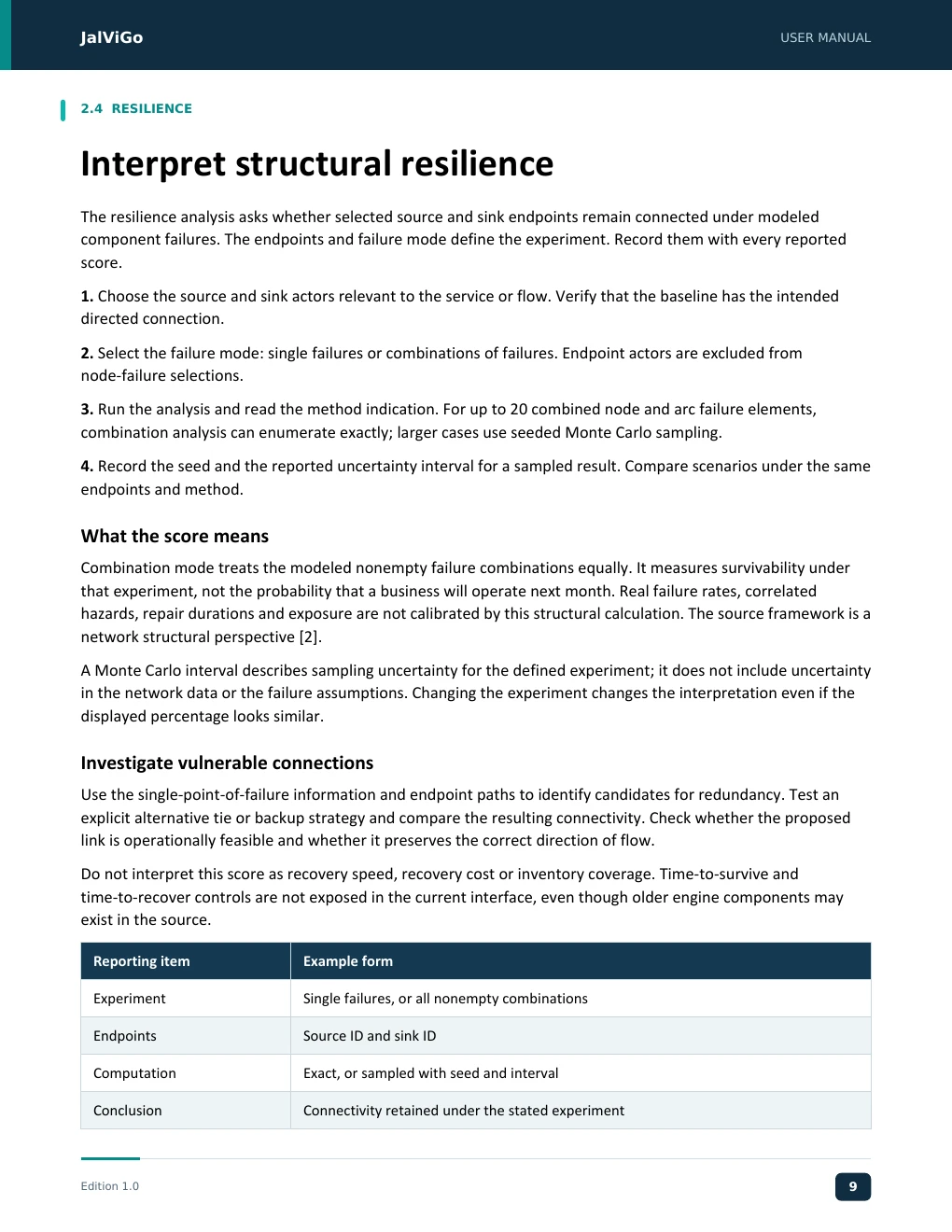
JJJJaaaallllVVVViiiiGGGGoooo UUUUSSSSEEEERRRR MMMMAAAANNNNUUUUAAAALLLL JalViGo User Manual 2.4 RESILIENCE Interpret structural resilience The resilience analysis asks whether selected source and sink endpoints remain connected under modeled component failures. The endpoints and failure mode define the experiment. Record them with every reported score. 1. Choose the source and sink actors relevant to the service or flow. Verify that the baseline has the intended directed connection. 2. Select the failure mode: single failures or combinations of failures. Endpoint actors are excluded from node-failure selections. 3. Run the analysis and read the method indication. For up to 20 combined node and arc failure elements, combination analysis can enumerate exactly; larger cases use seeded Monte Carlo sampling. 4. Record the seed and the reported uncertainty interval for a sampled result. Compare scenarios under the same endpoints and method. What the score means Combination mode treats the modeled nonempty failure combinations equally. It measures survivability under that experiment, not the probability that a business will operate next month. Real failure rates, correlated hazards, repair durations and exposure are not calibrated by this structural calculation. The source framework is a network structural perspective [2]. A Monte Carlo interval describes sampling uncertainty for the defined experiment; it does not include uncertainty in the network data or the failure assumptions. Changing the experiment changes the interpretation even if the displayed percentage looks similar. Investigate vulnerable connections Use the single-point-of-failure information and endpoint paths to identify candidates for redundancy. Test an explicit alternative tie or backup strategy and compare the resulting connectivity. Check whether the proposed link is operationally feasible and whether it preserves the correct direction of flow. Do not interpret this score as recovery speed, recovery cost or inventory coverage. Time-to-survive and time-to-recover controls are not exposed in the current interface, even though older engine components may exist in the source. Reporting item Example form Experiment Single failures, or all nonempty combinations Endpoints Source ID and sink ID Computation Exact, or sampled with seed and interval Conclusion Connectivity retained under the stated experiment Edition 1.0 9 EEEEddddiiiittttiiiioooonnnn 1111....0000 9999
JJJJaaaallllVVVViiiiGGGGoooo UUUUSSSSEEEERRRR MMMMAAAANNNNUUUUAAAALLLL JalViGo User Manual 2.5 REPORT Read the performance report Report summarizes the current baseline and applicable domain outcomes. Structural baseline/scenario comparisons are in What-if; the manufacturing panel also compares both states. Click Click to show to reveal an indicator and its explanation, or click again to hide it. Employee productivity and employee wellbeing use this same interaction. Measure family Interpretation and reading rule Size and density Actor and directed tie counts describe the population; density is ties divided by n(n - 1). Reciprocity Fraction of directed ties whose reverse tie also exists. Global efficiency Mean reciprocal directed distance over all distinct ordered pairs; unreachable pairs contribute zero. Average finite distance Average only over reachable pairs. A reduction after disconnection is not automatically an improvement. Z1 to Z5 Structural indicators with specific projection and normalization conventions; see page 65. Manufacturing Baseline, scenario and changes for makespan, throughput, cycle and waiting measures when inputs are valid. Employee outcomes Separate productivity and wellbeing values with criteria, coverage and observation-based analysis. Use multiple measures together A disrupted network may have fewer reachable pairs but shorter distances among the remaining pairs. Report efficiency and reachability alongside average distance. A high density also does not establish that the connections are affordable, useful or correctly directed. Handle unavailable values Treat N/A, an unavailable outcome, and zero as different states. A missing manufacturing route produces blocked results rather than a faster completion time. Employee measures need valid observations; they are not inferred from centrality. A zero valid output observation is meaningful, whereas missing output is excluded. Prepare a result statement State the case, observation period, baseline definition, intervention, metric units, method and interpretation. For example: “Removing the specified route arc blocks the fixed pump process; manufacturing completion measures are unavailable under that route assumption.” Avoid interpreting a structural experiment as an observed causal effect. Edition 1.0 10 EEEEddddiiiittttiiiioooonnnn 1111....0000 11110000
JJJJaaaallllVVVViiiiGGGGoooo UUUUSSSSEEEERRRR MMMMAAAANNNNUUUUAAAALLLL JalViGo User Manual 3.1 MANUFACTURING Case: Manufacturing Case and Inputs Choose Manufacturing - Precision Pump Assembly in Cases & templates and open Paths. This case demonstrates a deterministic serial line with one machine per station and a shared ordered route. Order Station ID Operation Minutes per unit 1 CUT Cutting 3 2 CNC CNC machining 8 3 DEBURR Deburring 2 4 ASSEMBLY Assembly 5 5 TEST Quality testing 4 6 PACK Packing 2 Enter a single product batch 1. Set the route in the order shown. Verify all five consecutive directed arcs exist. 2. Set processing times in minutes per unit. Set quantity to 20 and release interval to 0 minutes; use single-product mode for this example. 3. Inspect the process plan and charts in Paths. Open Report for the numerical baseline/scenario table. 4. Save the input session and export manufacturing results. Record the units and any assumptions about release time. All 20 units are released at time zero. Stations process one unit at a time in first-in, first-out order. The next operation begins only after that unit has finished the previous station and the next station is available. Buffers are unlimited. Setup, travel, breakdowns, rework and parallel machines are not modeled. Use the case to study a bottleneck CNC requires eight minutes per unit, the longest station processing time. With simultaneous releases, the first unit completes after 24 minutes and later completions are eight minutes apart. Twenty units therefore finish at 24 + 19 × 8 = 176 minutes. Remove CNC or the CNC-to-DEBURR arc in What-if to test route failure. The schedule becomes blocked. The model does not bypass a station merely because another network path exists. Restore the component before testing processing-time changes. Edition 1.0 11 EEEEddddiiiittttiiiioooonnnn 1111....0000 11111111
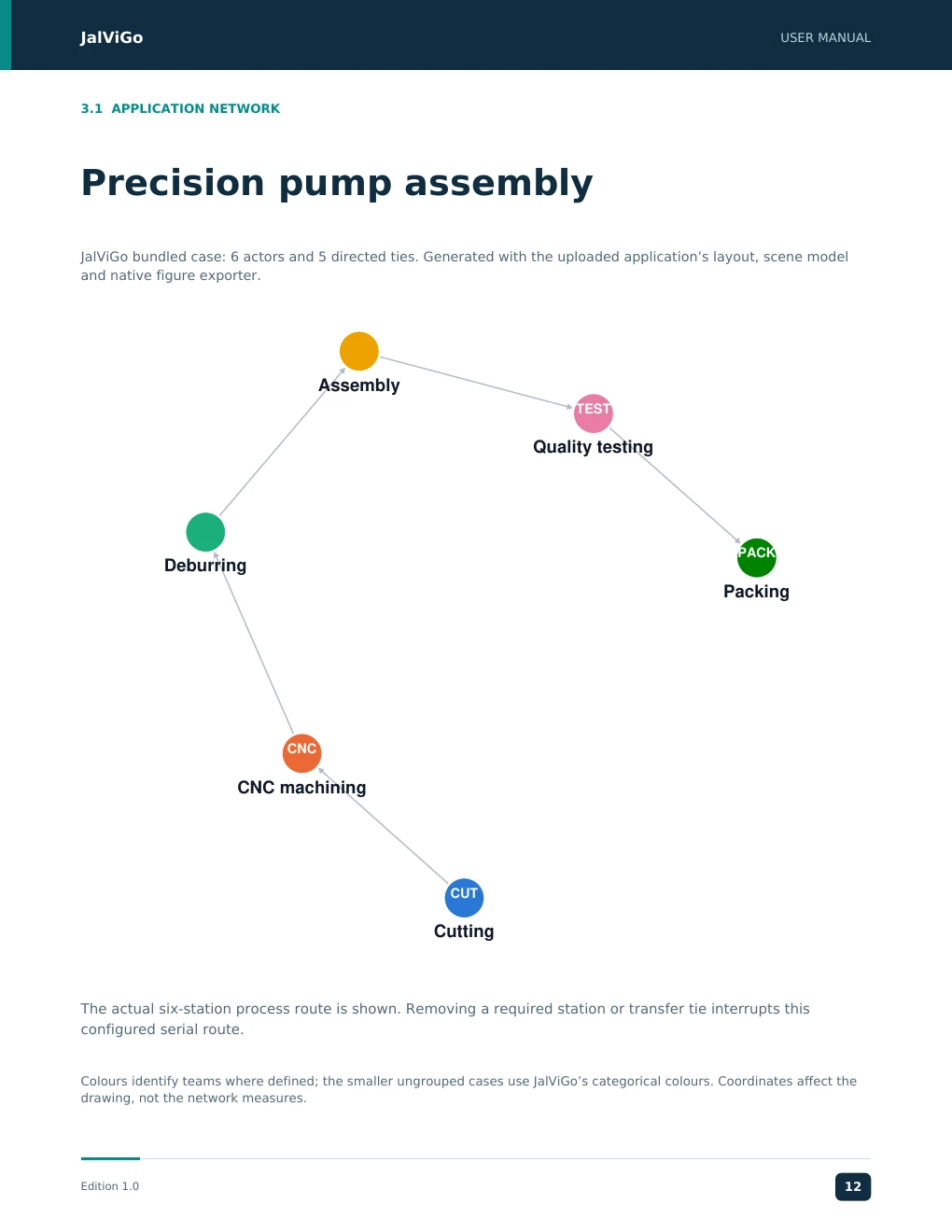
JalViGo USER MANUAL 3.1 APPLICATION NETWORK Precision pump assembly JalViGo bundled case: 6 actors and 5 directed ties. Generated with the uploaded application’s layout, scene model and native figure exporter. Assembly TEST Quality testing PACK Deburring Packing CNC CNC machining CUT Cutting The actual six-station process route is shown. Removing a required station or transfer tie interrupts this configured serial route. Colours identify teams where defined; the smaller ungrouped cases use JalViGo’s categorical colours. Coordinates affect the drawing, not the network measures. Edition 1.0 12
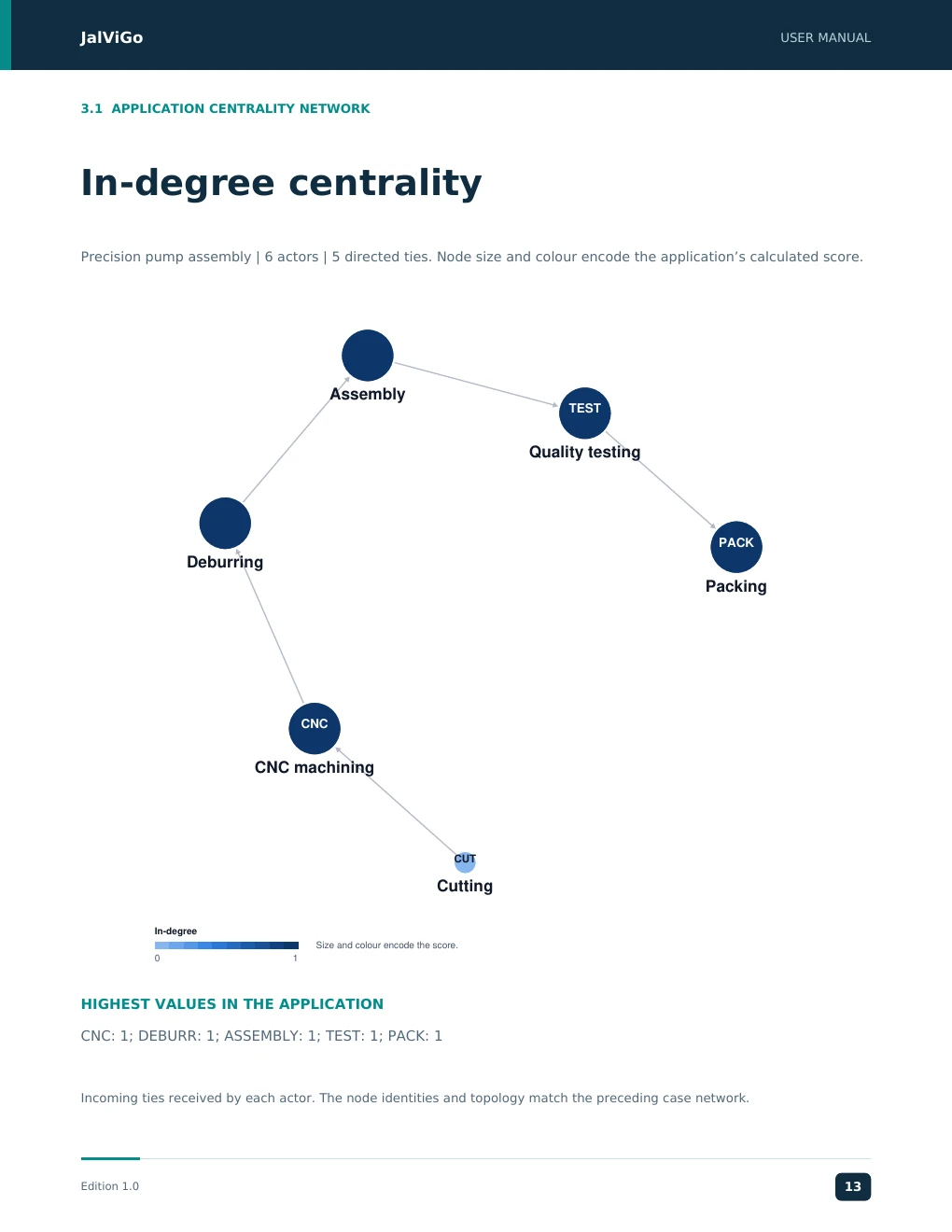
JalViGo USER MANUAL 3.1 APPLICATION CENTRALITY NETWORK In-degree centrality Precision pump assembly | 6 actors | 5 directed ties. Node size and colour encode the application’s calculated score. Assembly TEST Quality testing PACK Deburring Packing CNC CNC machining CUT Cutting In-degree Size and colour encode the score. 0 1 HIGHEST VALUES IN THE APPLICATION CNC: 1; DEBURR: 1; ASSEMBLY: 1; TEST: 1; PACK: 1 Incoming ties received by each actor. The node identities and topology match the preceding case network. Edition 1.0 13
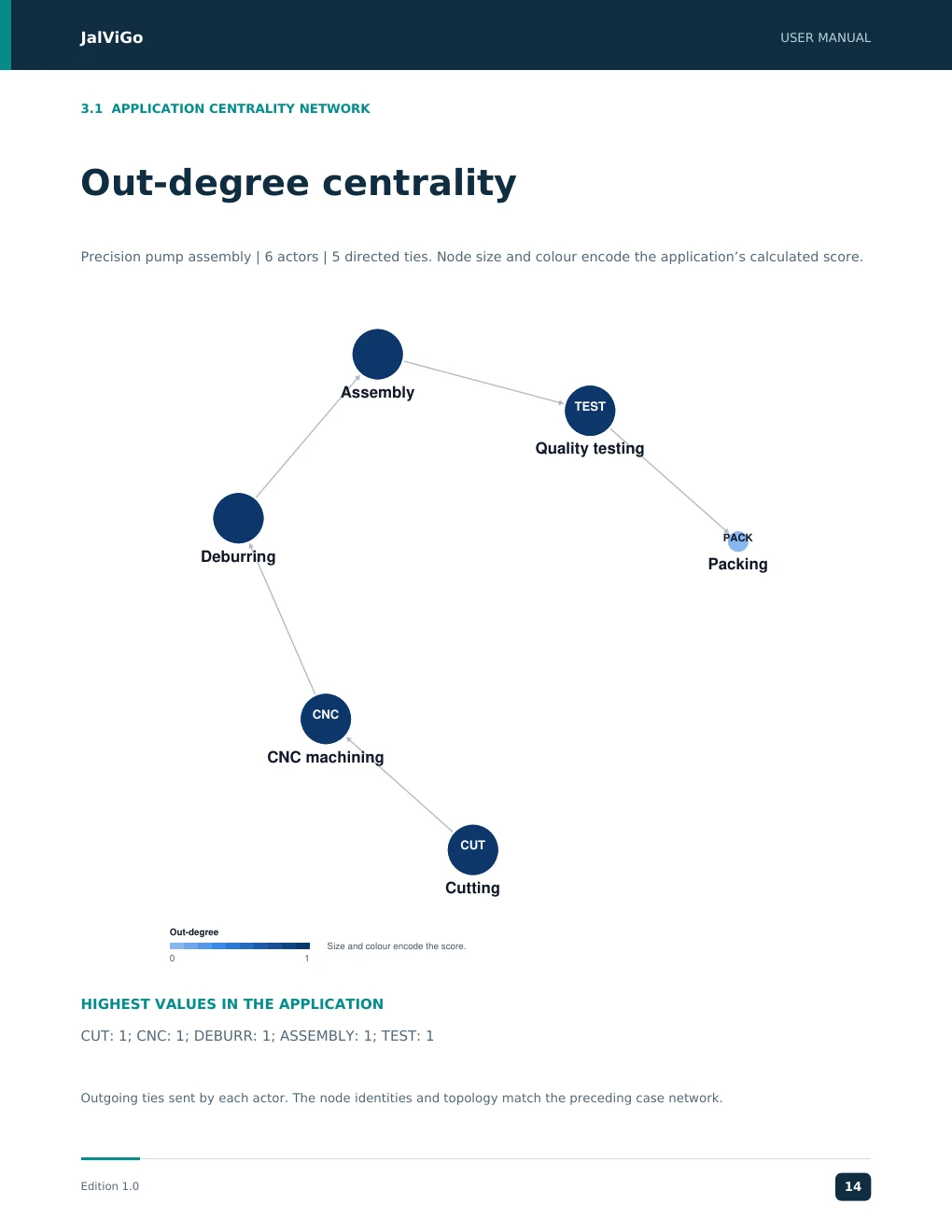
JalViGo USER MANUAL 3.1 APPLICATION CENTRALITY NETWORK Out-degree centrality Precision pump assembly | 6 actors | 5 directed ties. Node size and colour encode the application’s calculated score. Assembly TEST Quality testing PACK Deburring Packing CNC CNC machining CUT Cutting Out-degree Size and colour encode the score. 0 1 HIGHEST VALUES IN THE APPLICATION CUT: 1; CNC: 1; DEBURR: 1; ASSEMBLY: 1; TEST: 1 Outgoing ties sent by each actor. The node identities and topology match the preceding case network. Edition 1.0 14
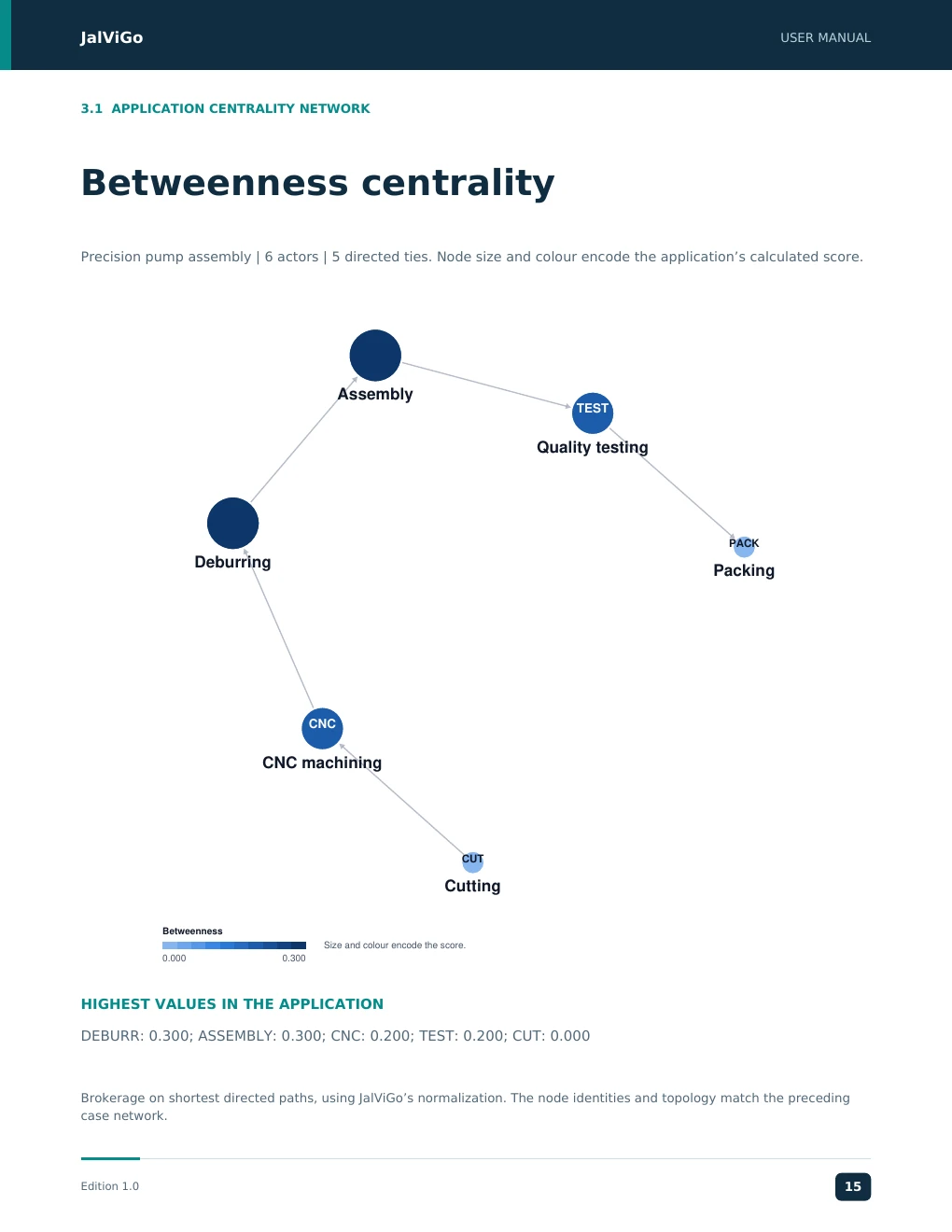
JalViGo USER MANUAL 3.1 APPLICATION CENTRALITY NETWORK Betweenness centrality Precision pump assembly | 6 actors | 5 directed ties. Node size and colour encode the application’s calculated score. Assembly TEST Quality testing PACK Deburring Packing CNC CNC machining CUT Cutting Betweenness Size and colour encode the score. 0.000 0.300 HIGHEST VALUES IN THE APPLICATION DEBURR: 0.300; ASSEMBLY: 0.300; CNC: 0.200; TEST: 0.200; CUT: 0.000 Brokerage on shortest directed paths, using JalViGo’s normalization. The node identities and topology match the preceding case network. Edition 1.0 15
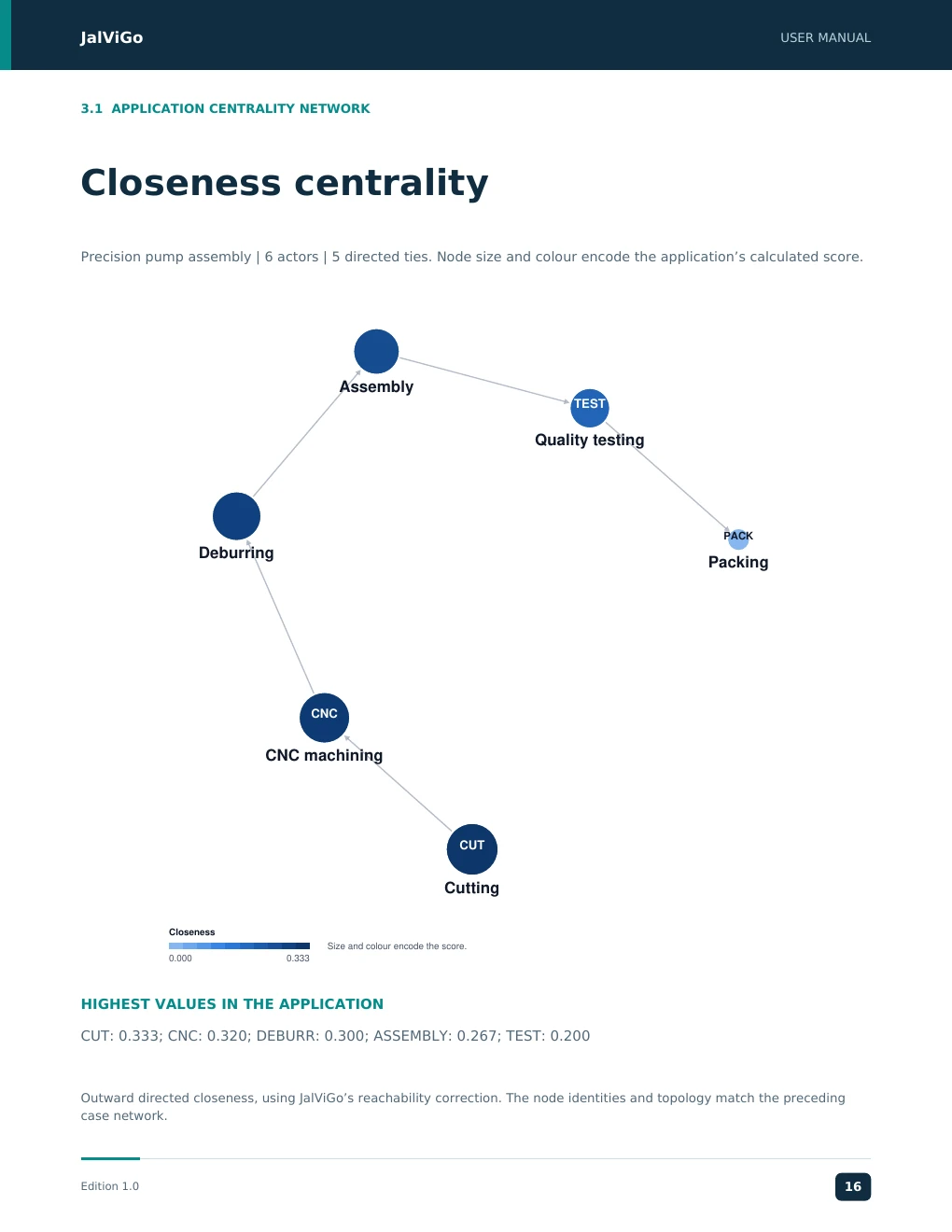
JalViGo USER MANUAL 3.1 APPLICATION CENTRALITY NETWORK Closeness centrality Precision pump assembly | 6 actors | 5 directed ties. Node size and colour encode the application’s calculated score. Assembly TEST Quality testing PACK Deburring Packing CNC CNC machining CUT Cutting Closeness Size and colour encode the score. 0.000 0.333 HIGHEST VALUES IN THE APPLICATION CUT: 0.333; CNC: 0.320; DEBURR: 0.300; ASSEMBLY: 0.267; TEST: 0.200 Outward directed closeness, using JalViGo’s reachability correction. The node identities and topology match the preceding case network. Edition 1.0 16
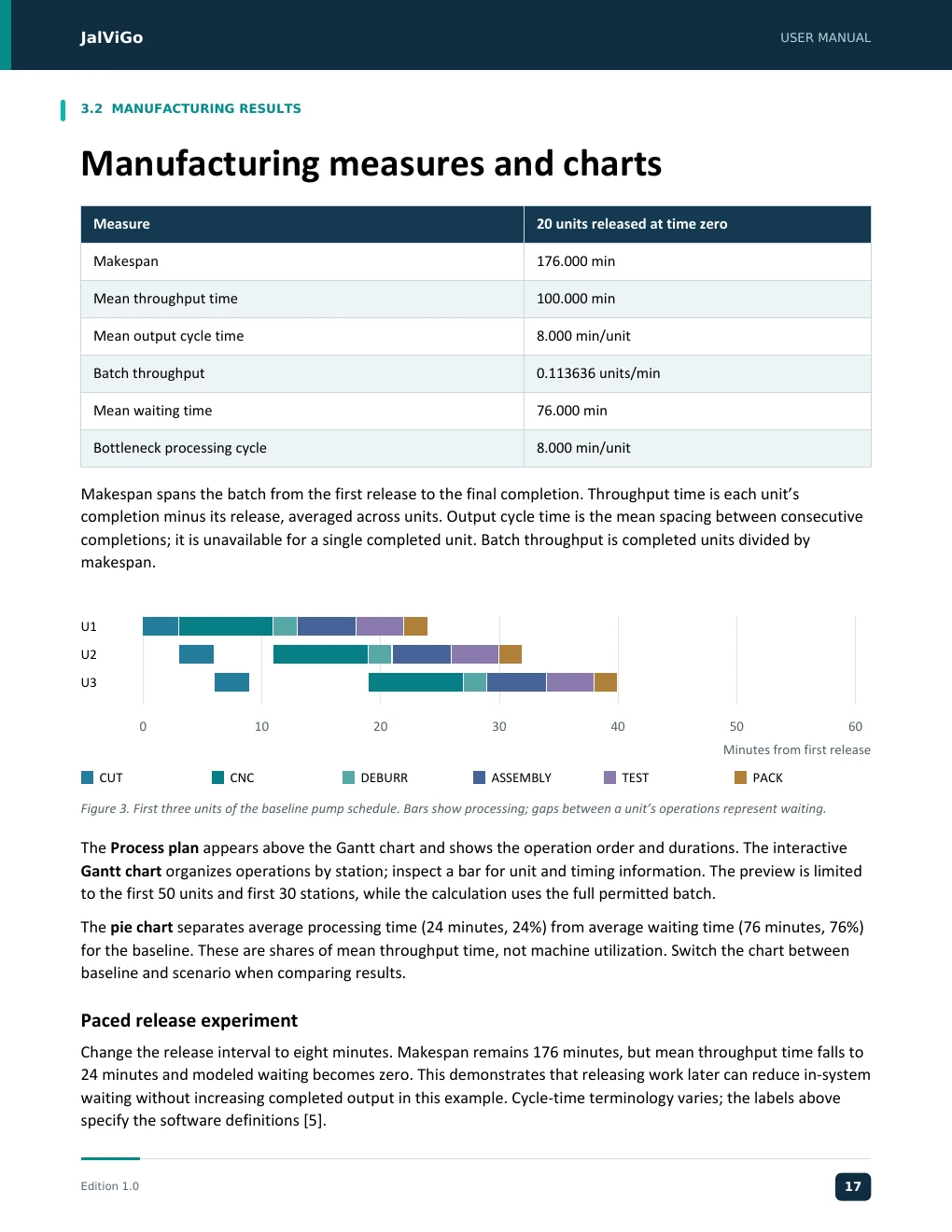
JJJJaaaallllVVVViiiiGGGGoooo UUUUSSSSEEEERRRR MMMMAAAANNNNUUUUAAAALLLL JalViGo User Manual 3.2 MANUFACTURING RESULTS Manufacturing measures and charts Measure 20 units released at time zero Makespan 176.000 min Mean throughput time 100.000 min Mean output cycle time 8.000 min/unit Batch throughput 0.113636 units/min Mean waiting time 76.000 min Bottleneck processing cycle 8.000 min/unit Makespan spans the batch from the first release to the final completion. Throughput time is each unit’s completion minus its release, averaged across units. Output cycle time is the mean spacing between consecutive completions; it is unavailable for a single completed unit. Batch throughput is completed units divided by makespan. U1 U2 U3 0 10 20 30 40 50 60 Minutes from first release CUT CNC DEBURR ASSEMBLY TEST PACK Figure 3. First three units of the baseline pump schedule. Bars show processing; gaps between a unit’s operations represent waiting. The Process plan appears above the Gantt chart and shows the operation order and durations. The interactive Gantt chart organizes operations by station; inspect a bar for unit and timing information. The preview is limited to the first 50 units and first 30 stations, while the calculation uses the full permitted batch. The pie chart separates average processing time (24 minutes, 24%) from average waiting time (76 minutes, 76%) for the baseline. These are shares of mean throughput time, not machine utilization. Switch the chart between baseline and scenario when comparing results. Paced release experiment Change the release interval to eight minutes. Makespan remains 176 minutes, but mean throughput time falls to 24 minutes and modeled waiting becomes zero. This demonstrates that releasing work later can reduce in-system waiting without increasing completed output in this example. Cycle-time terminology varies; the labels above specify the software definitions [5]. Edition 1.0 12 EEEEddddiiiittttiiiioooonnnn 1111....0000 11112347
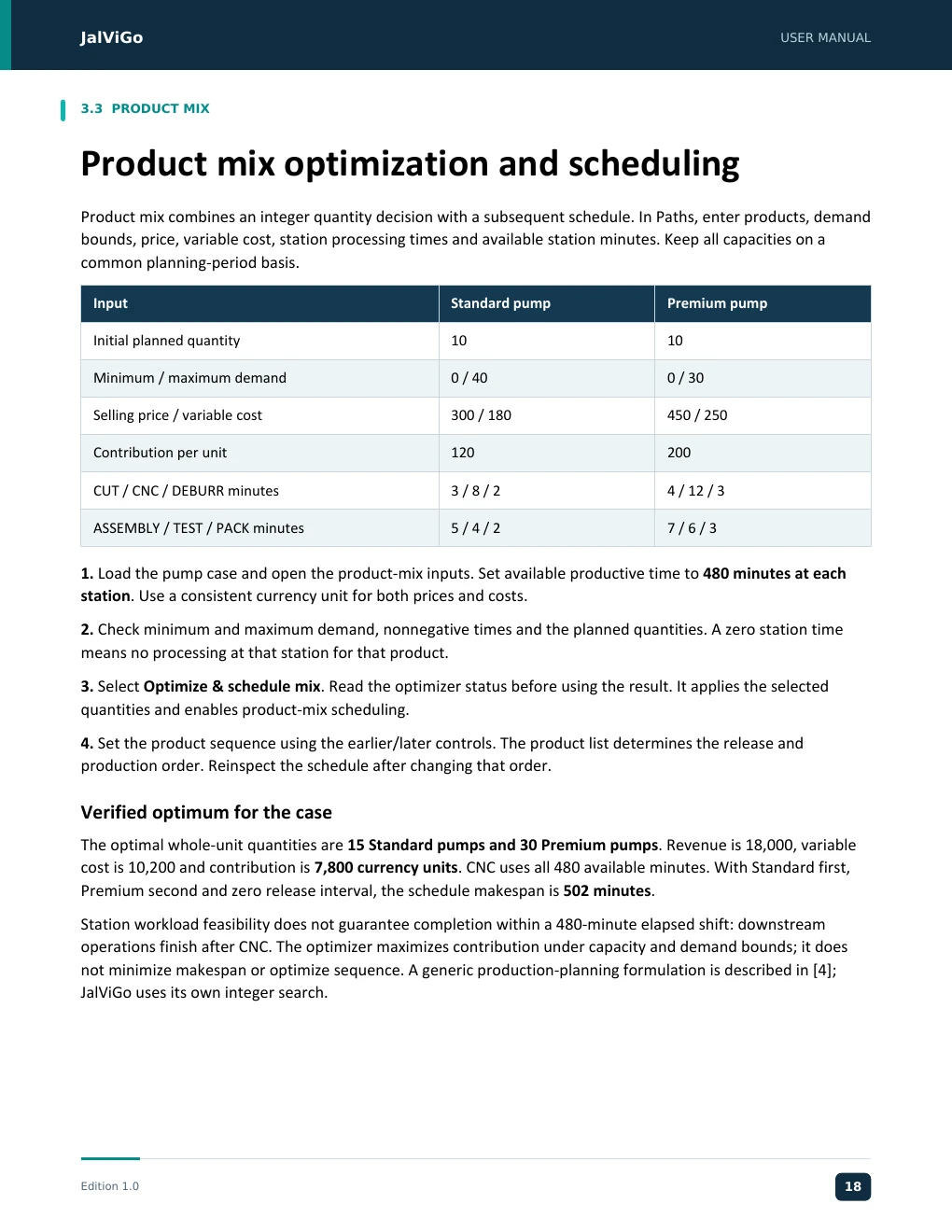
JJJJaaaallllVVVViiiiGGGGoooo UUUUSSSSEEEERRRR MMMMAAAANNNNUUUUAAAALLLL JalViGo User Manual 3.3 PRODUCT MIX Product mix optimization and scheduling Product mix combines an integer quantity decision with a subsequent schedule. In Paths, enter products, demand bounds, price, variable cost, station processing times and available station minutes. Keep all capacities on a common planning-period basis. Input Standard pump Premium pump Initial planned quantity 10 10 Minimum / maximum demand 0 / 40 0 / 30 Selling price / variable cost 300 / 180 450 / 250 Contribution per unit 120 200 CUT / CNC / DEBURR minutes 3 / 8 / 2 4 / 12 / 3 ASSEMBLY / TEST / PACK minutes 5 / 4 / 2 7 / 6 / 3 1. Load the pump case and open the product-mix inputs. Set available productive time to 480 minutes at each station. Use a consistent currency unit for both prices and costs. 2. Check minimum and maximum demand, nonnegative times and the planned quantities. A zero station time means no processing at that station for that product. 3. Select Optimize & schedule mix. Read the optimizer status before using the result. It applies the selected quantities and enables product-mix scheduling. 4. Set the product sequence using the earlier/later controls. The product list determines the release and production order. Reinspect the schedule after changing that order. Verified optimum for the case The optimal whole-unit quantities are 15 Standard pumps and 30 Premium pumps. Revenue is 18,000, variable cost is 10,200 and contribution is 7,800 currency units. CNC uses all 480 available minutes. With Standard first, Premium second and zero release interval, the schedule makespan is 502 minutes. Station workload feasibility does not guarantee completion within a 480-minute elapsed shift: downstream operations finish after CNC. The optimizer maximizes contribution under capacity and demand bounds; it does not minimize makespan or optimize sequence. A generic production-planning formulation is described in [4]; JalViGo uses its own integer search. Edition 1.0 13 EEEEddddiiiittttiiiioooonnnn 1111....0000 11113458
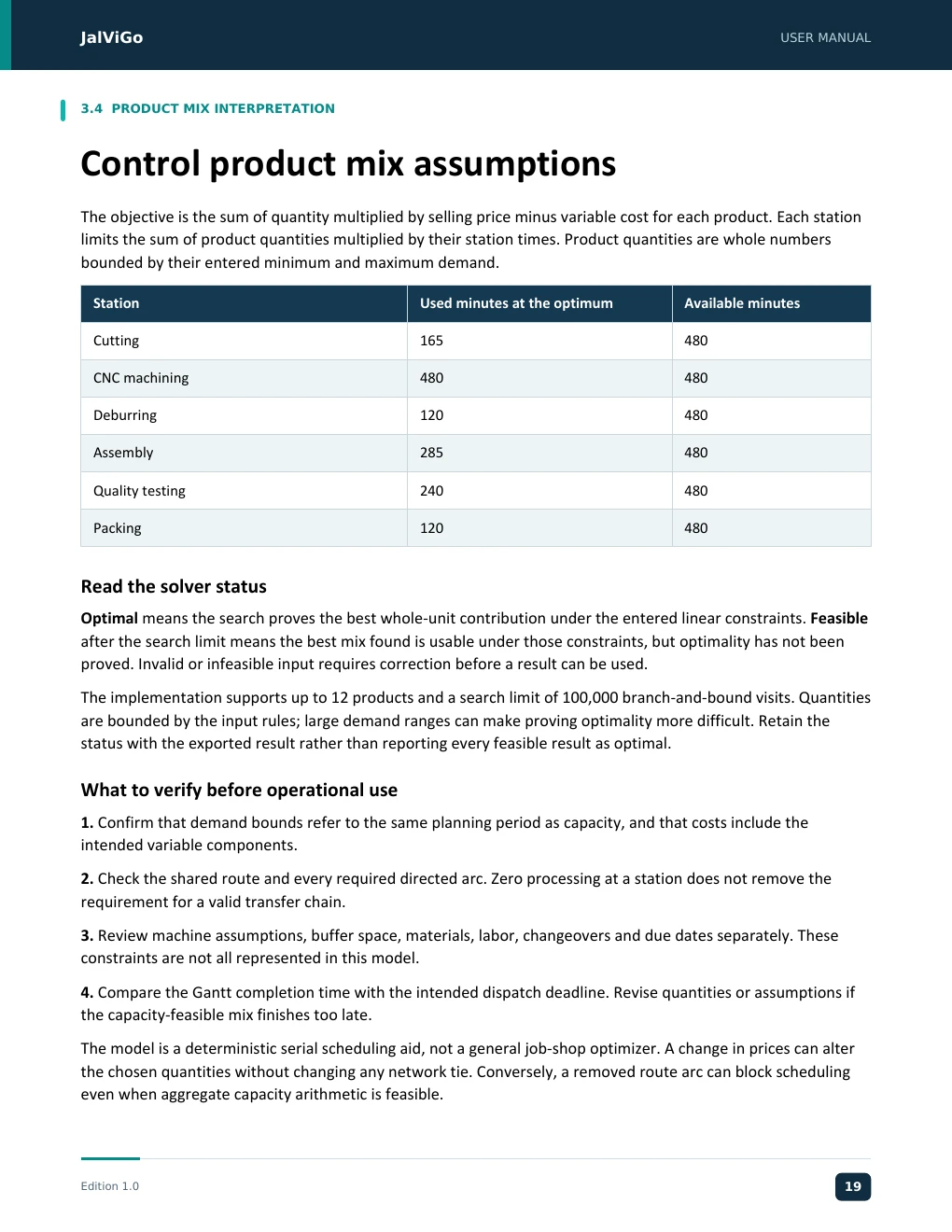
JJJJaaaallllVVVViiiiGGGGoooo UUUUSSSSEEEERRRR MMMMAAAANNNNUUUUAAAALLLL JalViGo User Manual 3.4 PRODUCT MIX INTERPRETATION Control product mix assumptions The objective is the sum of quantity multiplied by selling price minus variable cost for each product. Each station limits the sum of product quantities multiplied by their station times. Product quantities are whole numbers bounded by their entered minimum and maximum demand. Station Used minutes at the optimum Available minutes Cutting 165 480 CNC machining 480 480 Deburring 120 480 Assembly 285 480 Quality testing 240 480 Packing 120 480 Read the solver status Optimal means the search proves the best whole-unit contribution under the entered linear constraints. Feasible after the search limit means the best mix found is usable under those constraints, but optimality has not been proved. Invalid or infeasible input requires correction before a result can be used. The implementation supports up to 12 products and a search limit of 100,000 branch-and-bound visits. Quantities are bounded by the input rules; large demand ranges can make proving optimality more difficult. Retain the status with the exported result rather than reporting every feasible result as optimal. What to verify before operational use 1. Confirm that demand bounds refer to the same planning period as capacity, and that costs include the intended variable components. 2. Check the shared route and every required directed arc. Zero processing at a station does not remove the requirement for a valid transfer chain. 3. Review machine assumptions, buffer space, materials, labor, changeovers and due dates separately. These constraints are not all represented in this model. 4. Compare the Gantt completion time with the intended dispatch deadline. Revise quantities or assumptions if the capacity-feasible mix finishes too late. The model is a deterministic serial scheduling aid, not a general job-shop optimizer. A change in prices can alter the chosen quantities without changing any network tie. Conversely, a removed route arc can block scheduling even when aggregate capacity arithmetic is feasible. Edition 1.0 14 EEEEddddiiiittttiiiioooonnnn 1111....0000 11114569
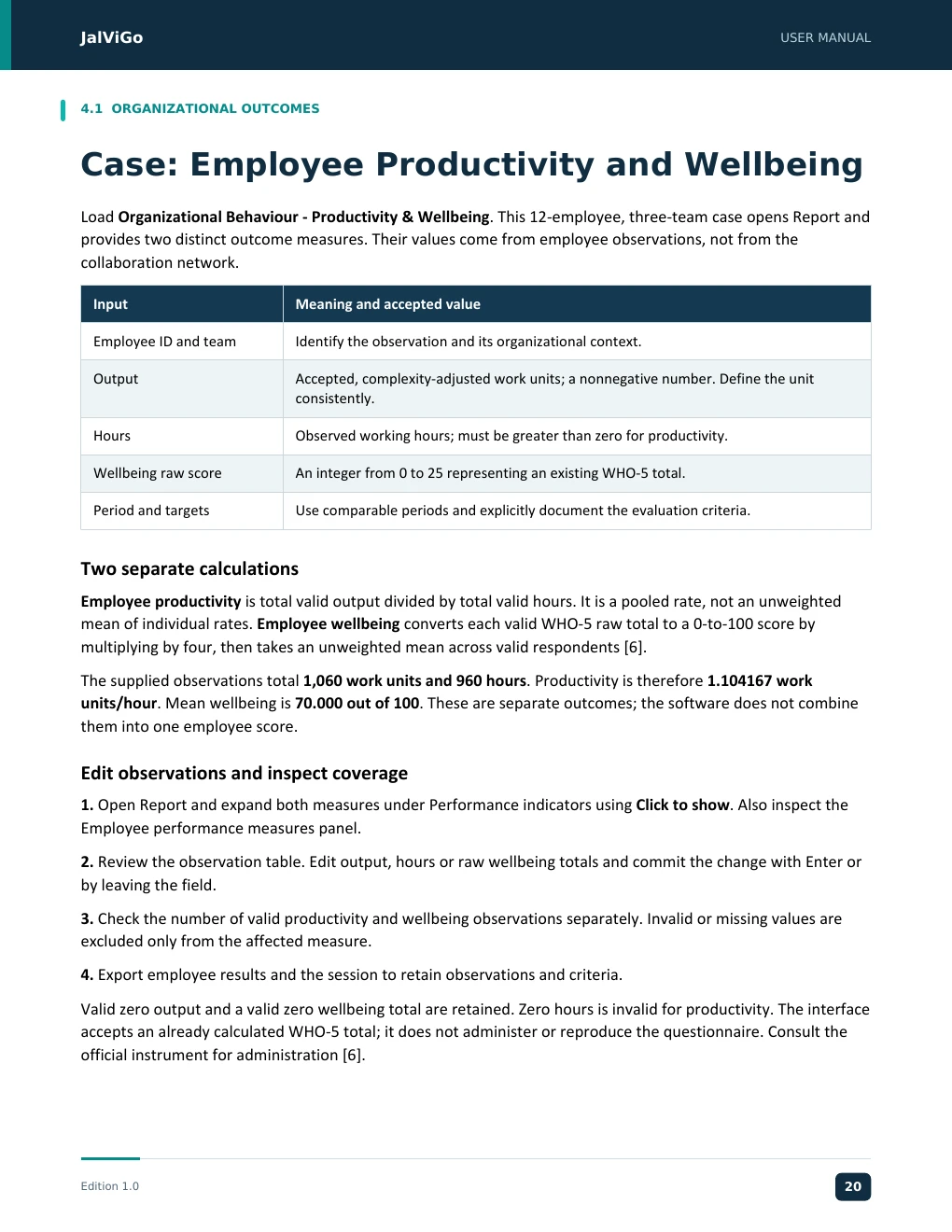
JJJJaaaallllVVVViiiiGGGGoooo UUUUSSSSEEEERRRR MMMMAAAANNNNUUUUAAAALLLL JalViGo User Manual 4.1 ORGANIZATIONAL OUTCOMES Case: Employee Productivity and Wellbeing Load Organizational Behaviour - Productivity & Wellbeing. This 12-employee, three-team case opens Report and provides two distinct outcome measures. Their values come from employee observations, not from the collaboration network. Input Meaning and accepted value Employee ID and team Identify the observation and its organizational context. Output Accepted, complexity-adjusted work units; a nonnegative number. Define the unit consistently. Hours Observed working hours; must be greater than zero for productivity. Wellbeing raw score An integer from 0 to 25 representing an existing WHO-5 total. Period and targets Use comparable periods and explicitly document the evaluation criteria. Two separate calculations Employee productivity is total valid output divided by total valid hours. It is a pooled rate, not an unweighted mean of individual rates. Employee wellbeing converts each valid WHO-5 raw total to a 0-to-100 score by multiplying by four, then takes an unweighted mean across valid respondents [6]. The supplied observations total 1,060 work units and 960 hours. Productivity is therefore 1.104167 work units/hour. Mean wellbeing is 70.000 out of 100. These are separate outcomes; the software does not combine them into one employee score. Edit observations and inspect coverage 1. Open Report and expand both measures under Performance indicators using Click to show. Also inspect the Employee performance measures panel. 2. Review the observation table. Edit output, hours or raw wellbeing totals and commit the change with Enter or by leaving the field. 3. Check the number of valid productivity and wellbeing observations separately. Invalid or missing values are excluded only from the affected measure. 4. Export employee results and the session to retain observations and criteria. Valid zero output and a valid zero wellbeing total are retained. Zero hours is invalid for productivity. The interface accepts an already calculated WHO-5 total; it does not administer or reproduce the questionnaire. Consult the official instrument for administration [6]. Edition 1.0 15 EEEEddddiiiittttiiiioooonnnn 1111....0000 11125670
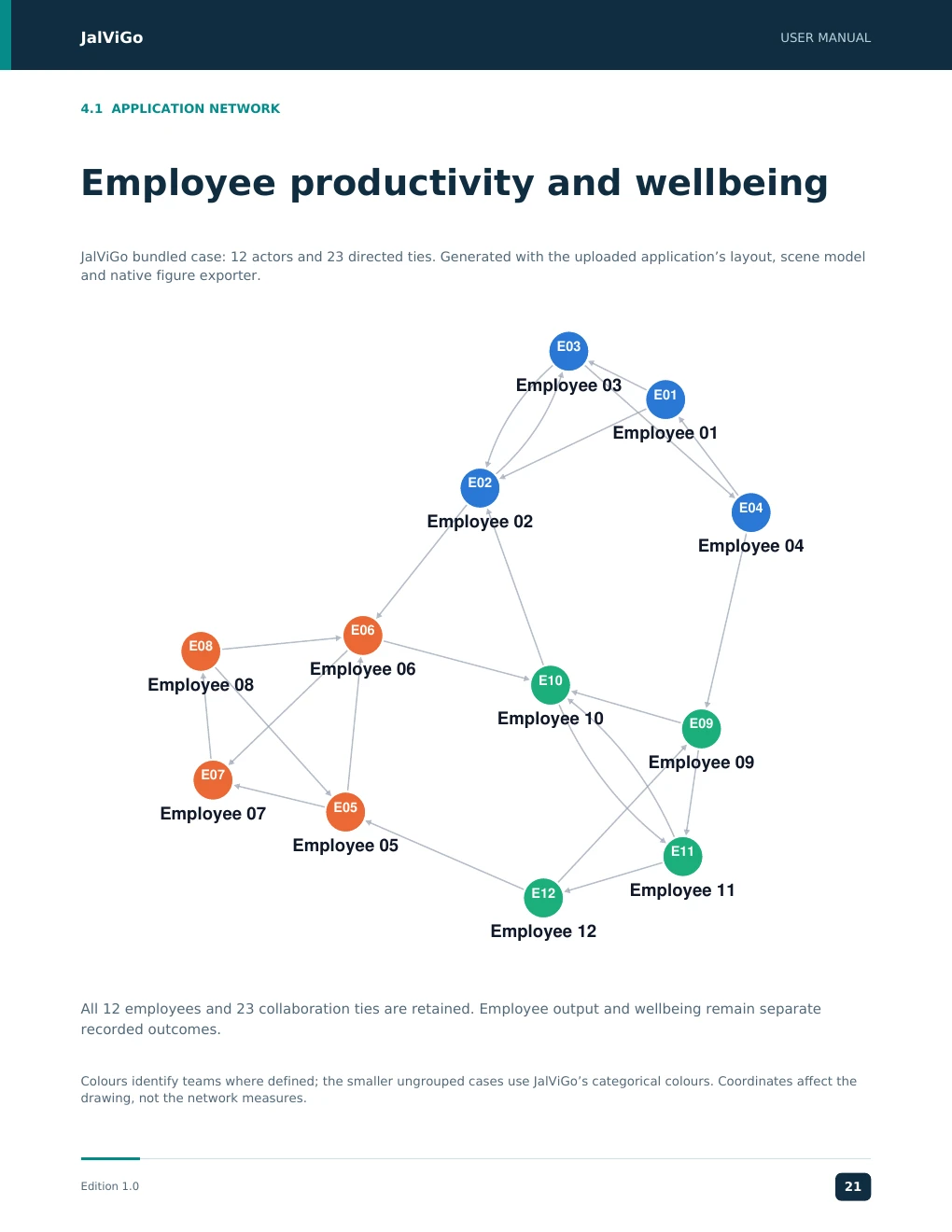
JalViGo USER MANUAL 4.1 APPLICATION NETWORK Employee productivity and wellbeing JalViGo bundled case: 12 actors and 23 directed ties. Generated with the uploaded application’s layout, scene model and native figure exporter. E03 Employee 03 E01 Employee 01 E02 E04 Employee 02 Employee 04 E06 E08 Employee 06 Employee 08 E10 Employee 10 E09 Employee 09 E07 E05 Employee 07 Employee 05 E11 E12 Employee 11 Employee 12 All 12 employees and 23 collaboration ties are retained. Employee output and wellbeing remain separate recorded outcomes. Colours identify teams where defined; the smaller ungrouped cases use JalViGo’s categorical colours. Coordinates affect the drawing, not the network measures. Edition 1.0 21
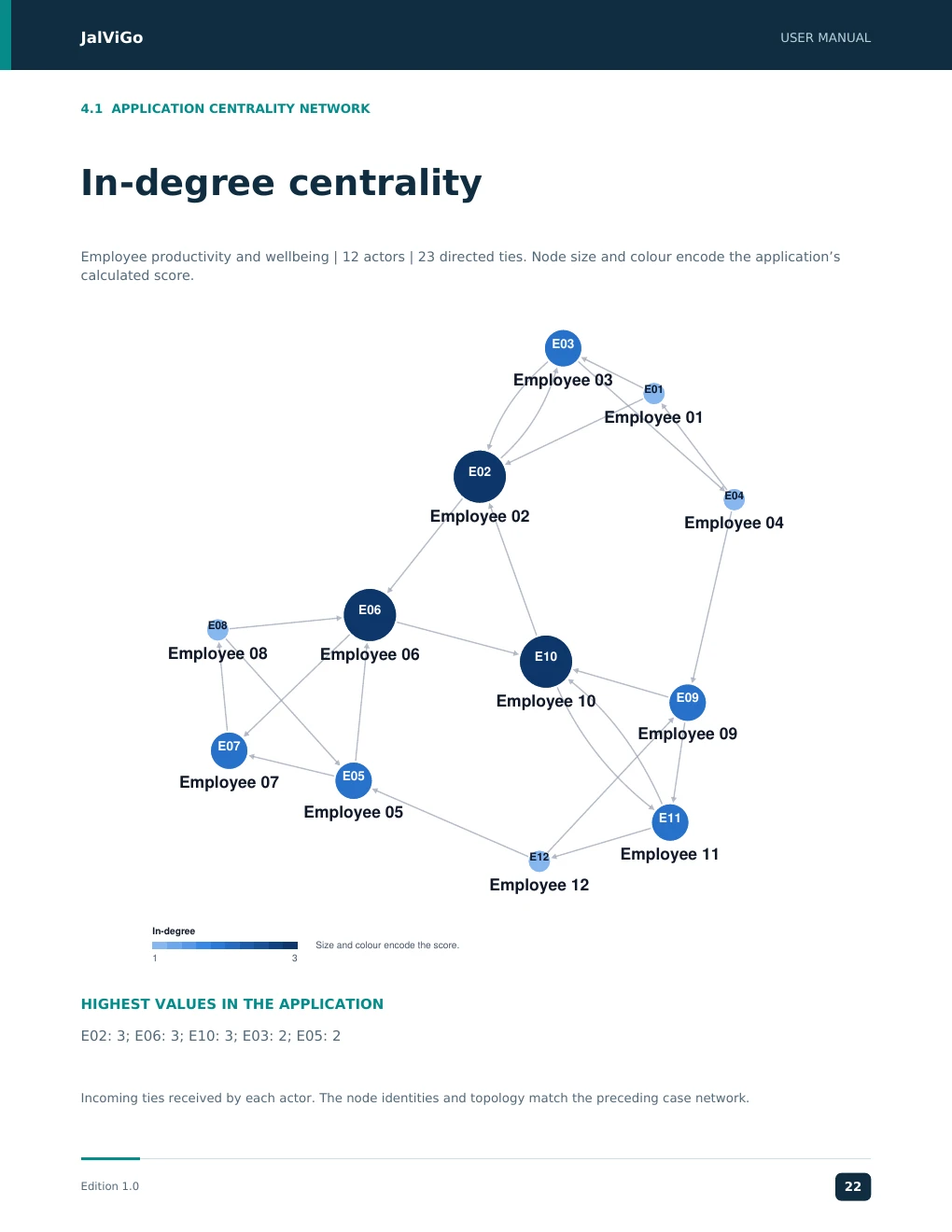
JalViGo USER MANUAL 4.1 APPLICATION CENTRALITY NETWORK In-degree centrality Employee productivity and wellbeing | 12 actors | 23 directed ties. Node size and colour encode the application’s calculated score. E03 Employee 03 E01 Employee 01 E02 E04 Employee 02 Employee 04 E06 E08 Employee 08 Employee 06 E10 Employee 10 E09 Employee 09 E07 E05 Employee 07 Employee 05 E11 Employee 11 E12 Employee 12 In-degree Size and colour encode the score. 1 3 HIGHEST VALUES IN THE APPLICATION E02: 3; E06: 3; E10: 3; E03: 2; E05: 2 Incoming ties received by each actor. The node identities and topology match the preceding case network. Edition 1.0 22
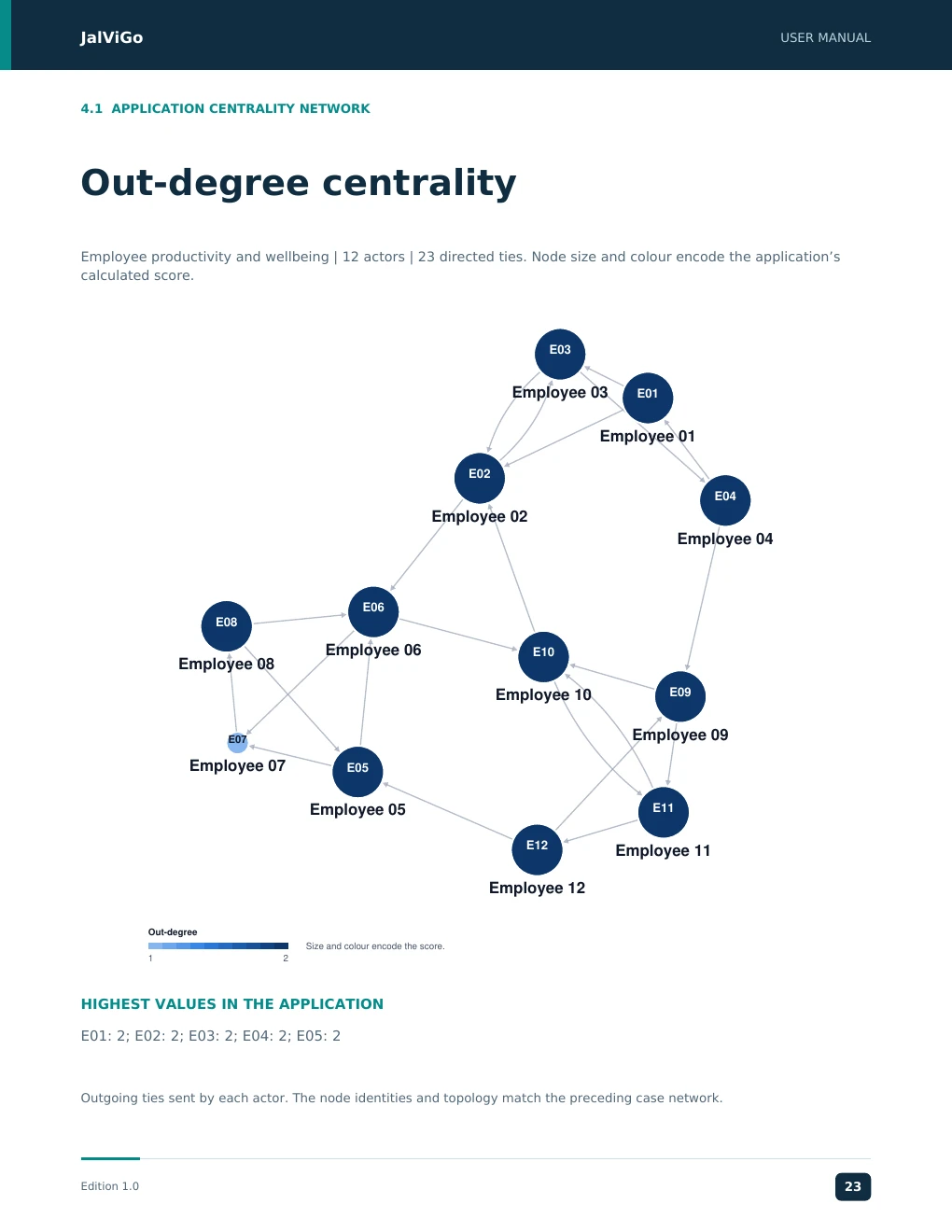
JalViGo USER MANUAL 4.1 APPLICATION CENTRALITY NETWORK Out-degree centrality Employee productivity and wellbeing | 12 actors | 23 directed ties. Node size and colour encode the application’s calculated score. E03 Employee 03 E01 Employee 01 E02 E04 Employee 02 Employee 04 E06 E08 Employee 06 E10 Employee 08 Employee 10 E09 Employee 09 E07 Employee 07 E05 Employee 05 E11 E12 Employee 11 Employee 12 Out-degree Size and colour encode the score. 1 2 HIGHEST VALUES IN THE APPLICATION E01: 2; E02: 2; E03: 2; E04: 2; E05: 2 Outgoing ties sent by each actor. The node identities and topology match the preceding case network. Edition 1.0 23
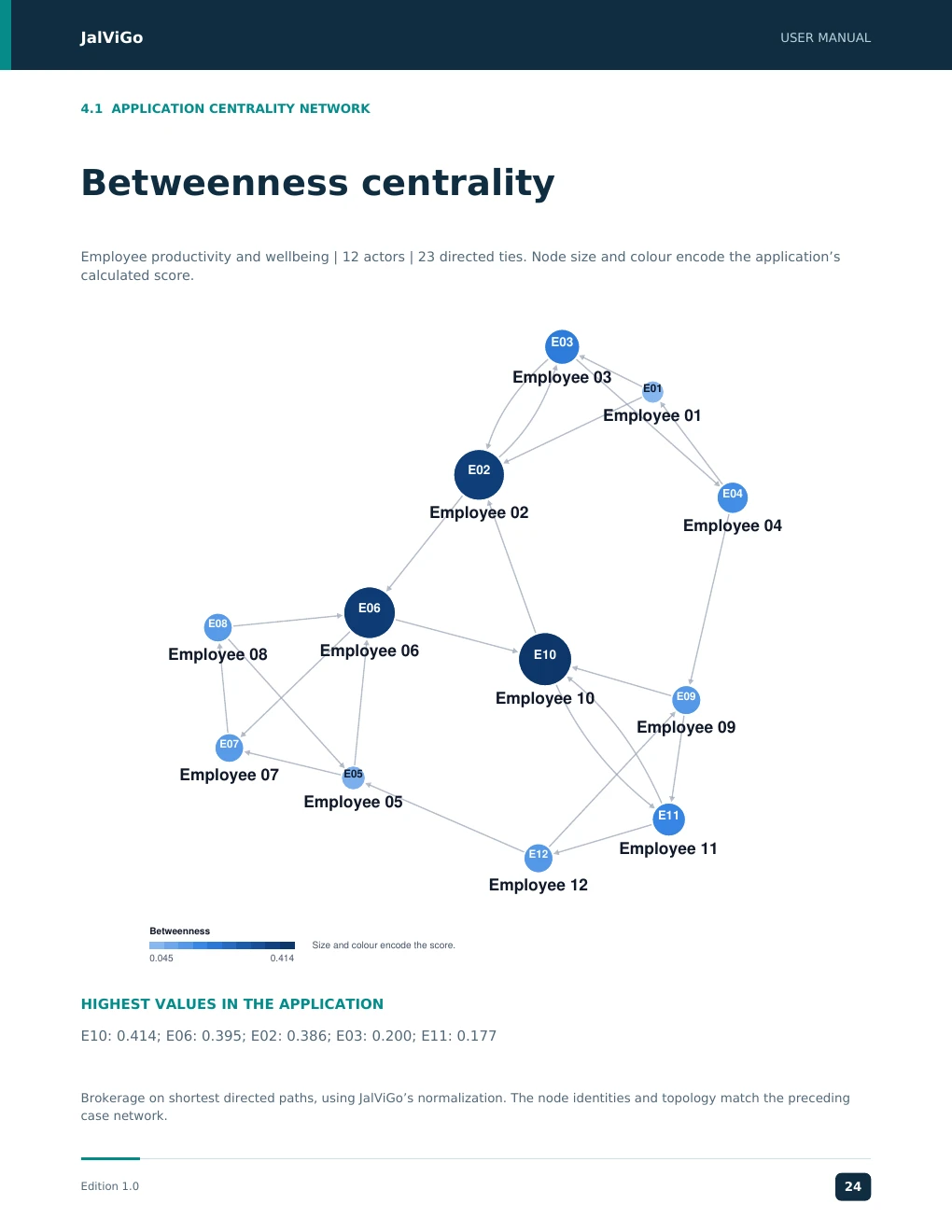
JalViGo USER MANUAL 4.1 APPLICATION CENTRALITY NETWORK Betweenness centrality Employee productivity and wellbeing | 12 actors | 23 directed ties. Node size and colour encode the application’s calculated score. E03 Employee 03 E01 Employee 01 E02 E04 Employee 02 Employee 04 E06 E08 Employee 08 Employee 06 E10 Employee 10 E09 Employee 09 E07 Employee 07 E05 Employee 05 E11 Employee 11 E12 Employee 12 Betweenness Size and colour encode the score. 0.045 0.414 HIGHEST VALUES IN THE APPLICATION E10: 0.414; E06: 0.395; E02: 0.386; E03: 0.200; E11: 0.177 Brokerage on shortest directed paths, using JalViGo’s normalization. The node identities and topology match the preceding case network. Edition 1.0 24
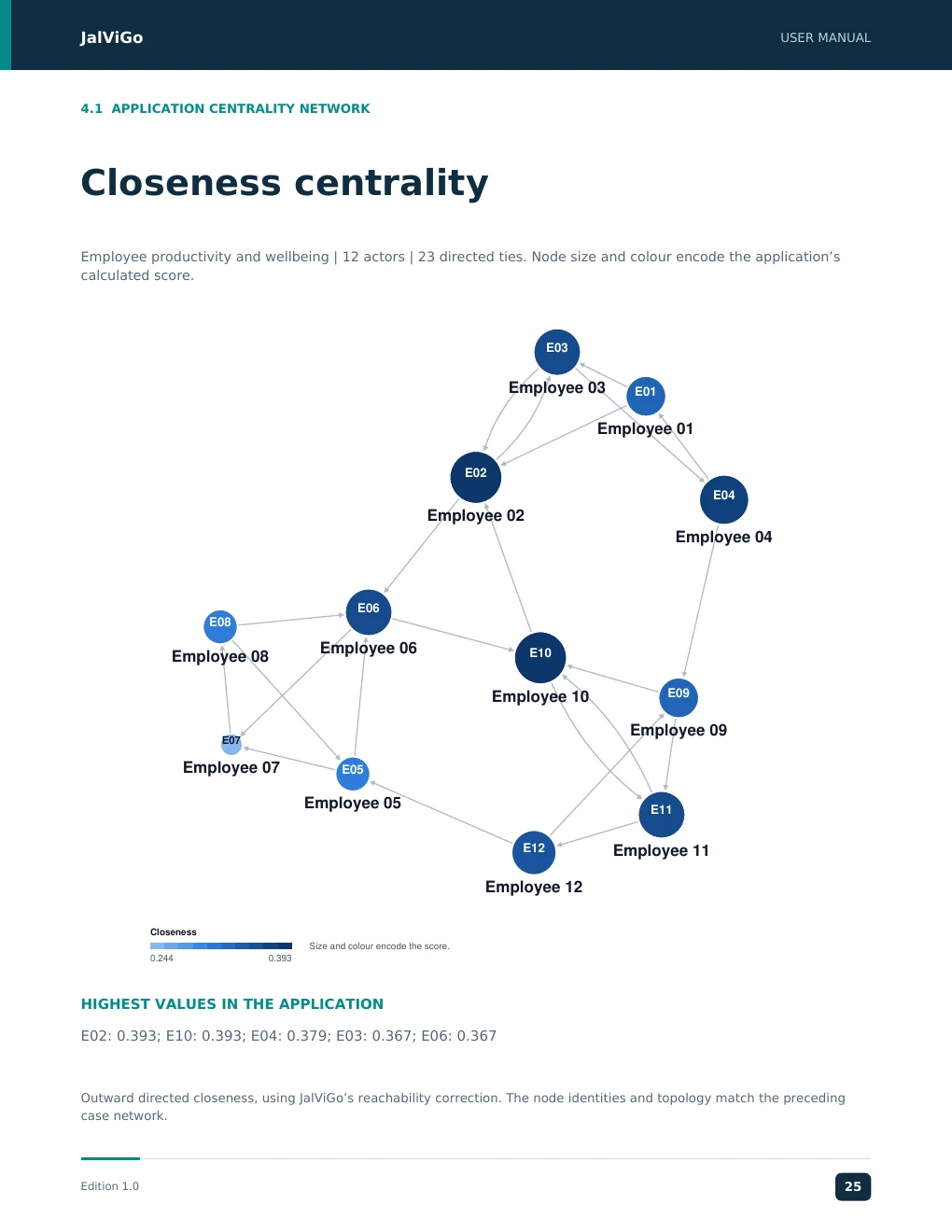
JalViGo USER MANUAL 4.1 APPLICATION CENTRALITY NETWORK Closeness centrality Employee productivity and wellbeing | 12 actors | 23 directed ties. Node size and colour encode the application’s calculated score. E03 Employee 03 E01 Employee 01 E02 E04 Employee 02 Employee 04 E06 E08 Employee 06 Employee 08 E10 Employee 10 E09 Employee 09 E07 Employee 07 E05 Employee 05 E11 E12 Employee 11 Employee 12 Closeness Size and colour encode the score. 0.244 0.393 HIGHEST VALUES IN THE APPLICATION E02: 0.393; E10: 0.393; E04: 0.379; E03: 0.367; E06: 0.367 Outward directed closeness, using JalViGo’s reachability correction. The node identities and topology match the preceding case network. Edition 1.0 25
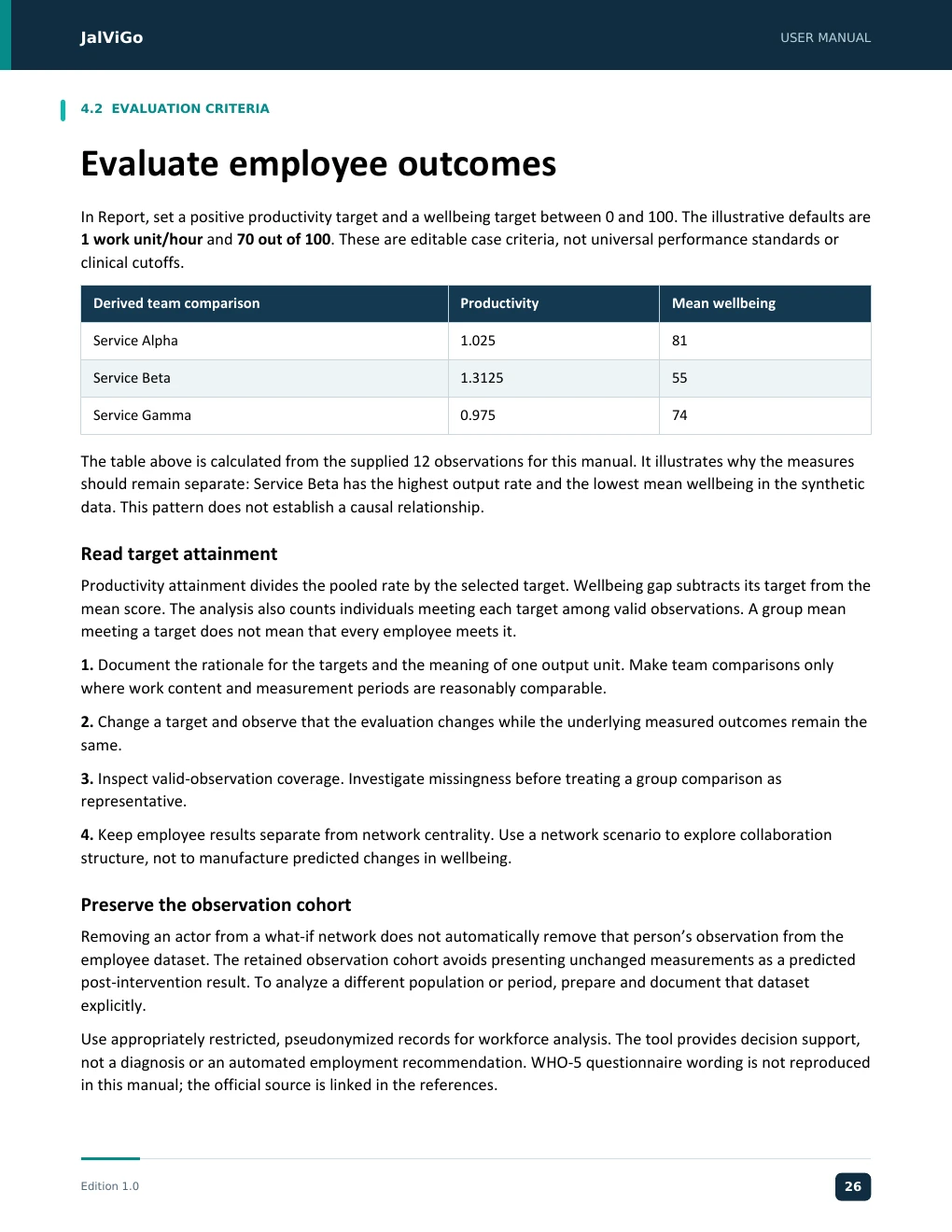
JJJJaaaallllVVVViiiiGGGGoooo UUUUSSSSEEEERRRR MMMMAAAANNNNUUUUAAAALLLL JalViGo User Manual 4.2 EVALUATION CRITERIA Evaluate employee outcomes In Report, set a positive productivity target and a wellbeing target between 0 and 100. The illustrative defaults are 1 work unit/hour and 70 out of 100. These are editable case criteria, not universal performance standards or clinical cutoffs. Derived team comparison Productivity Mean wellbeing Service Alpha 1.025 81 Service Beta 1.3125 55 Service Gamma 0.975 74 The table above is calculated from the supplied 12 observations for this manual. It illustrates why the measures should remain separate: Service Beta has the highest output rate and the lowest mean wellbeing in the synthetic data. This pattern does not establish a causal relationship. Read target attainment Productivity attainment divides the pooled rate by the selected target. Wellbeing gap subtracts its target from the mean score. The analysis also counts individuals meeting each target among valid observations. A group mean meeting a target does not mean that every employee meets it. 1. Document the rationale for the targets and the meaning of one output unit. Make team comparisons only where work content and measurement periods are reasonably comparable. 2. Change a target and observe that the evaluation changes while the underlying measured outcomes remain the same. 3. Inspect valid-observation coverage. Investigate missingness before treating a group comparison as representative. 4. Keep employee results separate from network centrality. Use a network scenario to explore collaboration structure, not to manufacture predicted changes in wellbeing. Preserve the observation cohort Removing an actor from a what-if network does not automatically remove that person’s observation from the employee dataset. The retained observation cohort avoids presenting unchanged measurements as a predicted post-intervention result. To analyze a different population or period, prepare and document that dataset explicitly. Use appropriately restricted, pseudonymized records for workforce analysis. The tool provides decision support, not a diagnosis or an automated employment recommendation. WHO-5 questionnaire wording is not reproduced in this manual; the official source is linked in the references. Edition 1.0 16 EEEEddddiiiittttiiiioooonnnn 1111....0000 11226806
JJJJaaaallllVVVViiiiGGGGoooo UUUUSSSSEEEERRRR MMMMAAAANNNNUUUUAAAALLLL JalViGo User Manual 5.1 SECTOR WALKTHROUGH Case: Corporate Communication Case: Corporate Communication. Ten actors represent executive and functional roles, including CEO, Operations, Supply Chain, Finance, Human Resources, Marketing, IT, Project Office, Regional Head and Sales. Decision question Which roles connect otherwise separated functions, and how might communication continuity change if one coordinating role is temporarily unavailable? Treat each directed tie as a documented communication relationship over a specified period. 1. Load the case and use Explore to compare in-degree, out-degree and betweenness. Note whether the same role leads all three rankings. 2. In Paths, examine the direction from CEO to IT. One available three-step route is CEO to Operations to Supply Chain to IT; another passes through Project Office. 3. In What-if, remove OPS explicitly with other controls at zero. Compare structural results there. To inspect a route, apply the scenario using the save/apply/restore procedure on page 7. 4. Restore the baseline, then test removal of one specific communication arc. Compare its effect with actor removal, which also removes all incident ties. 5. Export the baseline and each scenario with a short explanation of the role or relationship represented. Record Why it matters Centrality ranking Identifies structural roles for discussion Reachability and efficiency Shows whether alternative communication remains Specific removed ID or arc Makes the scenario reproducible Proposed backup link Needs business validation before implementation Domain interpretation A coordinator can be both valuable and a continuity dependency. Consider a designated deputy or an agreed escalation channel as a business hypothesis, then represent the corresponding tie and inspect the structural effect. Do not assume that adding a line in the graph establishes actual communication behavior. The case does not contain measured employee performance. Productivity and wellbeing are not derived from communication frequency or centrality. Use one of the organizational outcome cases, with appropriate observations, when those outcomes are required. Edition 1.0 17 EEEEddddiiiittttiiiioooonnnn 1111....0000 11227917
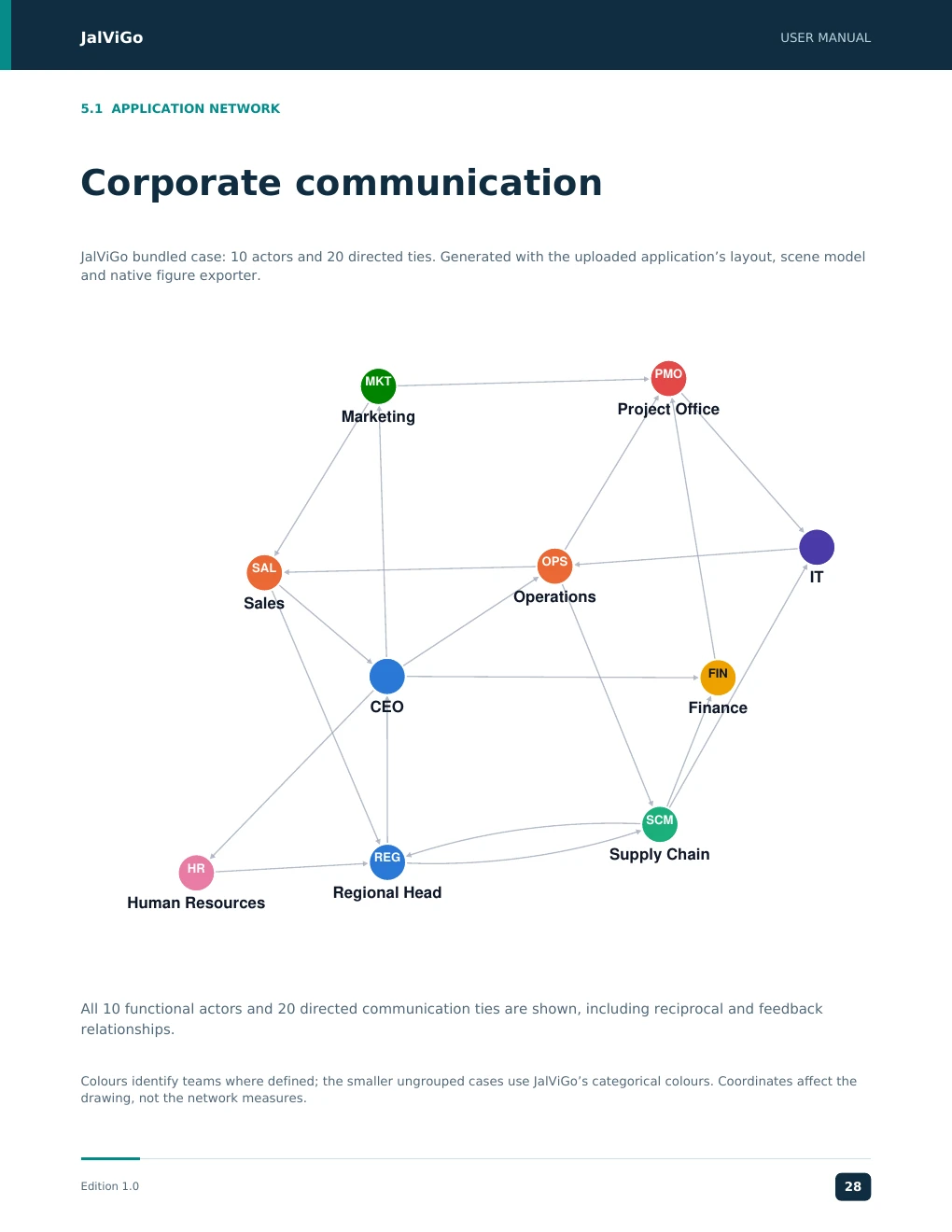
JalViGo USER MANUAL 5.1 APPLICATION NETWORK Corporate communication JalViGo bundled case: 10 actors and 20 directed ties. Generated with the uploaded application’s layout, scene model and native figure exporter. PMO MKT Project Office Marketing OPS SAL IT Operations Sales FIN CEO Finance SCM REG Supply Chain HR Regional Head Human Resources All 10 functional actors and 20 directed communication ties are shown, including reciprocal and feedback relationships. Colours identify teams where defined; the smaller ungrouped cases use JalViGo’s categorical colours. Coordinates affect the drawing, not the network measures. Edition 1.0 28
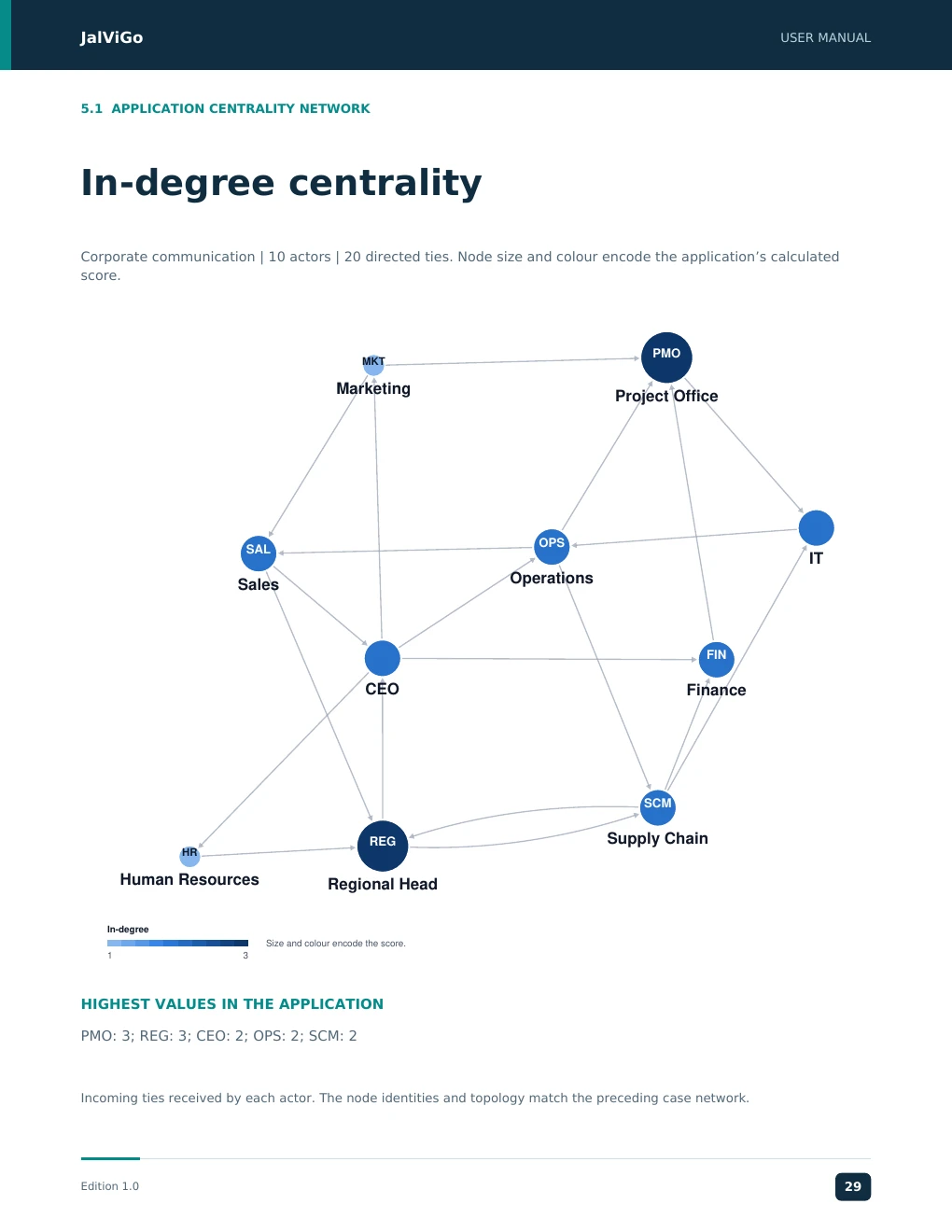
JalViGo USER MANUAL 5.1 APPLICATION CENTRALITY NETWORK In-degree centrality Corporate communication | 10 actors | 20 directed ties. Node size and colour encode the application’s calculated score. PMO MKT Marketing Project Office OPS SAL IT Operations Sales FIN CEO Finance SCM REG Supply Chain HR Human Resources Regional Head In-degree Size and colour encode the score. 1 3 HIGHEST VALUES IN THE APPLICATION PMO: 3; REG: 3; CEO: 2; OPS: 2; SCM: 2 Incoming ties received by each actor. The node identities and topology match the preceding case network. Edition 1.0 29
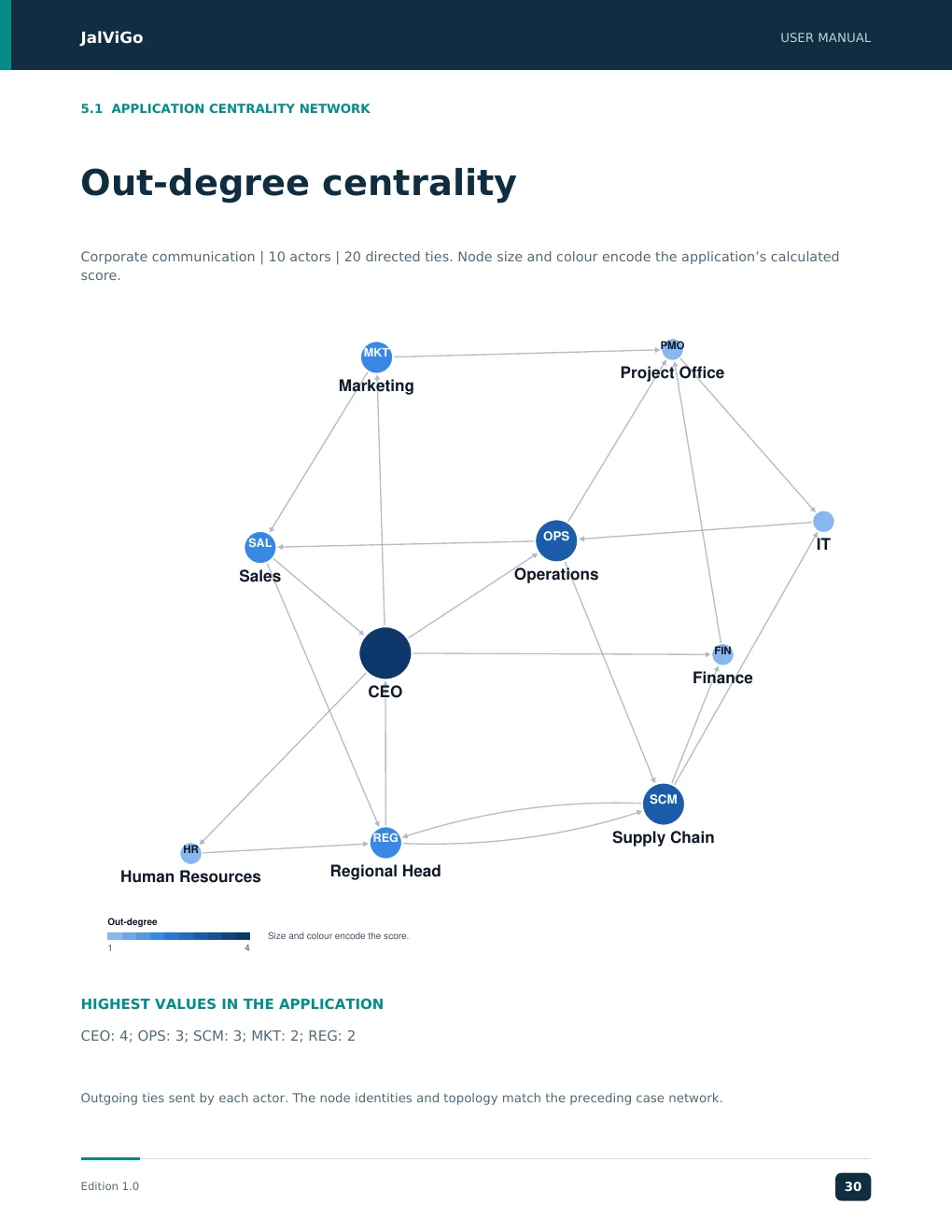
JalViGo USER MANUAL 5.1 APPLICATION CENTRALITY NETWORK Out-degree centrality Corporate communication | 10 actors | 20 directed ties. Node size and colour encode the application’s calculated score. PMO MKT Project Office Marketing OPS SAL IT Sales Operations FIN Finance CEO SCM REG Supply Chain HR Regional Head Human Resources Out-degree Size and colour encode the score. 1 4 HIGHEST VALUES IN THE APPLICATION CEO: 4; OPS: 3; SCM: 3; MKT: 2; REG: 2 Outgoing ties sent by each actor. The node identities and topology match the preceding case network. Edition 1.0 30
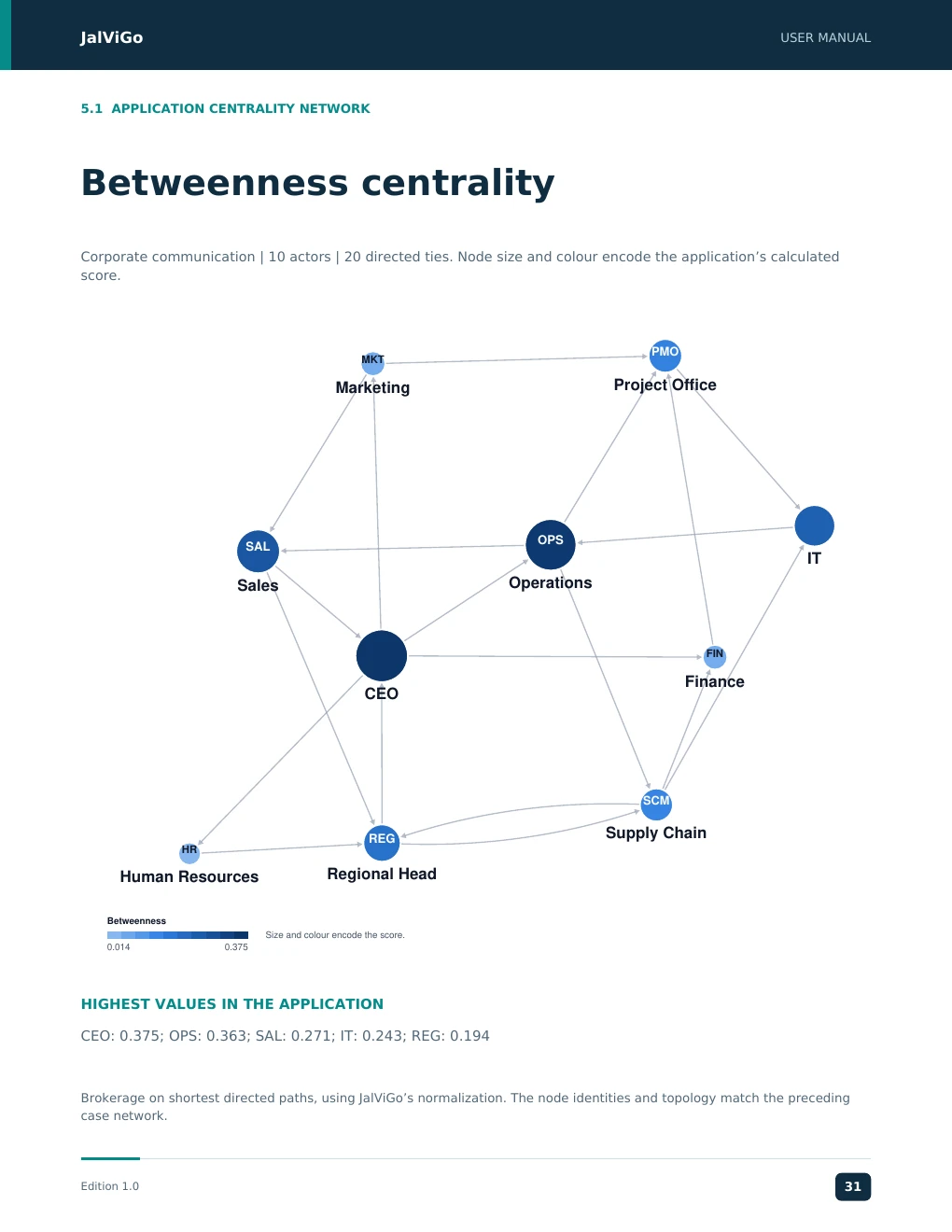
JalViGo USER MANUAL 5.1 APPLICATION CENTRALITY NETWORK Betweenness centrality Corporate communication | 10 actors | 20 directed ties. Node size and colour encode the application’s calculated score. PMO MKT Marketing Project Office OPS SAL IT Sales Operations FIN Finance CEO SCM Supply Chain REG HR Human Resources Regional Head Betweenness Size and colour encode the score. 0.014 0.375 HIGHEST VALUES IN THE APPLICATION CEO: 0.375; OPS: 0.363; SAL: 0.271; IT: 0.243; REG: 0.194 Brokerage on shortest directed paths, using JalViGo’s normalization. The node identities and topology match the preceding case network. Edition 1.0 31
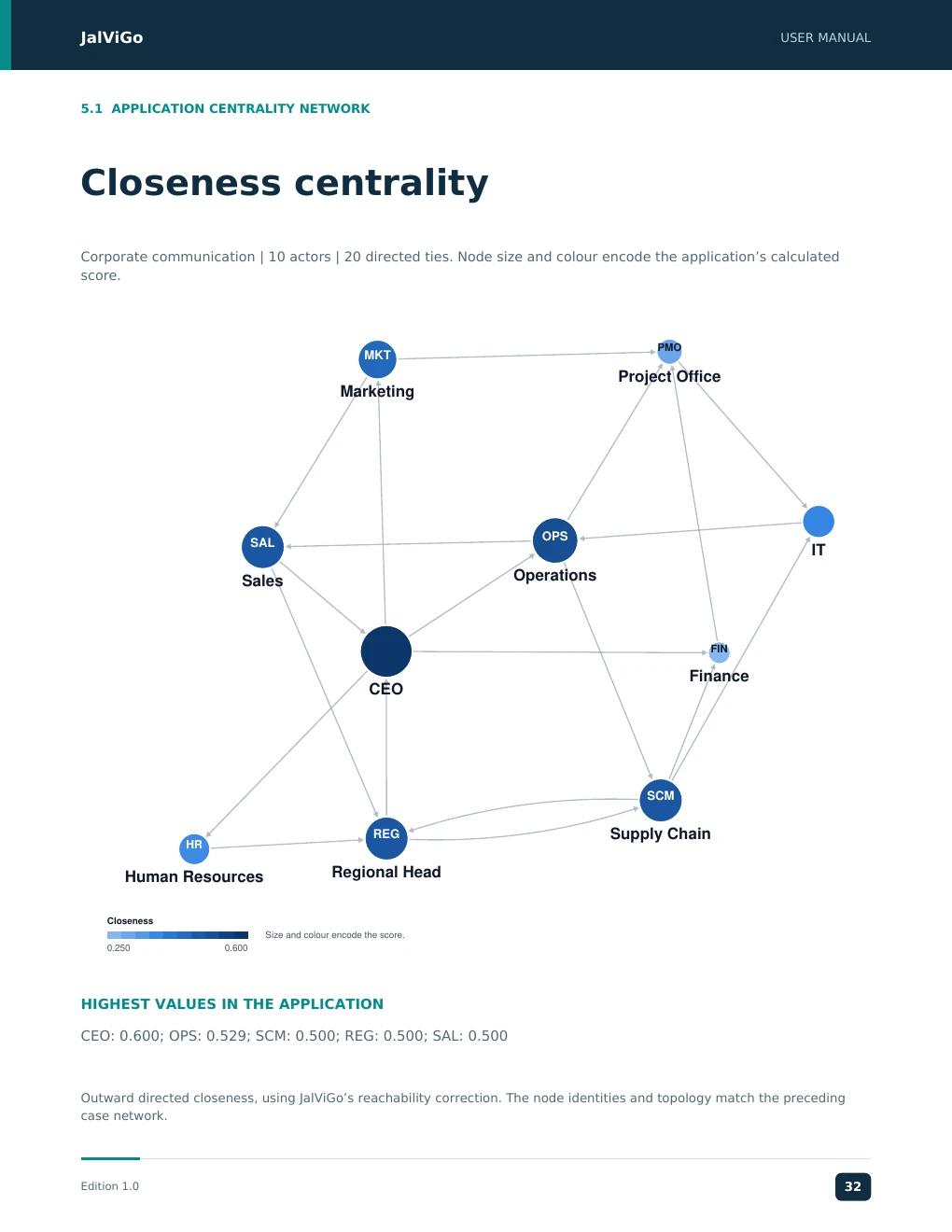
JalViGo USER MANUAL 5.1 APPLICATION CENTRALITY NETWORK Closeness centrality Corporate communication | 10 actors | 20 directed ties. Node size and colour encode the application’s calculated score. PMO MKT Project Office Marketing OPS SAL IT Operations Sales FIN Finance CEO SCM REG Supply Chain HR Human Resources Regional Head Closeness Size and colour encode the score. 0.250 0.600 HIGHEST VALUES IN THE APPLICATION CEO: 0.600; OPS: 0.529; SCM: 0.500; REG: 0.500; SAL: 0.500 Outward directed closeness, using JalViGo’s reachability correction. The node identities and topology match the preceding case network. Edition 1.0 32
JJJJaaaallllVVVViiiiGGGGoooo UUUUSSSSEEEERRRR MMMMAAAANNNNUUUUAAAALLLL JalViGo User Manual 5.2 SECTOR WALKTHROUGH Case: Supply Chain Coordination Case: Supply Chain Coordination. Ten actors include two suppliers, two plants, a warehouse, two distribution centres, two retailers and a logistics partner. Interpret the ties consistently as coordination links; they do not carry measured shipment volumes or capacities. Decision question Which intermediate facility or connection supports source-to-retailer continuity, and can a feasible backup connection reduce structural dependence? The network perspective complements operational capacity analysis [2]. 1. Load the case. In Paths, choose S1 as source and R1 as destination. Inspect the route S1 to M1 to WH to DC1 to R1 and any alternatives. 2. Save the baseline and remove WH in What-if. S1 can no longer reach R1. Apply the scenario to verify this in Paths, then restore the saved baseline. 3. Remove only M1 to WH. The route through M2 remains available. Use the save/apply/restore procedure on page 7 to inspect it in Paths. 4. Choose the same endpoints in resilience analysis. Record whether the calculation is exact or sampled, along with the seed and failure mode. 5. Test a backup strategy or explicit new connection. Validate physical transport, contracts and capacity before treating it as an implementable alternative. Network evidence Operational follow-up Loss of source-to-retailer reachability Identify a real alternate service or transport arrangement Remaining directed route Check capacity, lead time and product compatibility Higher structural resilience Assess investment and operating costs separately Z1 to Z5 changes Report the calculation conventions and graph projection Boundary of the case A surviving path is not a guarantee that demand can be fulfilled. Binary ties omit throughput capacity, inventory, product spoilage, shipment timing and contracts. The cited perishable-food study [3] motivates structural indicators, but loading this case does not execute that publication’s full optimization model. Edition 1.0 18 EEEEddddiiiittttiiiioooonnnn 1111....0000 12238143
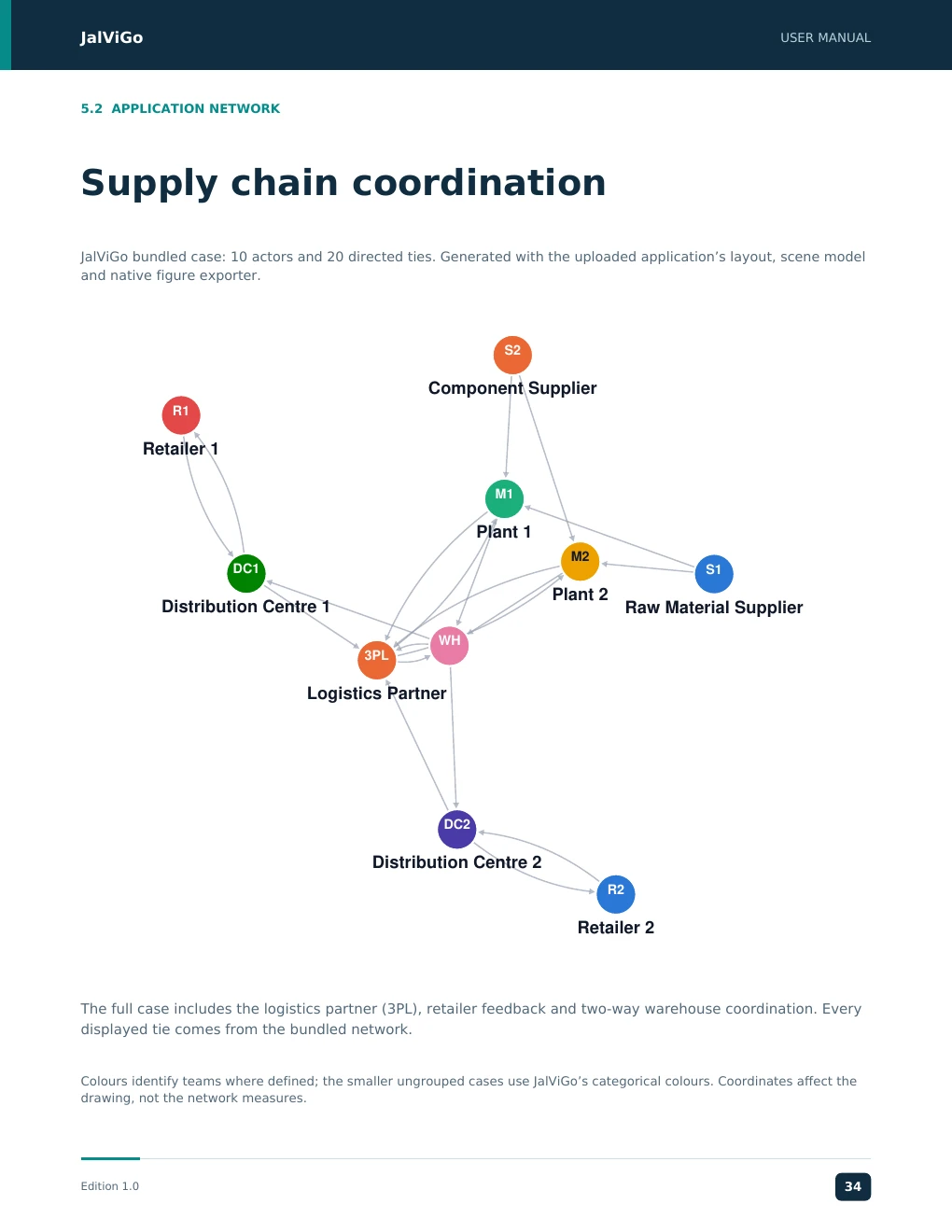
JalViGo USER MANUAL 5.2 APPLICATION NETWORK Supply chain coordination JalViGo bundled case: 10 actors and 20 directed ties. Generated with the uploaded application’s layout, scene model and native figure exporter. S2 Component Supplier R1 Retailer 1 M1 Plant 1 M2 DC1 S1 Plant 2 Distribution Centre 1 Raw Material Supplier WH 3PL Logistics Partner DC2 Distribution Centre 2 R2 Retailer 2 The full case includes the logistics partner (3PL), retailer feedback and two-way warehouse coordination. Every displayed tie comes from the bundled network. Colours identify teams where defined; the smaller ungrouped cases use JalViGo’s categorical colours. Coordinates affect the drawing, not the network measures. Edition 1.0 34
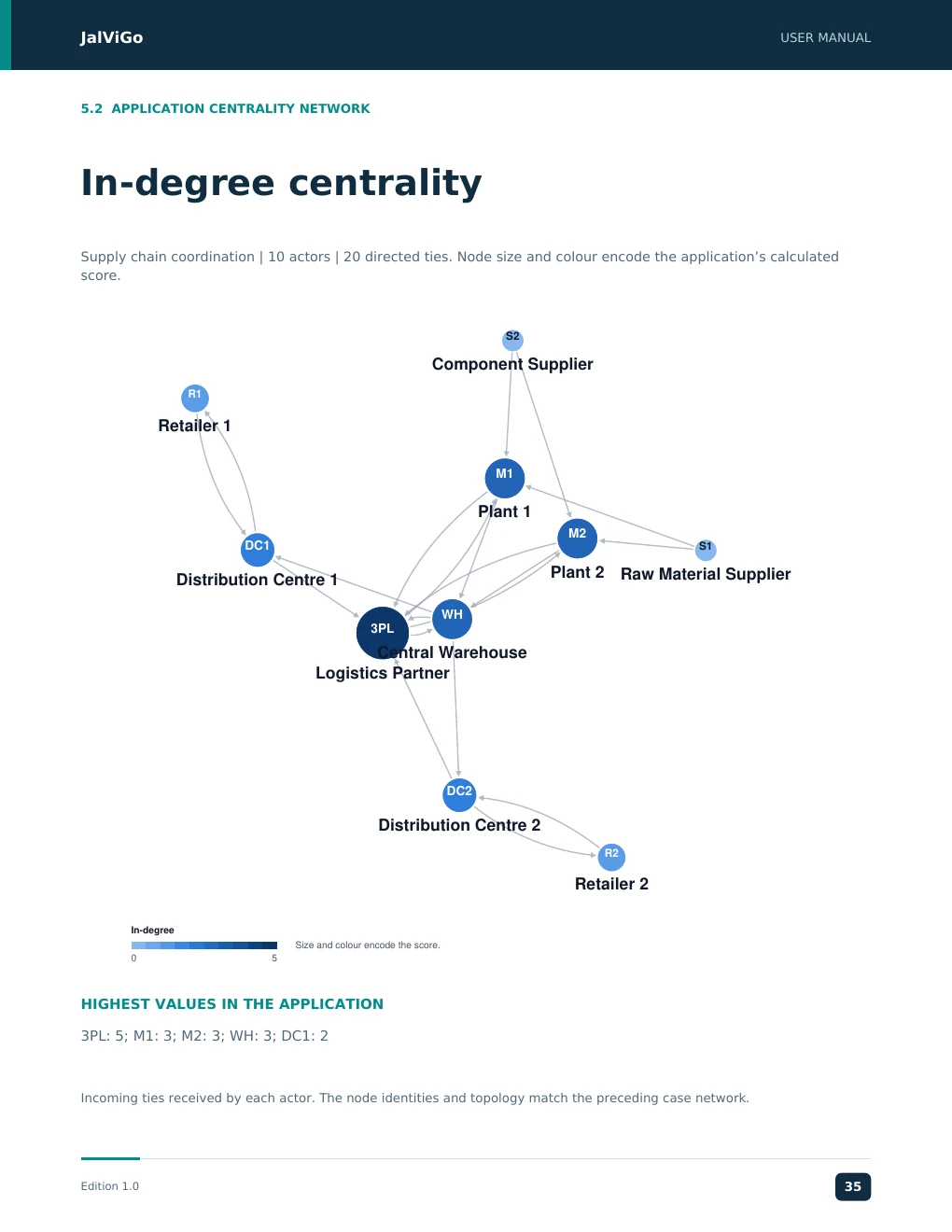
JalViGo USER MANUAL 5.2 APPLICATION CENTRALITY NETWORK In-degree centrality Supply chain coordination | 10 actors | 20 directed ties. Node size and colour encode the application’s calculated score. S2 Component Supplier R1 Retailer 1 M1 Plant 1 M2 DC1 S1 Plant 2 Raw Material Supplier Distribution Centre 1 WH 3PL Central Warehouse Logistics Partner DC2 Distribution Centre 2 R2 Retailer 2 In-degree Size and colour encode the score. 0 5 HIGHEST VALUES IN THE APPLICATION 3PL: 5; M1: 3; M2: 3; WH: 3; DC1: 2 Incoming ties received by each actor. The node identities and topology match the preceding case network. Edition 1.0 35
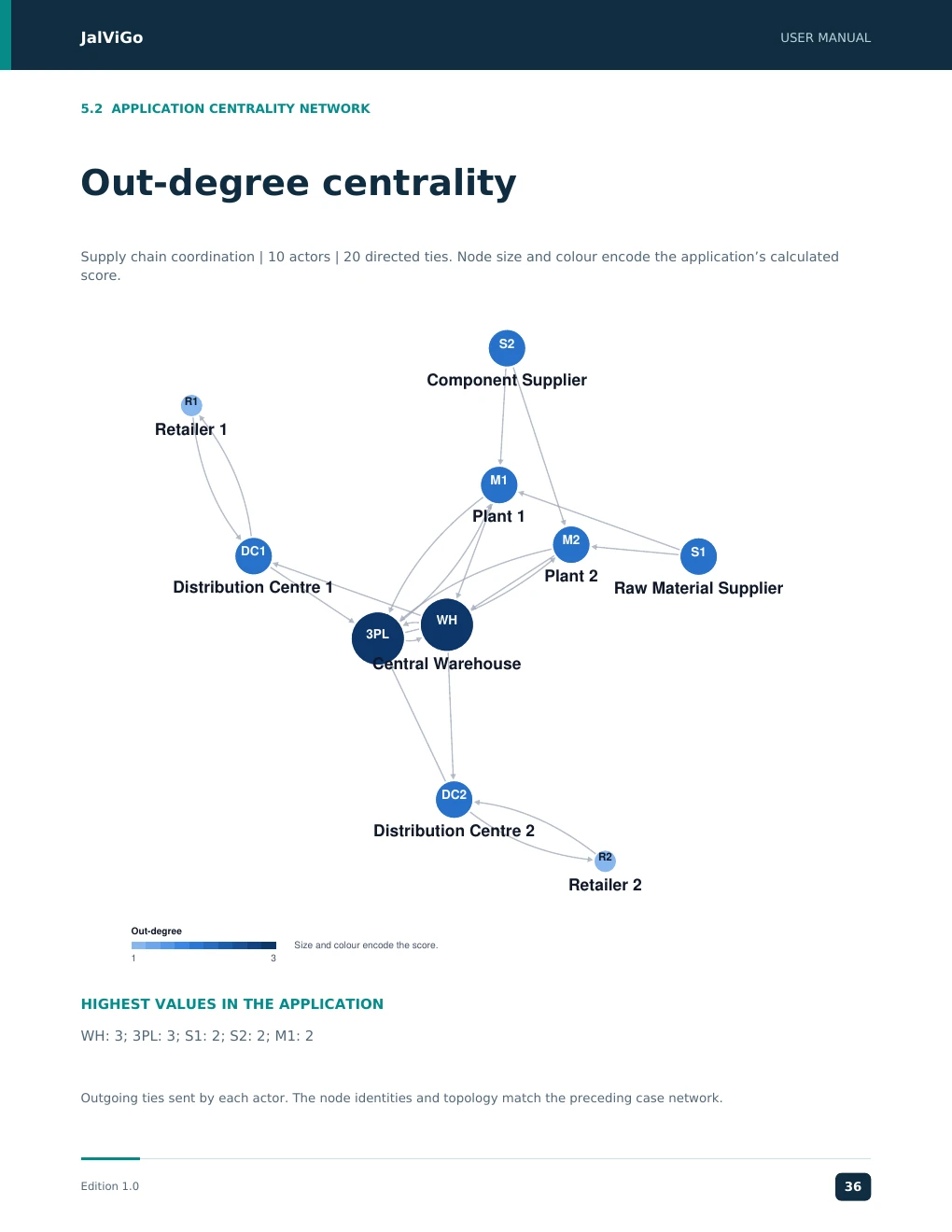
JalViGo USER MANUAL 5.2 APPLICATION CENTRALITY NETWORK Out-degree centrality Supply chain coordination | 10 actors | 20 directed ties. Node size and colour encode the application’s calculated score. S2 Component Supplier R1 Retailer 1 M1 Plant 1 M2 DC1 S1 Plant 2 Distribution Centre 1 Raw Material Supplier WH 3PL Central Warehouse DC2 Distribution Centre 2 R2 Retailer 2 Out-degree Size and colour encode the score. 1 3 HIGHEST VALUES IN THE APPLICATION WH: 3; 3PL: 3; S1: 2; S2: 2; M1: 2 Outgoing ties sent by each actor. The node identities and topology match the preceding case network. Edition 1.0 36
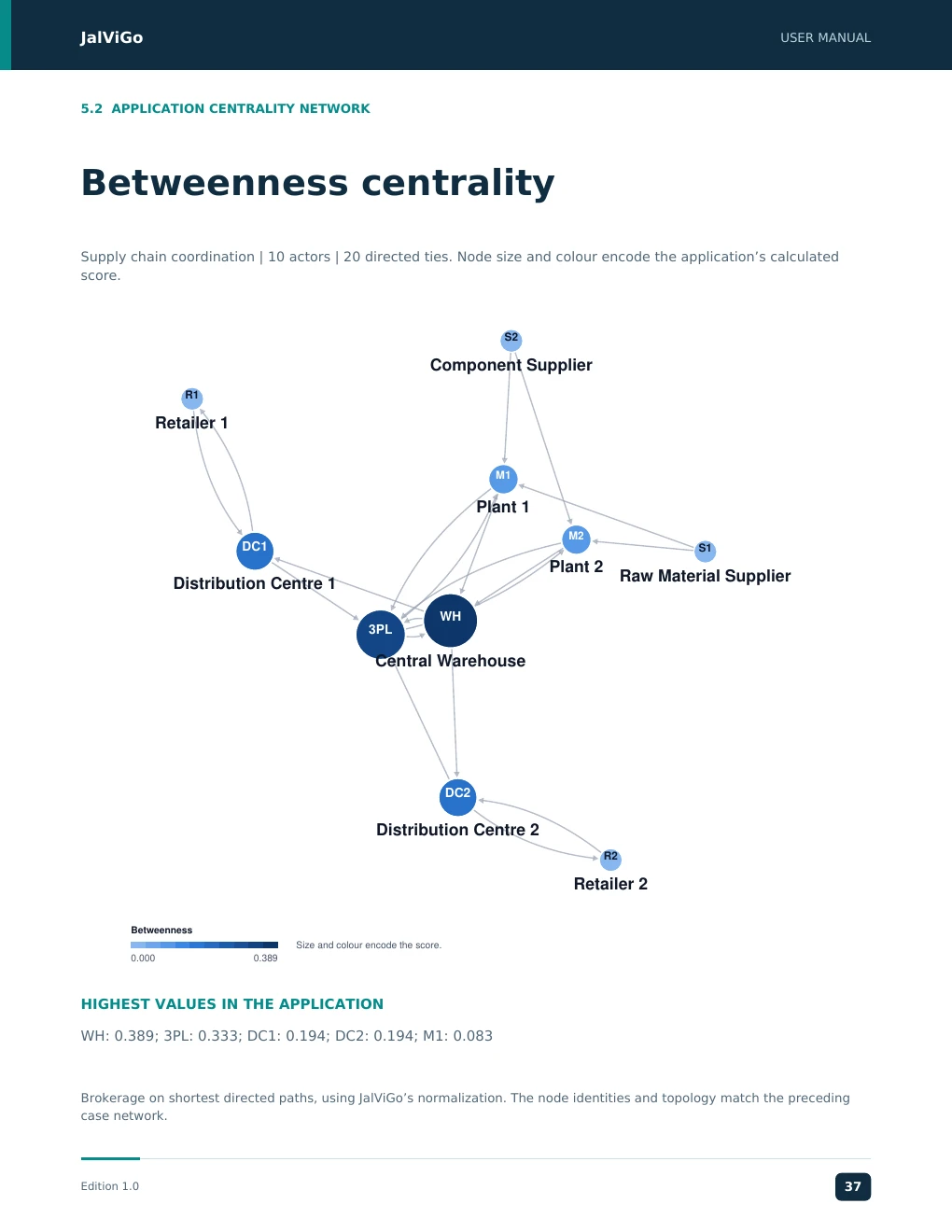
JalViGo USER MANUAL 5.2 APPLICATION CENTRALITY NETWORK Betweenness centrality Supply chain coordination | 10 actors | 20 directed ties. Node size and colour encode the application’s calculated score. S2 Component Supplier R1 Retailer 1 M1 Plant 1 M2 DC1 S1 Plant 2 Raw Material Supplier Distribution Centre 1 WH 3PL Central Warehouse DC2 Distribution Centre 2 R2 Retailer 2 Betweenness Size and colour encode the score. 0.000 0.389 HIGHEST VALUES IN THE APPLICATION WH: 0.389; 3PL: 0.333; DC1: 0.194; DC2: 0.194; M1: 0.083 Brokerage on shortest directed paths, using JalViGo’s normalization. The node identities and topology match the preceding case network. Edition 1.0 37
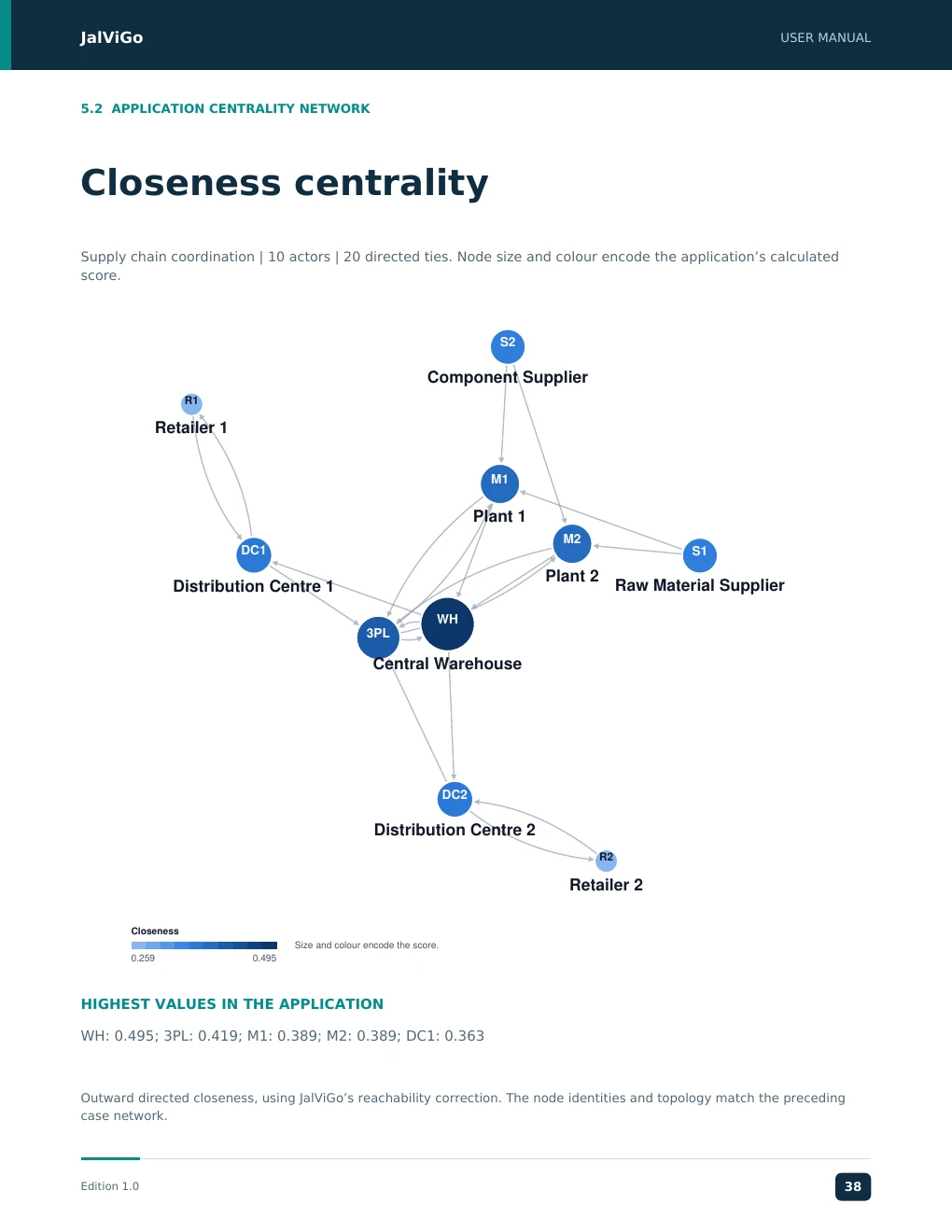
JalViGo USER MANUAL 5.2 APPLICATION CENTRALITY NETWORK Closeness centrality Supply chain coordination | 10 actors | 20 directed ties. Node size and colour encode the application’s calculated score. S2 Component Supplier R1 Retailer 1 M1 Plant 1 M2 DC1 S1 Plant 2 Distribution Centre 1 Raw Material Supplier WH 3PL Central Warehouse DC2 Distribution Centre 2 R2 Retailer 2 Closeness Size and colour encode the score. 0.259 0.495 HIGHEST VALUES IN THE APPLICATION WH: 0.495; 3PL: 0.419; M1: 0.389; M2: 0.389; DC1: 0.363 Outward directed closeness, using JalViGo’s reachability correction. The node identities and topology match the preceding case network. Edition 1.0 38
JJJJaaaallllVVVViiiiGGGGoooo UUUUSSSSEEEERRRR MMMMAAAANNNNUUUUAAAALLLL JalViGo User Manual 5.3 SECTOR WALKTHROUGH Case: Project Collaboration Case: Project Collaboration. Ten roles represent Sponsor, Project Manager, Design, Engineering, Data Team, Quality, Procurement, Vendor, Operations and Customer. The ties illustrate directed coordination dependencies. Decision question Is coordination overly dependent on the project manager, and can technical teams still reach the operational handover roles if one communication route is lost? 1. Load the case. Compare the Project Manager and Engineering in the centrality ranking. Record the selected measure rather than using the general word importance. 2. In Paths, examine DES to OPS. The supplied graph includes Design to Data Team to Operations, as well as Design to Engineering to Quality to Operations. 3. Remove DATA to OPS in What-if. Use the save/apply/restore procedure on page 7 to verify the alternative through Engineering and Quality in Paths. 4. Restore the baseline and remove PM. Compare sponsor/customer coordination with technical handover routes. Actor removal and arc removal answer different questions. 5. Document any proposed backup liaison role as a new relationship, then compare the baseline and scenario in What-if. Output to retain Interpretation Selected actor ranking Potential coordination and brokerage roles Endpoint path before and after Availability of directed handover routes Efficiency and disconnected pairs Overall structural effect of the intervention Annotated network figure A communication aid for the project team Apply the result in the domain Discuss whether the paths reflect how information actually moves, whether escalation rules permit the proposed alternate route and whether a named deputy can cover the missing coordination role. Refresh the network when project responsibilities change. This is a role-collaboration network, not a critical-path project schedule. Arcs have no activity durations, precedence slack or resource calendars in this case. A shortest route in the collaboration graph is not the project completion time. Use the manufacturing scheduler only for processes that match its stated serial assumptions. Edition 1.0 19 EEEEddddiiiittttiiiioooonnnn 1111....0000 12239379
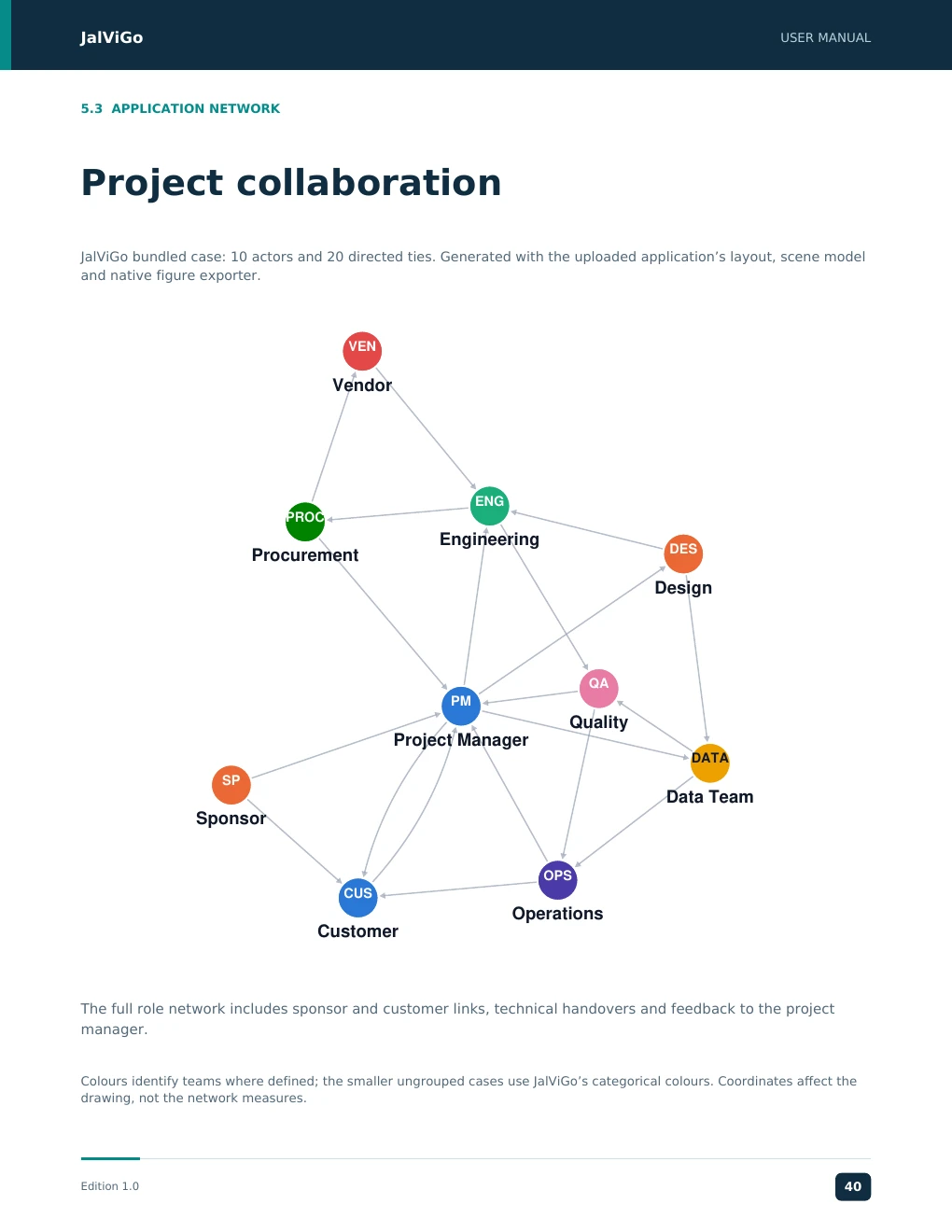
JalViGo USER MANUAL 5.3 APPLICATION NETWORK Project collaboration JalViGo bundled case: 10 actors and 20 directed ties. Generated with the uploaded application’s layout, scene model and native figure exporter. VEN Vendor ENG PROC Engineering DES Procurement Design QA PM Quality Project Manager DATA SP Data Team Sponsor OPS CUS Operations Customer The full role network includes sponsor and customer links, technical handovers and feedback to the project manager. Colours identify teams where defined; the smaller ungrouped cases use JalViGo’s categorical colours. Coordinates affect the drawing, not the network measures. Edition 1.0 40
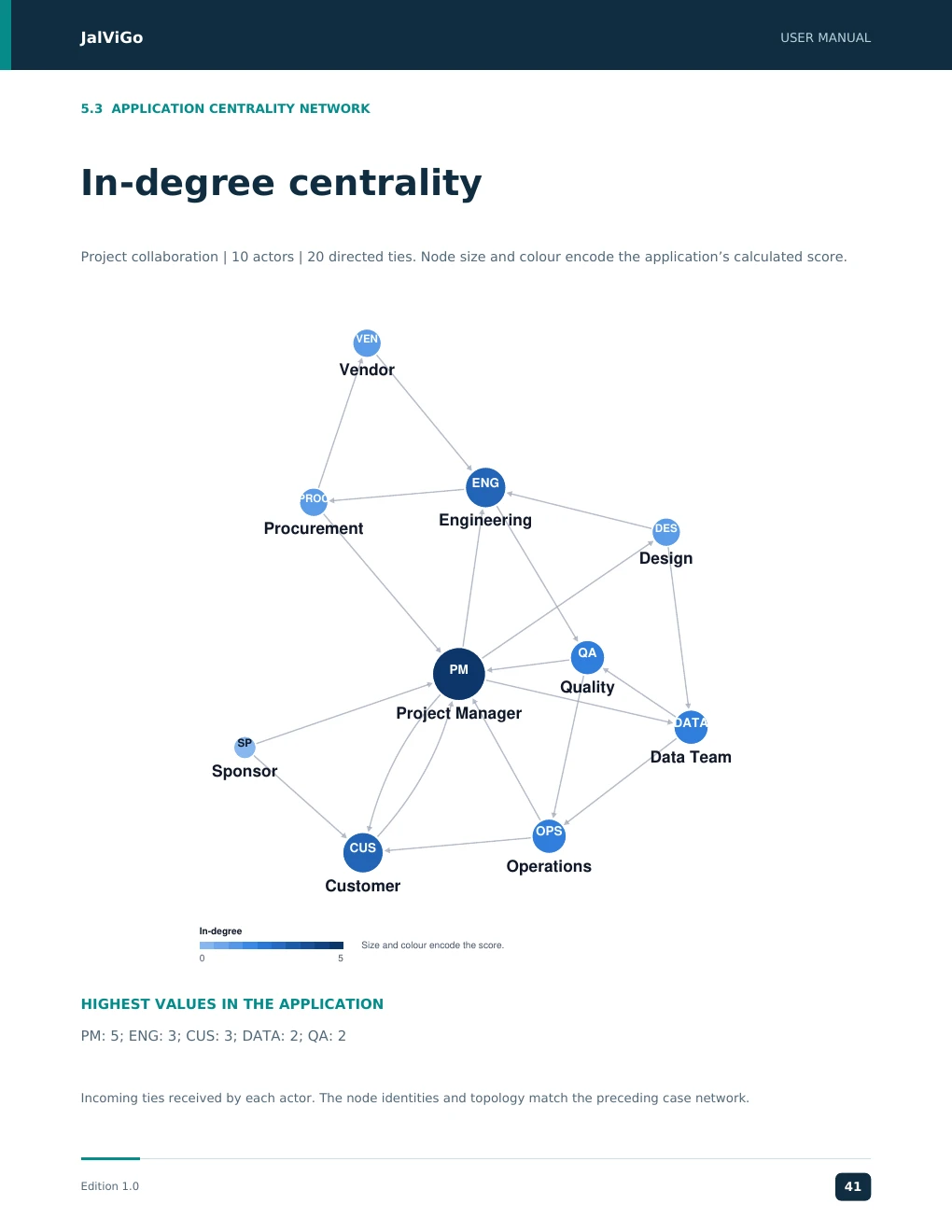
JalViGo USER MANUAL 5.3 APPLICATION CENTRALITY NETWORK In-degree centrality Project collaboration | 10 actors | 20 directed ties. Node size and colour encode the application’s calculated score. VEN Vendor ENG PROC Engineering Procurement DES Design QA PM Quality Project Manager DATA SP Data Team Sponsor OPS CUS Operations Customer In-degree Size and colour encode the score. 0 5 HIGHEST VALUES IN THE APPLICATION PM: 5; ENG: 3; CUS: 3; DATA: 2; QA: 2 Incoming ties received by each actor. The node identities and topology match the preceding case network. Edition 1.0 41
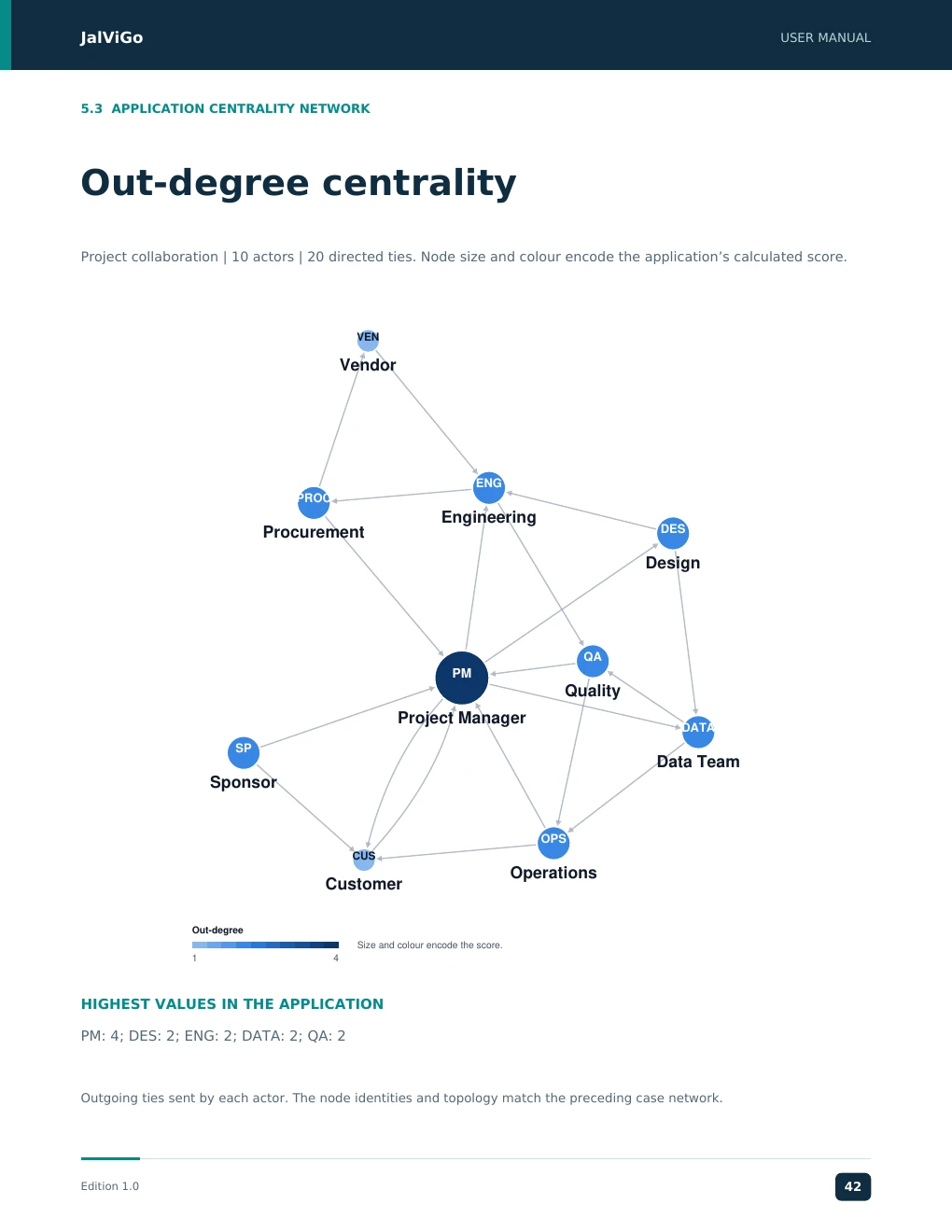
JalViGo USER MANUAL 5.3 APPLICATION CENTRALITY NETWORK Out-degree centrality Project collaboration | 10 actors | 20 directed ties. Node size and colour encode the application’s calculated score. VEN Vendor ENG PROC Engineering Procurement DES Design QA PM Quality Project Manager DATA SP Data Team Sponsor OPS CUS Operations Customer Out-degree Size and colour encode the score. 1 4 HIGHEST VALUES IN THE APPLICATION PM: 4; DES: 2; ENG: 2; DATA: 2; QA: 2 Outgoing ties sent by each actor. The node identities and topology match the preceding case network. Edition 1.0 42
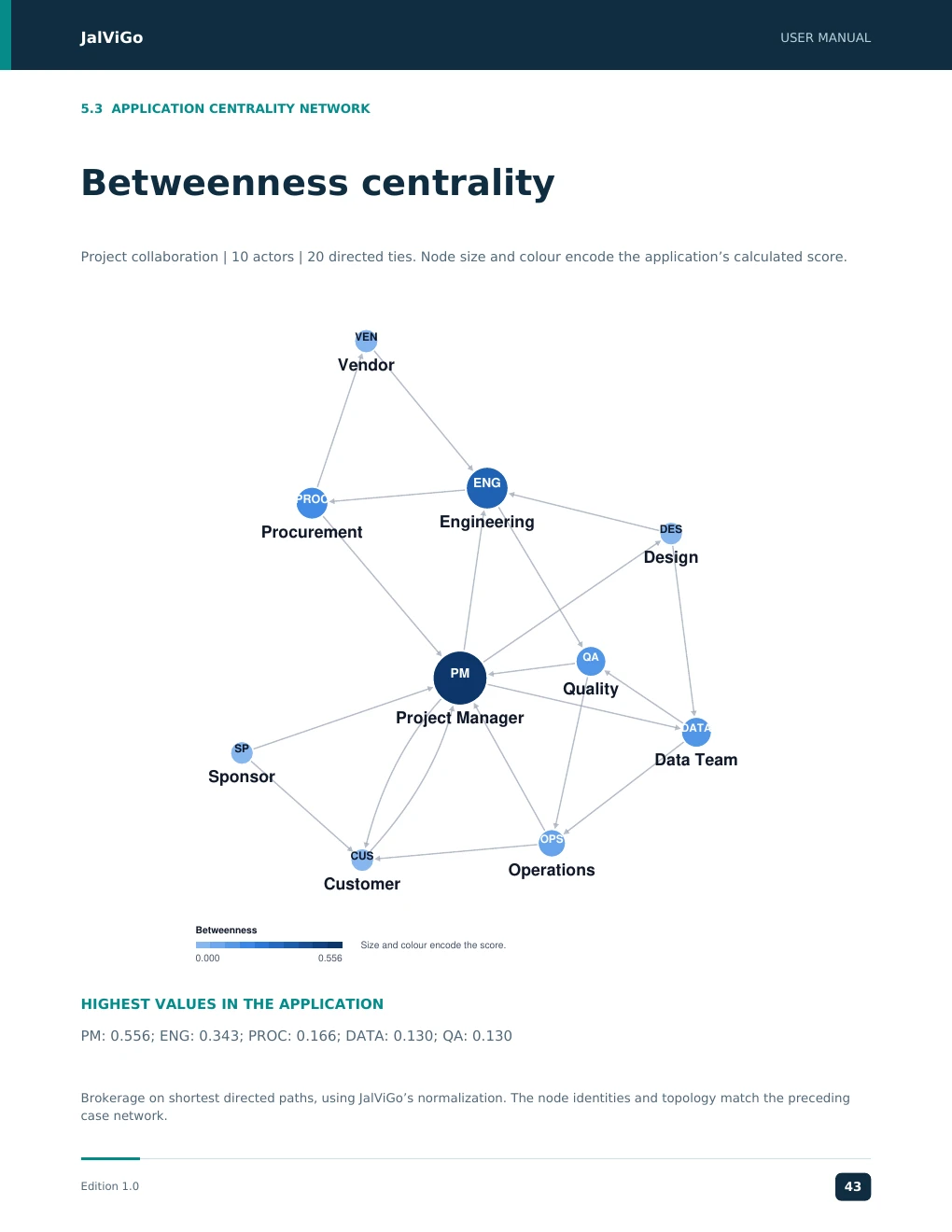
JalViGo USER MANUAL 5.3 APPLICATION CENTRALITY NETWORK Betweenness centrality Project collaboration | 10 actors | 20 directed ties. Node size and colour encode the application’s calculated score. VEN Vendor ENG PROC Engineering Procurement DES Design QA PM Quality Project Manager DATA SP Data Team Sponsor OPS CUS Operations Customer Betweenness Size and colour encode the score. 0.000 0.556 HIGHEST VALUES IN THE APPLICATION PM: 0.556; ENG: 0.343; PROC: 0.166; DATA: 0.130; QA: 0.130 Brokerage on shortest directed paths, using JalViGo’s normalization. The node identities and topology match the preceding case network. Edition 1.0 43
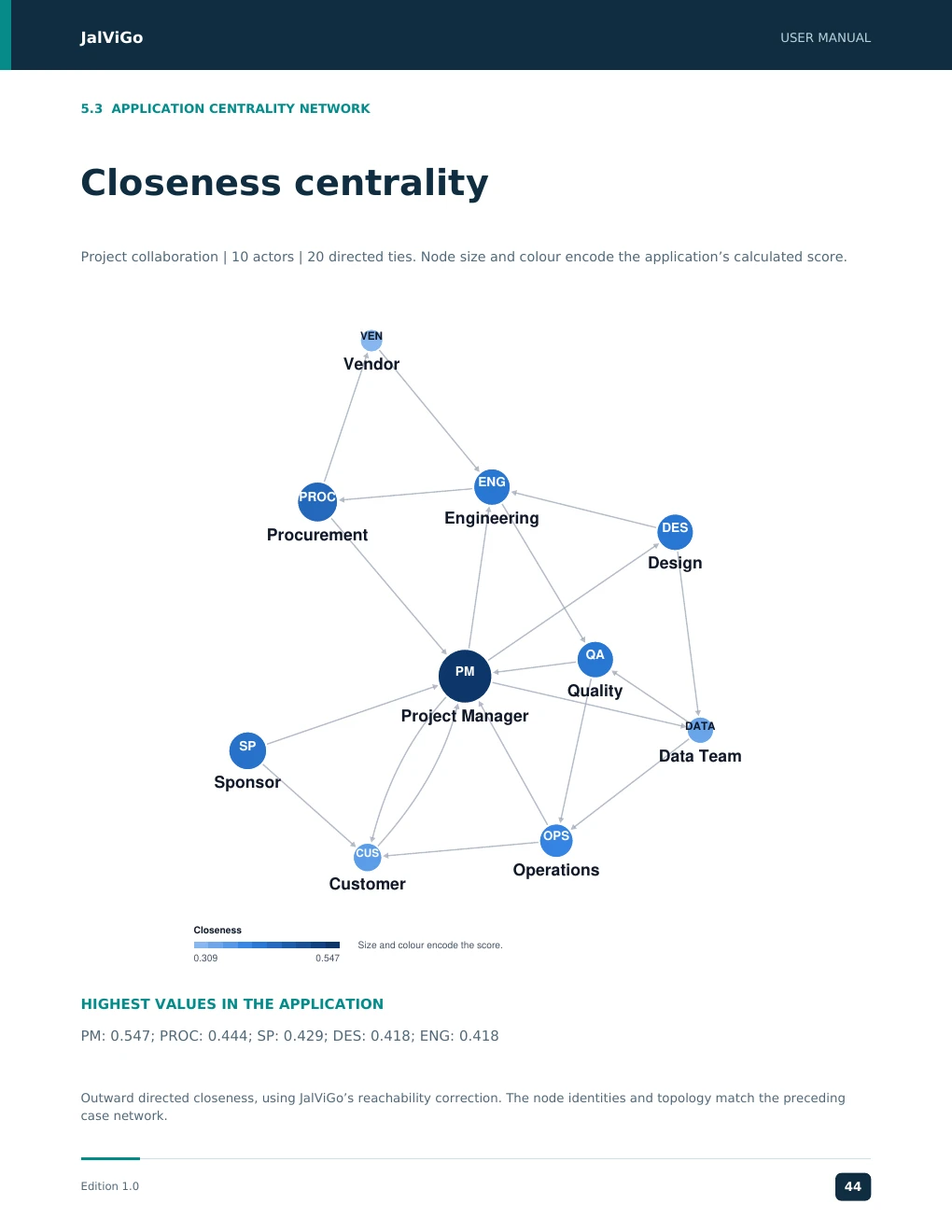
JalViGo USER MANUAL 5.3 APPLICATION CENTRALITY NETWORK Closeness centrality Project collaboration | 10 actors | 20 directed ties. Node size and colour encode the application’s calculated score. VEN Vendor ENG PROC Engineering DES Procurement Design QA PM Quality Project Manager DATA SP Data Team Sponsor OPS CUS Operations Customer Closeness Size and colour encode the score. 0.309 0.547 HIGHEST VALUES IN THE APPLICATION PM: 0.547; PROC: 0.444; SP: 0.429; DES: 0.418; ENG: 0.418 Outward directed closeness, using JalViGo’s reachability correction. The node identities and topology match the preceding case network. Edition 1.0 44
JJJJaaaallllVVVViiiiGGGGoooo UUUUSSSSEEEERRRR MMMMAAAANNNNUUUUAAAALLLL JalViGo User Manual 5.4 SECTOR WALKTHROUGH Case: Social Media Influence Case: Social Media Influence. Ten actors represent a brand, media, two influencers, three communities and three audience groups. Each tie is a directed influence or information relationship in an illustrative campaign network. Decision question Which intermediaries connect the brand to audience groups, and how much structural reach remains if a channel is unavailable? Specify whether a tie means following, sharing or an observed communication link before applying the workflow to real data. 1. Load the case and inspect out-degree, betweenness and eigenvector rankings. Compare the meaning of an actor with many outgoing links against one with influential incoming links. 2. In Paths, inspect BRD to A3. A direct three-step chain is Brand to Influencer B to Community 3 to Audience 3. 3. Save the baseline and remove INF2. This eliminates the inbound route to Community 3, so the brand no longer reaches A3. Apply the scenario to verify the endpoint result in Paths. 4. Restore the baseline and test an individual tie removal instead. Record the exact direction removed and whether another directed route remains. 5. Export a figure with readable community labels and a results file that identifies the intervention. Structural finding What it does not establish Reachable audience group Observed impressions or conversions High eigenvector score Commercial effectiveness or credibility Alternative path A guaranteed diffusion or exposure event Lost path after removal The size of a real campaign revenue loss Use the result responsibly Use the analysis to prioritize questions about channel diversity and intermediary dependence. Validate those questions against campaign analytics, content differences and time-specific observations. Changing platform behavior and audience overlap are not simulated by the binary graph. The case does not connect to social-media accounts or scrape live engagement data. Import a properly prepared network for an actual study, document the collection window and retain a copy of the input alongside the exported analysis. Edition 1.0 20 EEEEddddiiiittttiiiioooonnnn 1111....0000 22340505
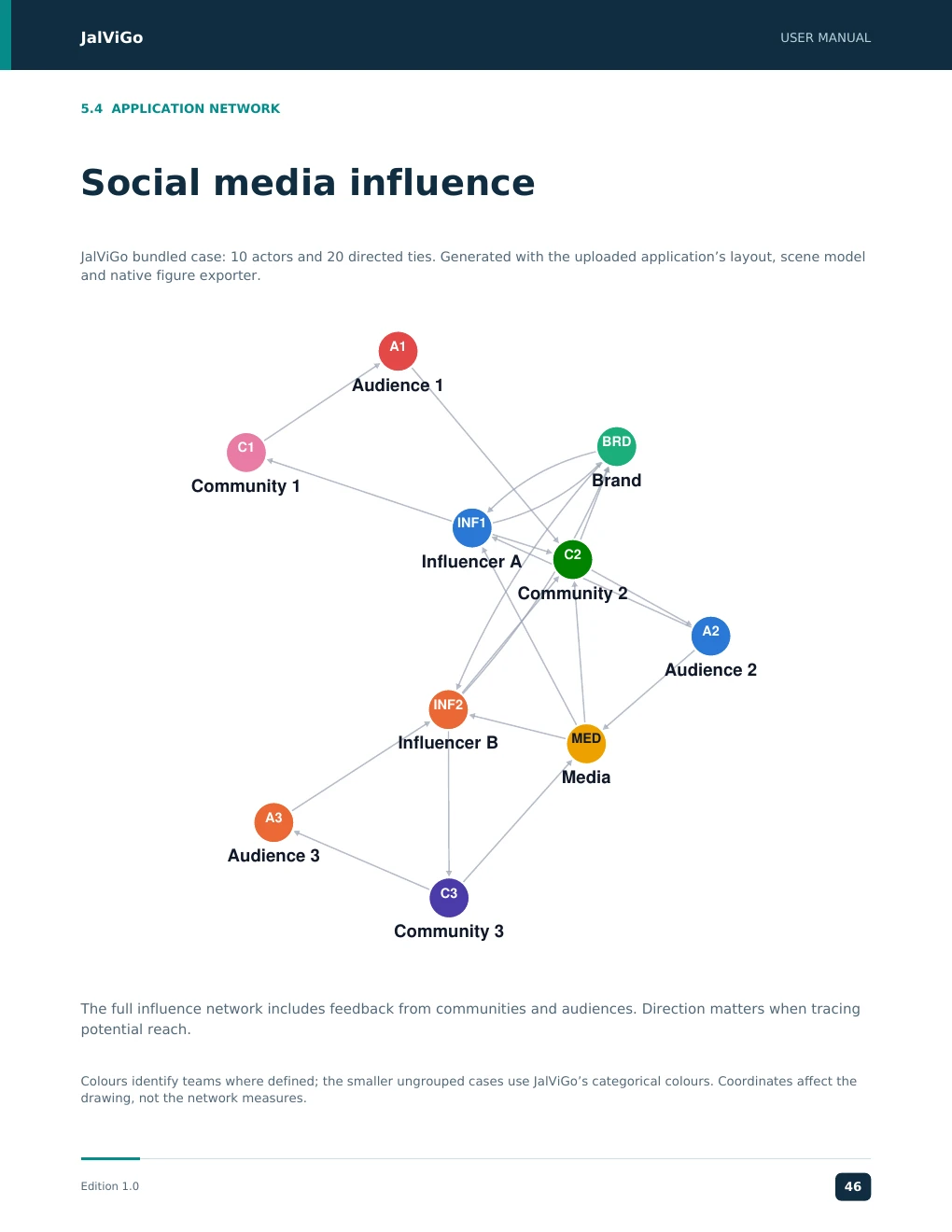
JalViGo USER MANUAL 5.4 APPLICATION NETWORK Social media influence JalViGo bundled case: 10 actors and 20 directed ties. Generated with the uploaded application’s layout, scene model and native figure exporter. A1 Audience 1 BRD C1 Brand Community 1 INF1 C2 Influencer A Community 2 A2 Audience 2 INF2 Influencer B MED Media A3 Audience 3 C3 Community 3 The full influence network includes feedback from communities and audiences. Direction matters when tracing potential reach. Colours identify teams where defined; the smaller ungrouped cases use JalViGo’s categorical colours. Coordinates affect the drawing, not the network measures. Edition 1.0 46
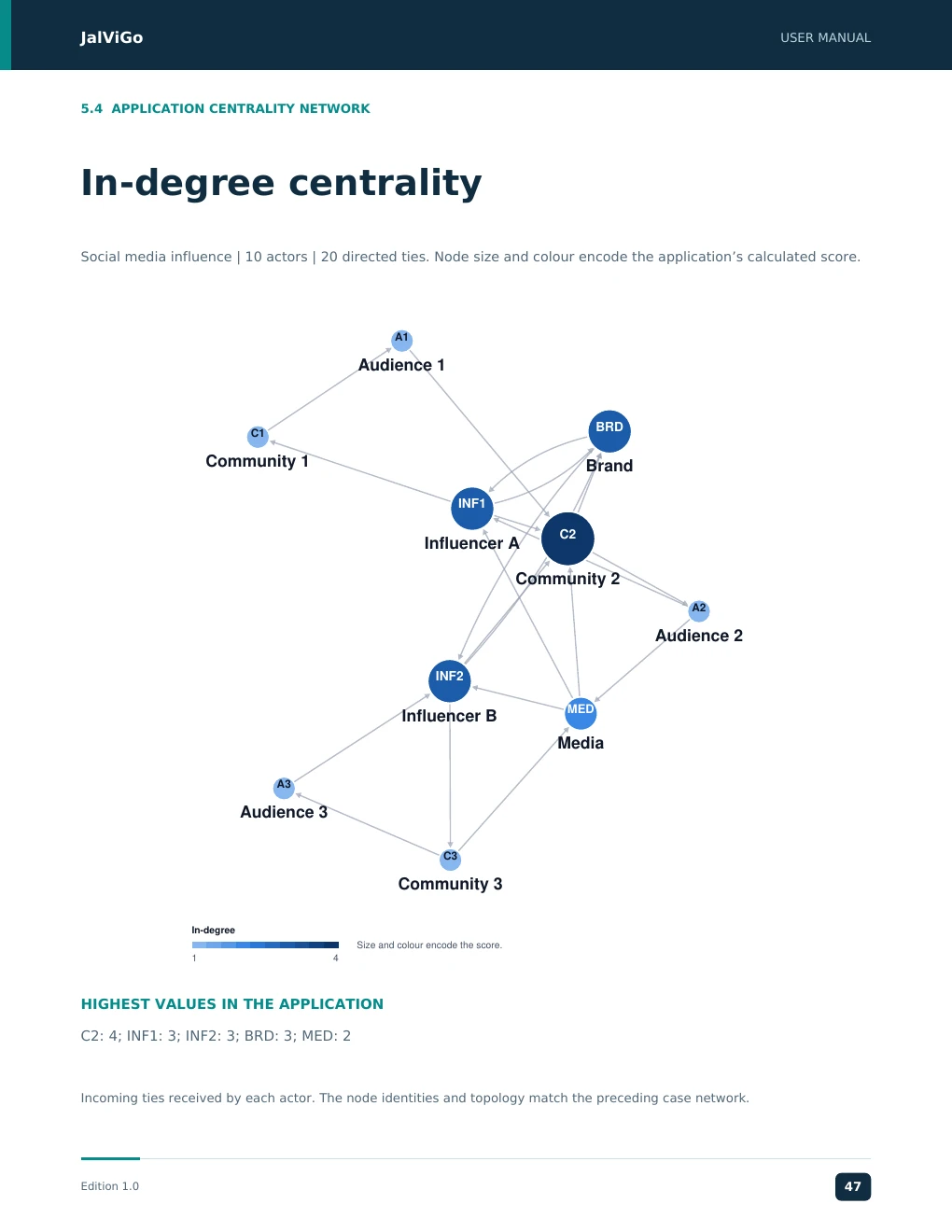
JalViGo USER MANUAL 5.4 APPLICATION CENTRALITY NETWORK In-degree centrality Social media influence | 10 actors | 20 directed ties. Node size and colour encode the application’s calculated score. A1 Audience 1 BRD C1 Community 1 Brand INF1 C2 Influencer A Community 2 A2 Audience 2 INF2 MED Influencer B Media A3 Audience 3 C3 Community 3 In-degree Size and colour encode the score. 1 4 HIGHEST VALUES IN THE APPLICATION C2: 4; INF1: 3; INF2: 3; BRD: 3; MED: 2 Incoming ties received by each actor. The node identities and topology match the preceding case network. Edition 1.0 47
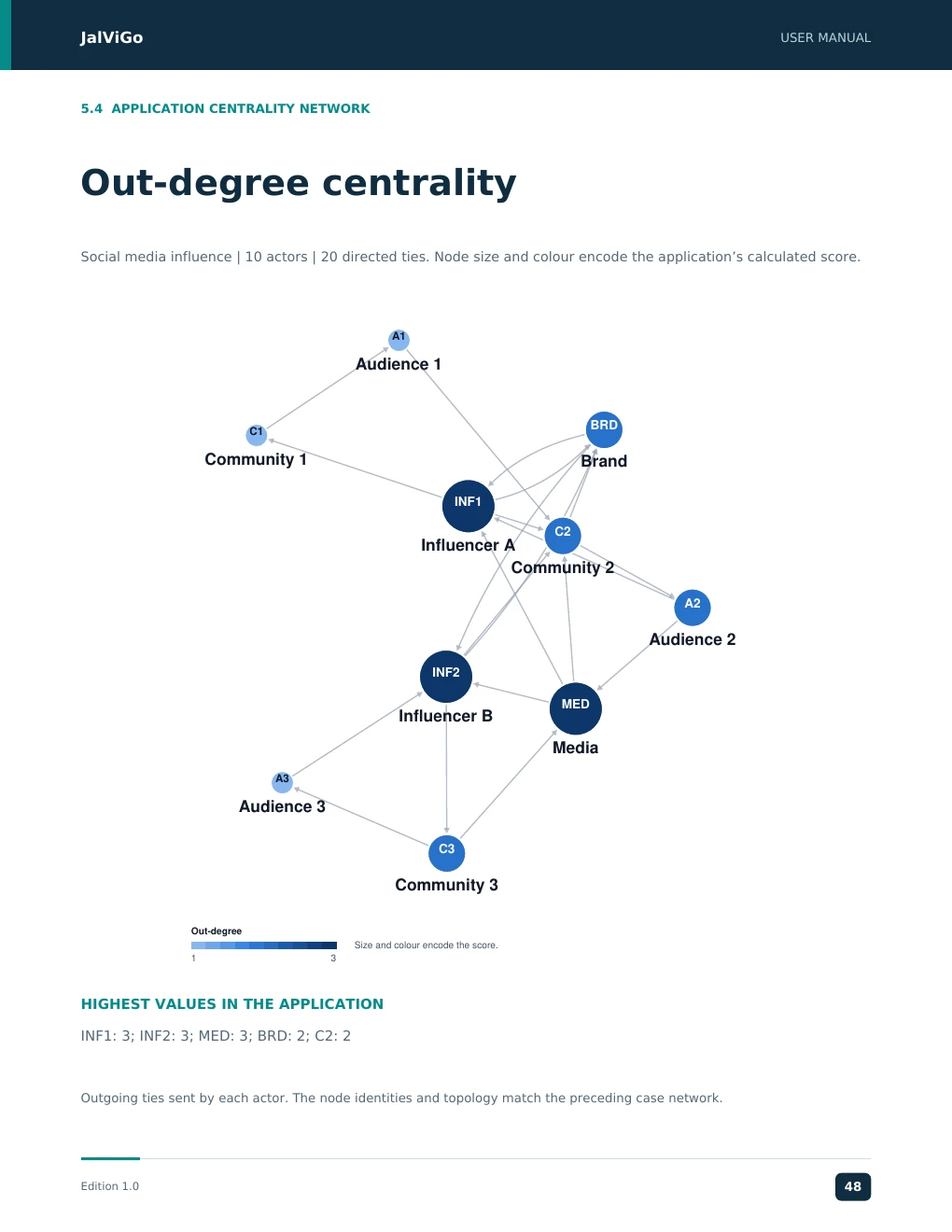
JalViGo USER MANUAL 5.4 APPLICATION CENTRALITY NETWORK Out-degree centrality Social media influence | 10 actors | 20 directed ties. Node size and colour encode the application’s calculated score. A1 Audience 1 BRD C1 Community 1 Brand INF1 C2 Influencer A Community 2 A2 Audience 2 INF2 MED Influencer B Media A3 Audience 3 C3 Community 3 Out-degree Size and colour encode the score. 1 3 HIGHEST VALUES IN THE APPLICATION INF1: 3; INF2: 3; MED: 3; BRD: 2; C2: 2 Outgoing ties sent by each actor. The node identities and topology match the preceding case network. Edition 1.0 48
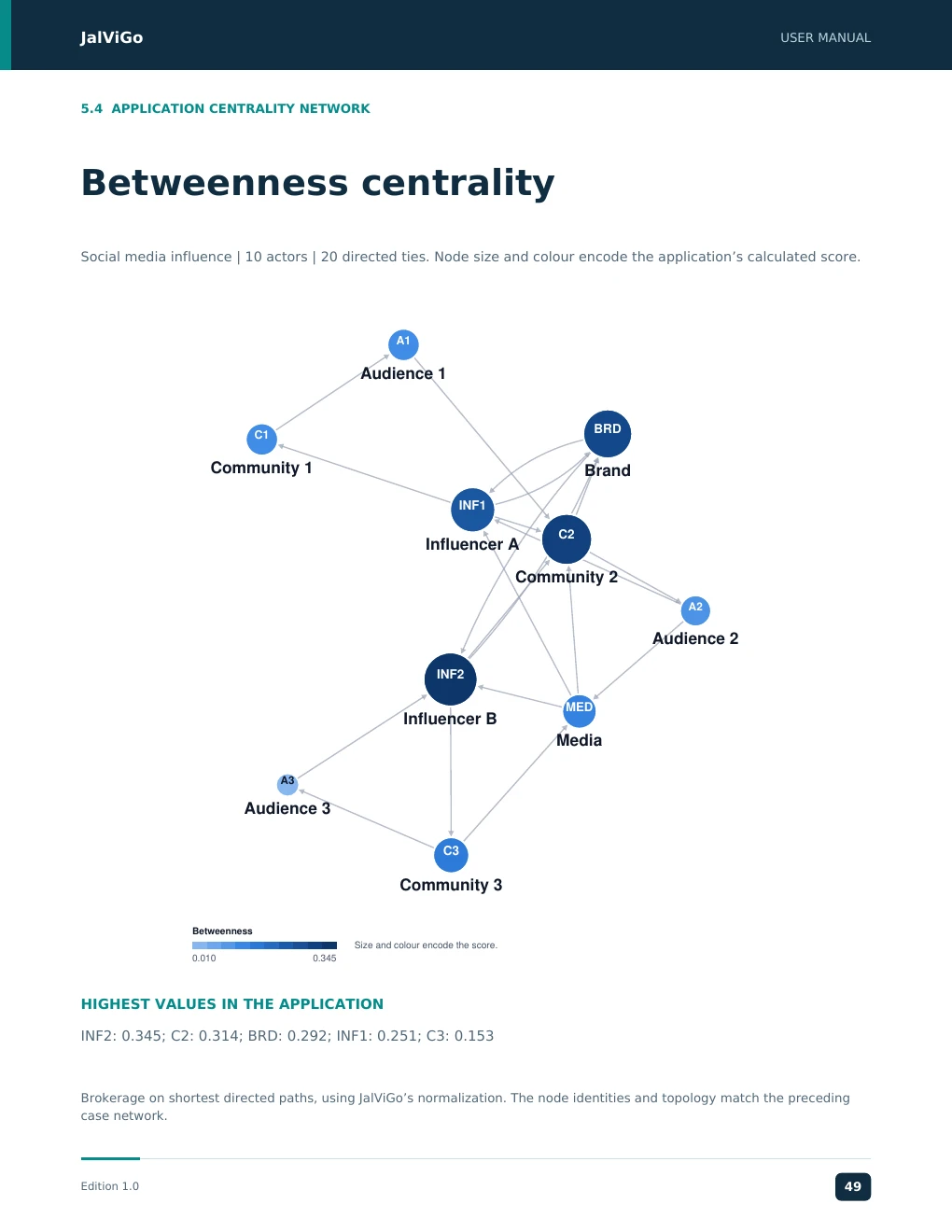
JalViGo USER MANUAL 5.4 APPLICATION CENTRALITY NETWORK Betweenness centrality Social media influence | 10 actors | 20 directed ties. Node size and colour encode the application’s calculated score. A1 Audience 1 BRD C1 Community 1 Brand INF1 C2 Influencer A Community 2 A2 Audience 2 INF2 MED Influencer B Media A3 Audience 3 C3 Community 3 Betweenness Size and colour encode the score. 0.010 0.345 HIGHEST VALUES IN THE APPLICATION INF2: 0.345; C2: 0.314; BRD: 0.292; INF1: 0.251; C3: 0.153 Brokerage on shortest directed paths, using JalViGo’s normalization. The node identities and topology match the preceding case network. Edition 1.0 49
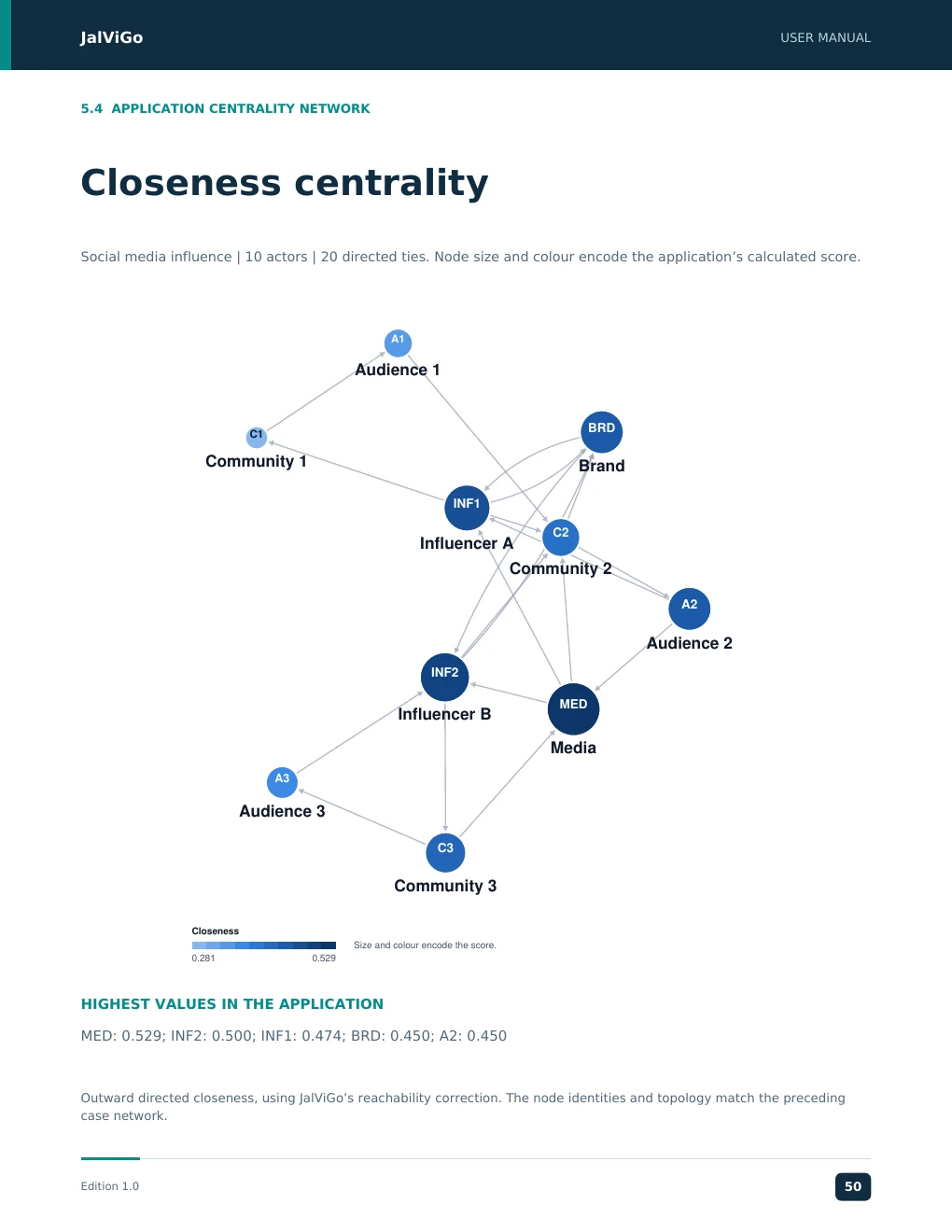
JalViGo USER MANUAL 5.4 APPLICATION CENTRALITY NETWORK Closeness centrality Social media influence | 10 actors | 20 directed ties. Node size and colour encode the application’s calculated score. A1 Audience 1 BRD C1 Community 1 Brand INF1 C2 Influencer A Community 2 A2 Audience 2 INF2 MED Influencer B Media A3 Audience 3 C3 Community 3 Closeness Size and colour encode the score. 0.281 0.529 HIGHEST VALUES IN THE APPLICATION MED: 0.529; INF2: 0.500; INF1: 0.474; BRD: 0.450; A2: 0.450 Outward directed closeness, using JalViGo’s reachability correction. The node identities and topology match the preceding case network. Edition 1.0 50
JJJJaaaallllVVVViiiiGGGGoooo UUUUSSSSEEEERRRR MMMMAAAANNNNUUUUAAAALLLL JalViGo User Manual 5.5 SECTOR WALKTHROUGH Case: Port and Logistics Case: Port & Logistics Network. The bundled ten-actor case represents stakeholders in port and logistics coordination. Use the actor names and case brief to identify the operational meaning of each relationship before running a disruption. Decision question Which coordination handoffs are vulnerable, and can the selected origin still reach the intended downstream stakeholder after a disruption? A stakeholder network supports a different decision from a physical vehicle-routing or berth-scheduling model. 1. Load the case and inspect actor labels. Identify a source and downstream destination relevant to the service being discussed; record their exact IDs. 2. Use Paths to establish a baseline route. Review each direction with a domain expert, distinguishing information exchange from physical movement. 3. Rank betweenness in Explore, then remove the highest-ranked intermediary in What-if. Use the save/apply/restore procedure on page 7 to query the disrupted endpoint path. 4. Restore the baseline and remove one arc on its path. Compare with whole-actor removal to distinguish a failed handoff from an unavailable stakeholder. 5. Evaluate a plausible alternative coordination link. Use identical endpoints and failure assumptions when comparing resilience scores. Evidence to present Operational interpretation Actor and arc definitions Explains what a disruption represents Endpoint path comparison Shows whether a coordination route remains Exact or sampled resilience Describes the modeled failure experiment Feasibility notes on new ties Separates a graph suggestion from an agreed procedure Limits of inference A connected stakeholder network does not prove sufficient berth capacity, crane availability, vessel turnaround performance or customs clearance speed. These require operational data and separate models. Do not relabel graph hop counts as transit time. For an actual port study, retain the observation period, relationship definition and accountable data owner. When the network changes, use a new baseline session so that the original disruption comparison remains reproducible. Edition 1.0 21 EEEEddddiiiittttiiiioooonnnn 1111....0000 22351731
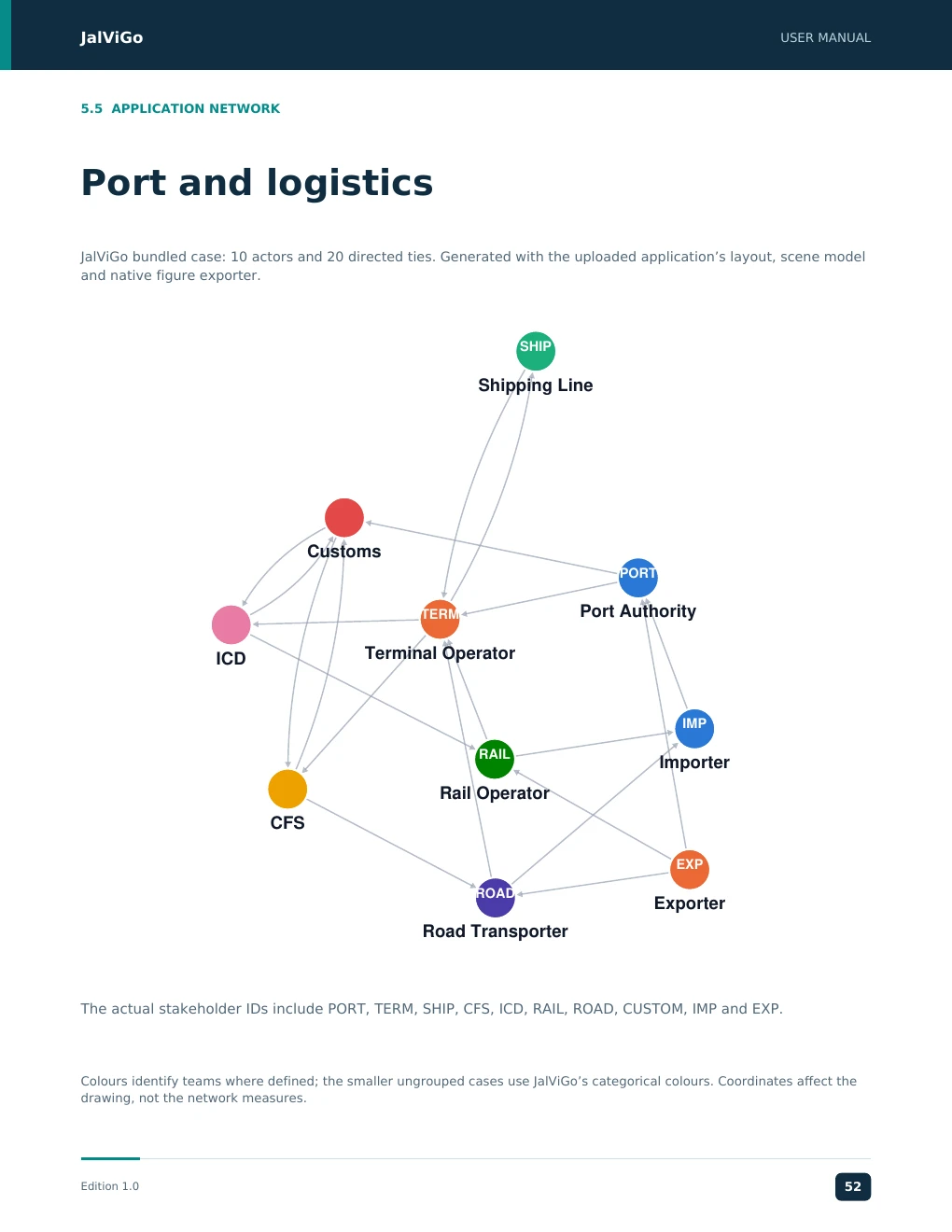
JalViGo USER MANUAL 5.5 APPLICATION NETWORK Port and logistics JalViGo bundled case: 10 actors and 20 directed ties. Generated with the uploaded application’s layout, scene model and native figure exporter. SHIP Shipping Line Customs PORT TERM Port Authority Terminal Operator ICD IMP RAIL Importer Rail Operator CFS EXP ROAD Exporter Road Transporter The actual stakeholder IDs include PORT, TERM, SHIP, CFS, ICD, RAIL, ROAD, CUSTOM, IMP and EXP. Colours identify teams where defined; the smaller ungrouped cases use JalViGo’s categorical colours. Coordinates affect the drawing, not the network measures. Edition 1.0 52
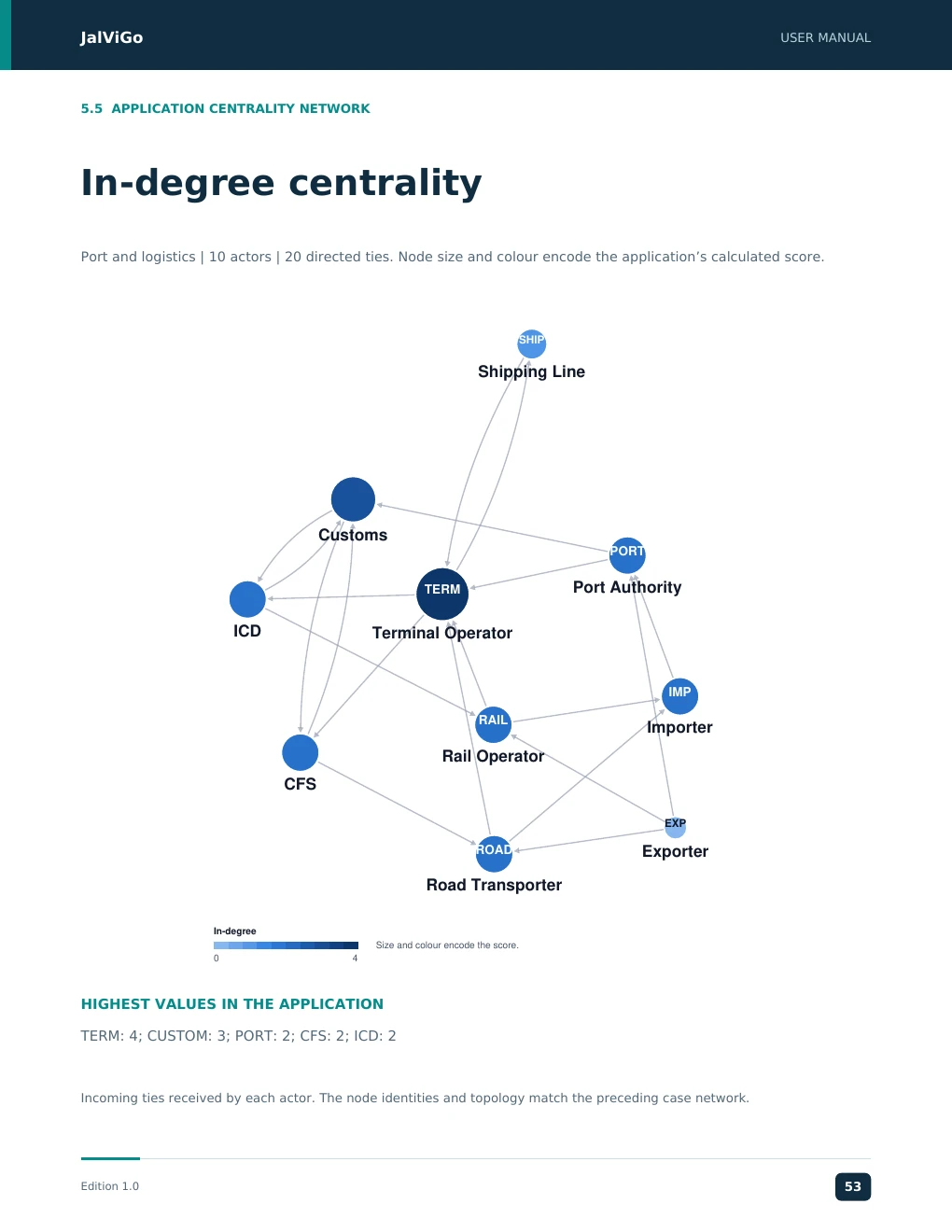
JalViGo USER MANUAL 5.5 APPLICATION CENTRALITY NETWORK In-degree centrality Port and logistics | 10 actors | 20 directed ties. Node size and colour encode the application’s calculated score. SHIP Shipping Line Customs PORT TERM Port Authority ICD Terminal Operator IMP RAIL Importer Rail Operator CFS EXP ROAD Exporter Road Transporter In-degree Size and colour encode the score. 0 4 HIGHEST VALUES IN THE APPLICATION TERM: 4; CUSTOM: 3; PORT: 2; CFS: 2; ICD: 2 Incoming ties received by each actor. The node identities and topology match the preceding case network. Edition 1.0 53
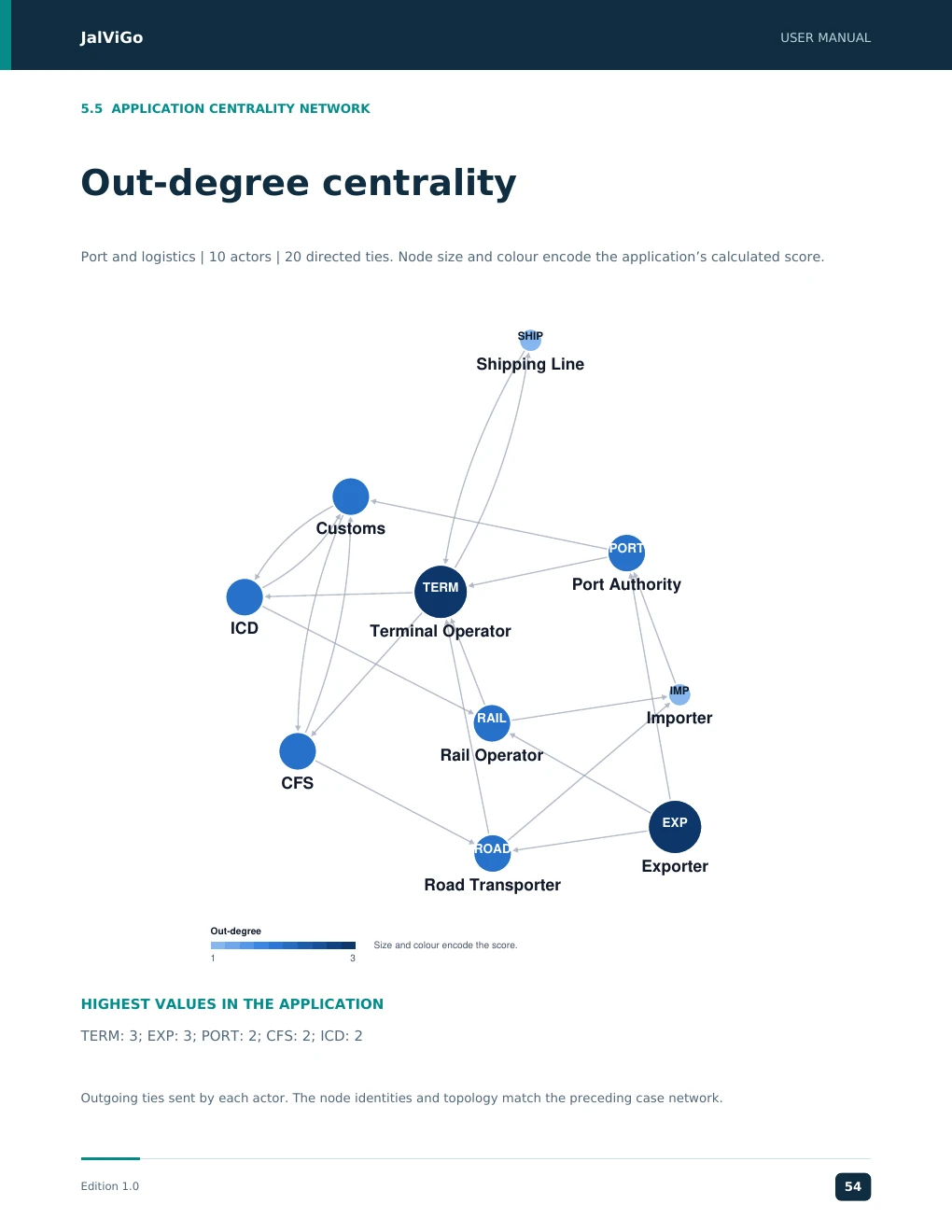
JalViGo USER MANUAL 5.5 APPLICATION CENTRALITY NETWORK Out-degree centrality Port and logistics | 10 actors | 20 directed ties. Node size and colour encode the application’s calculated score. SHIP Shipping Line Customs PORT TERM Port Authority ICD Terminal Operator IMP RAIL Importer Rail Operator CFS EXP ROAD Exporter Road Transporter Out-degree Size and colour encode the score. 1 3 HIGHEST VALUES IN THE APPLICATION TERM: 3; EXP: 3; PORT: 2; CFS: 2; ICD: 2 Outgoing ties sent by each actor. The node identities and topology match the preceding case network. Edition 1.0 54
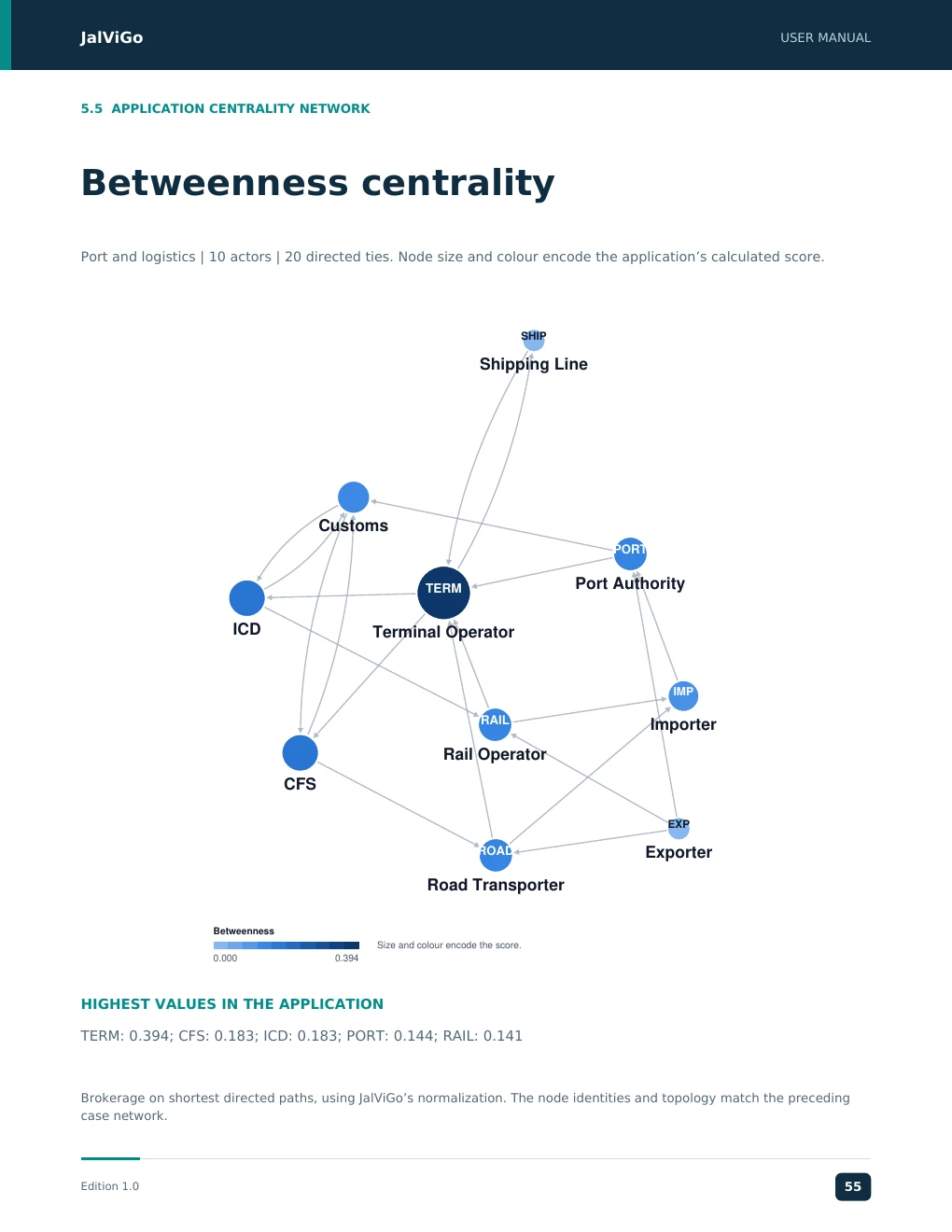
JalViGo USER MANUAL 5.5 APPLICATION CENTRALITY NETWORK Betweenness centrality Port and logistics | 10 actors | 20 directed ties. Node size and colour encode the application’s calculated score. SHIP Shipping Line Customs PORT Port Authority TERM ICD Terminal Operator IMP RAIL Importer Rail Operator CFS EXP ROAD Exporter Road Transporter Betweenness Size and colour encode the score. 0.000 0.394 HIGHEST VALUES IN THE APPLICATION TERM: 0.394; CFS: 0.183; ICD: 0.183; PORT: 0.144; RAIL: 0.141 Brokerage on shortest directed paths, using JalViGo’s normalization. The node identities and topology match the preceding case network. Edition 1.0 55
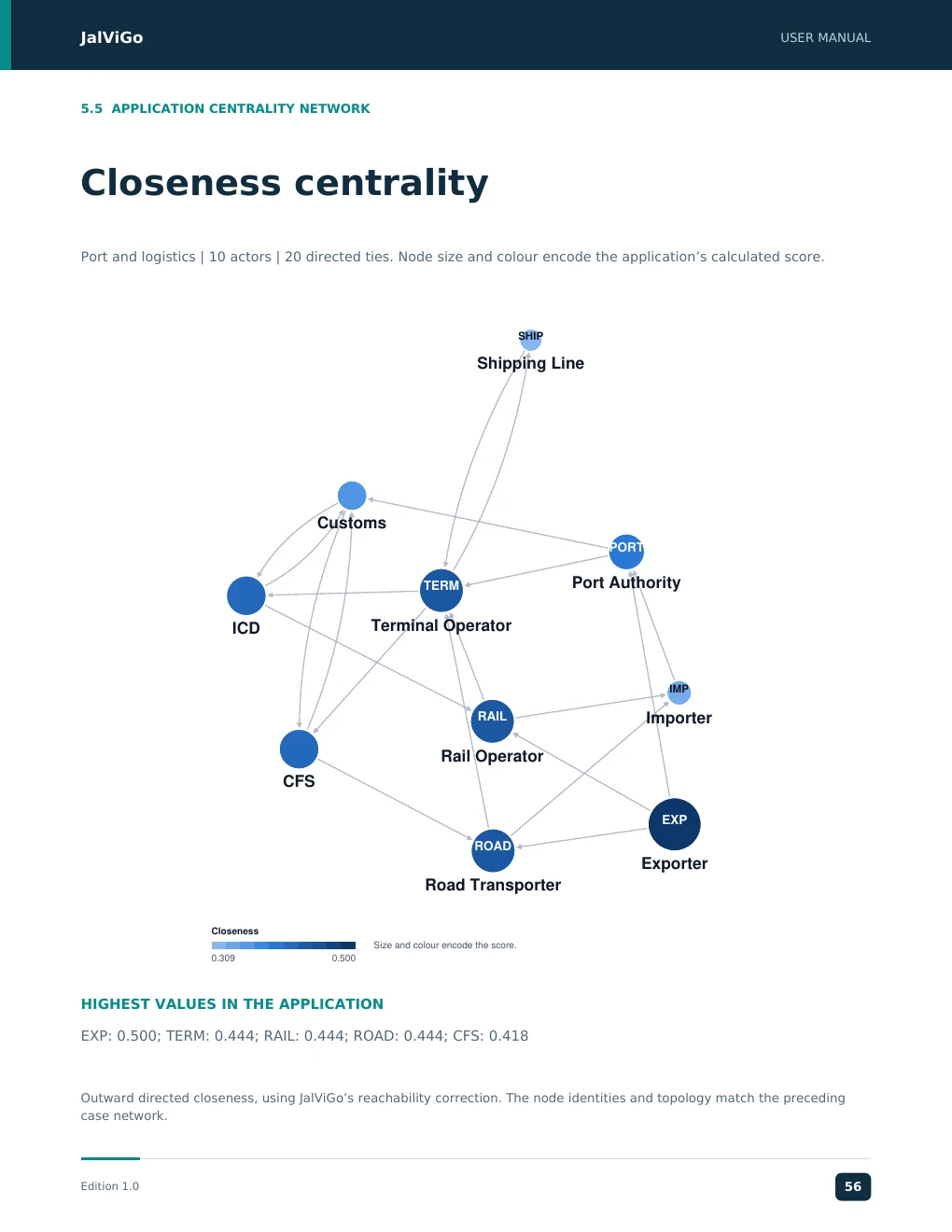
JalViGo USER MANUAL 5.5 APPLICATION CENTRALITY NETWORK Closeness centrality Port and logistics | 10 actors | 20 directed ties. Node size and colour encode the application’s calculated score. SHIP Shipping Line Customs PORT Port Authority TERM ICD Terminal Operator IMP RAIL Importer Rail Operator CFS EXP ROAD Exporter Road Transporter Closeness Size and colour encode the score. 0.309 0.500 HIGHEST VALUES IN THE APPLICATION EXP: 0.500; TERM: 0.444; RAIL: 0.444; ROAD: 0.444; CFS: 0.418 Outward directed closeness, using JalViGo’s reachability correction. The node identities and topology match the preceding case network. Edition 1.0 56
JJJJaaaallllVVVViiiiGGGGoooo UUUUSSSSEEEERRRR MMMMAAAANNNNUUUUAAAALLLL JalViGo User Manual 5.6 SECTOR WALKTHROUGH Case: Organizational Behaviour and HR Case: Organizational Behavior & Collaboration. This larger case has 120 employees in ten departments and includes synthetic productivity and wellbeing observations. It supports organization-level network exploration alongside separate outcome evaluation. Decision question Where are collaboration dependencies located, and how do observed employee outcomes compare with explicit criteria? Keep these as two related analytical questions rather than assuming that centrality explains the outcomes. 1. Choose the case in Cases & templates. Report opens with the employee measures available. Reveal Employee productivity and Employee wellbeing under Performance indicators. 2. Review the Employee performance measures panel, criteria and observation coverage. At the defaults, the productivity target is 1 and the wellbeing target is 70. 3. Confirm totals of 10,789 output units and 9,120 hours. The pooled productivity is 1.183005 units/hour, and mean wellbeing is 69.733333 out of 100. 4. Check target counts: 88 of 120 employees meet the productivity target, and 59 of 120 meet the wellbeing target in the synthetic dataset. 5. Use Explore to examine collaboration brokers and departments, then conduct a network scenario. Observe that structural removal does not predict or automatically change the recorded employee outcomes. Choose the right organizational case Case Best learning use 12 employee Productivity & Wellbeing Trace the calculations and inspect three team patterns 120 employee Behavior & Collaboration Practice larger organizational network and outcome analysis If an OB case appears to lack outcomes, reload the case and inspect the observation panel rather than only the network picture. A generic imported edge list will not create employee records. For a real study, replace the illustrative observations with governed data and document the work-unit definition, hours, survey administration and criteria. The manual’s benchmark values are calculation checks, not reference norms for an actual organization. Do not compare unrelated occupations using raw output units without an agreed adjustment method. Edition 1.0 22 EEEEddddiiiittttiiiioooonnnn 1111....0000 22352967
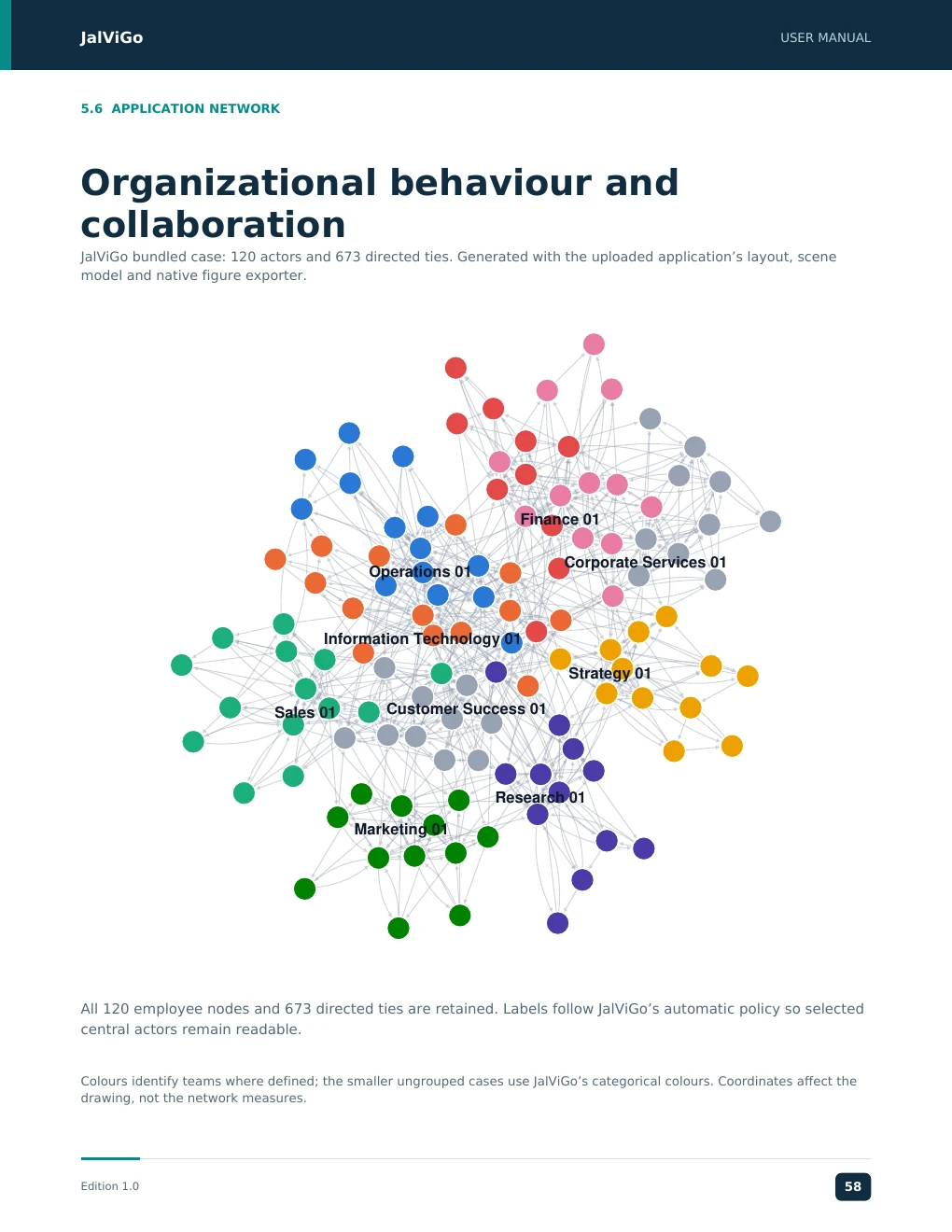
JalViGo USER MANUAL 5.6 APPLICATION NETWORK Organizational behaviour and collaboration JalViGo bundled case: 120 actors and 673 directed ties. Generated with the uploaded application’s layout, scene model and native figure exporter. Finance 01 Corporate Services 01 Operations 01 Information Technology 01 Strategy 01 Sales 01 Customer Success 01 Research 01 Marketing 01 All 120 employee nodes and 673 directed ties are retained. Labels follow JalViGo’s automatic policy so selected central actors remain readable. Colours identify teams where defined; the smaller ungrouped cases use JalViGo’s categorical colours. Coordinates affect the drawing, not the network measures. Edition 1.0 58
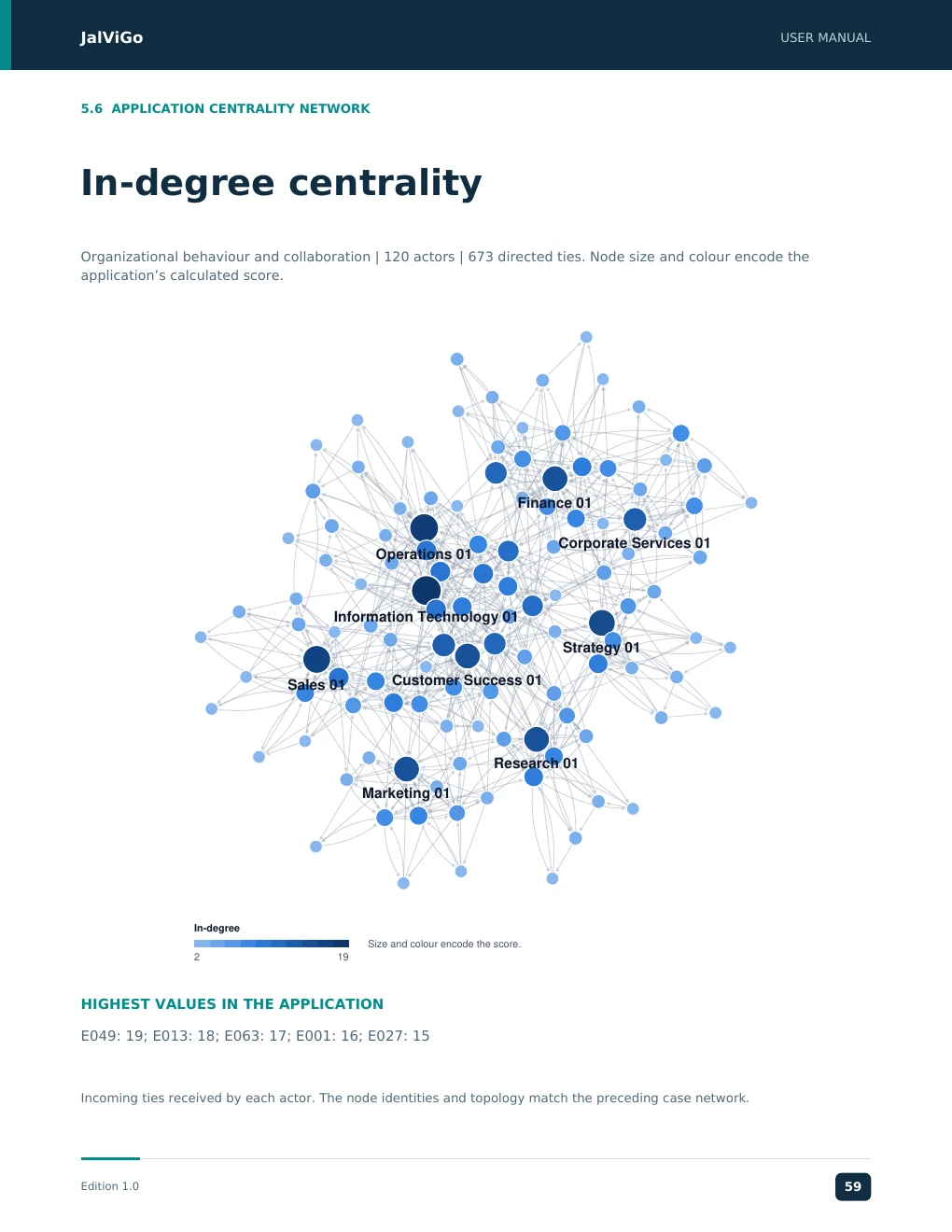
JalViGo USER MANUAL 5.6 APPLICATION CENTRALITY NETWORK In-degree centrality Organizational behaviour and collaboration | 120 actors | 673 directed ties. Node size and colour encode the application’s calculated score. Finance 01 Corporate Services 01 Operations 01 Information Technology 01 Strategy 01 Sales 01 Customer Success 01 Research 01 Marketing 01 In-degree Size and colour encode the score. 2 19 HIGHEST VALUES IN THE APPLICATION E049: 19; E013: 18; E063: 17; E001: 16; E027: 15 Incoming ties received by each actor. The node identities and topology match the preceding case network. Edition 1.0 59
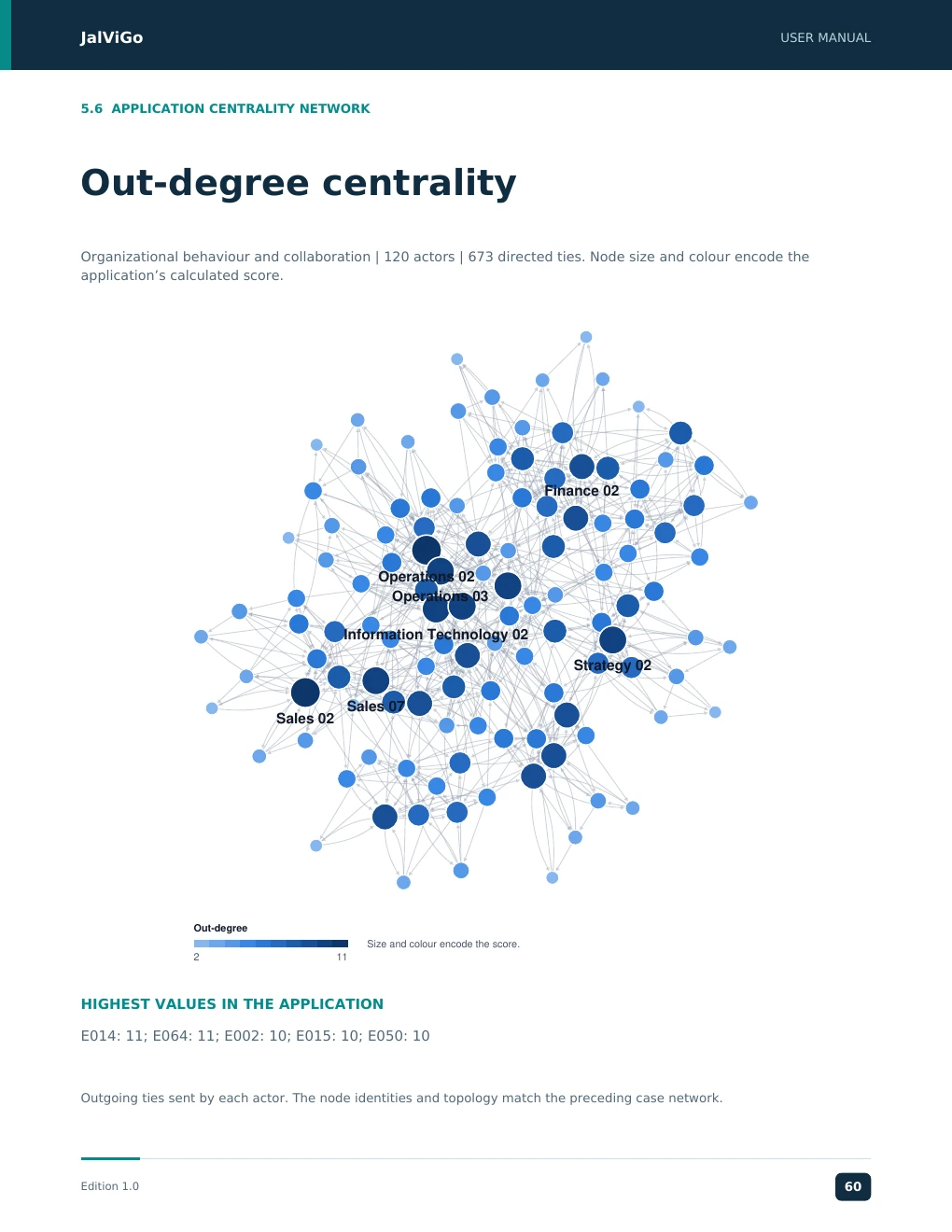
JalViGo USER MANUAL 5.6 APPLICATION CENTRALITY NETWORK Out-degree centrality Organizational behaviour and collaboration | 120 actors | 673 directed ties. Node size and colour encode the application’s calculated score. Finance 02 Operations 02 Operations 03 Information Technology 02 Strategy 02 Sales 07 Sales 02 Out-degree Size and colour encode the score. 2 11 HIGHEST VALUES IN THE APPLICATION E014: 11; E064: 11; E002: 10; E015: 10; E050: 10 Outgoing ties sent by each actor. The node identities and topology match the preceding case network. Edition 1.0 60
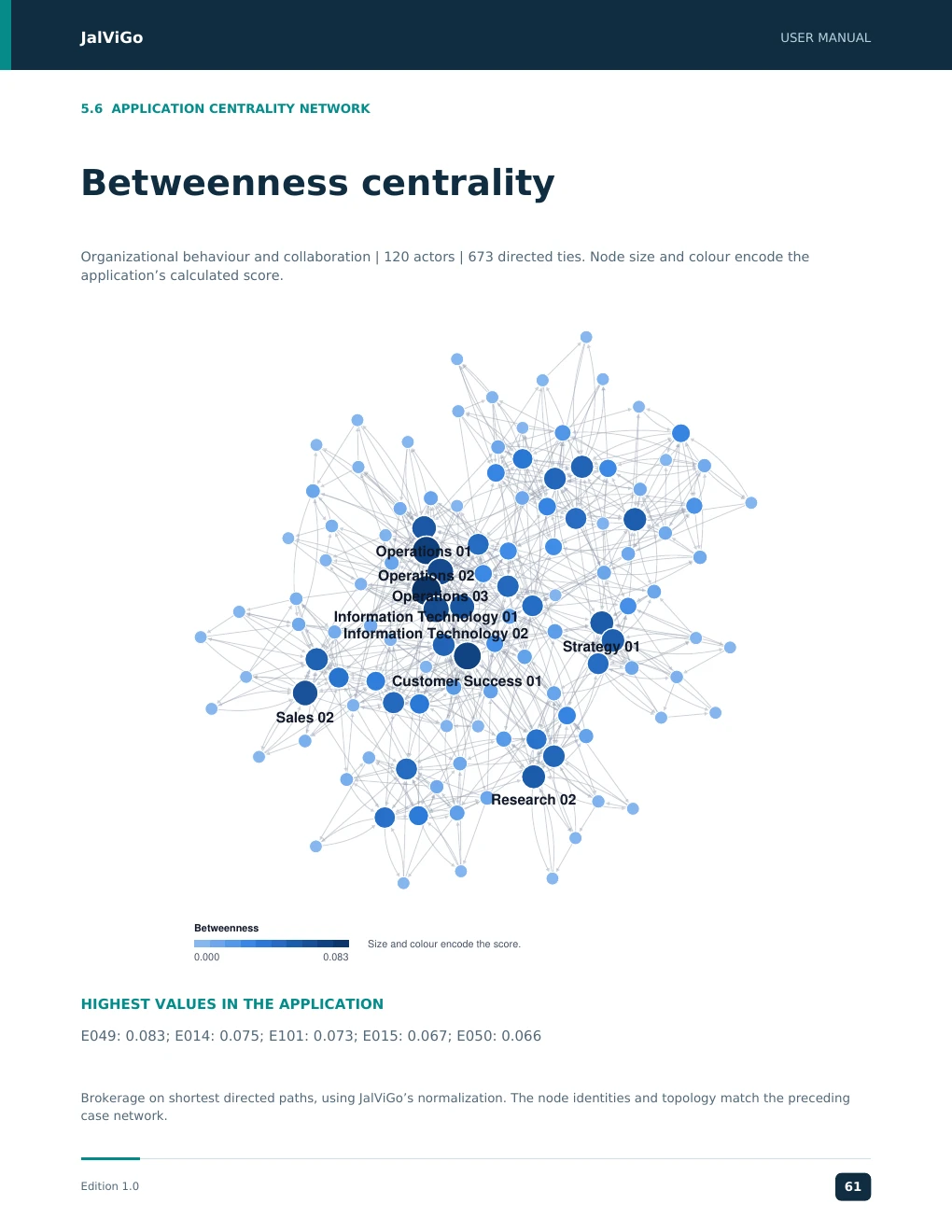
JalViGo USER MANUAL 5.6 APPLICATION CENTRALITY NETWORK Betweenness centrality Organizational behaviour and collaboration | 120 actors | 673 directed ties. Node size and colour encode the application’s calculated score. Operations 01 Operations 02 Operations 03 Information Technology 01 Information Technology 02 Strategy 01 Customer Success 01 Sales 02 Research 02 Betweenness Size and colour encode the score. 0.000 0.083 HIGHEST VALUES IN THE APPLICATION E049: 0.083; E014: 0.075; E101: 0.073; E015: 0.067; E050: 0.066 Brokerage on shortest directed paths, using JalViGo’s normalization. The node identities and topology match the preceding case network. Edition 1.0 61
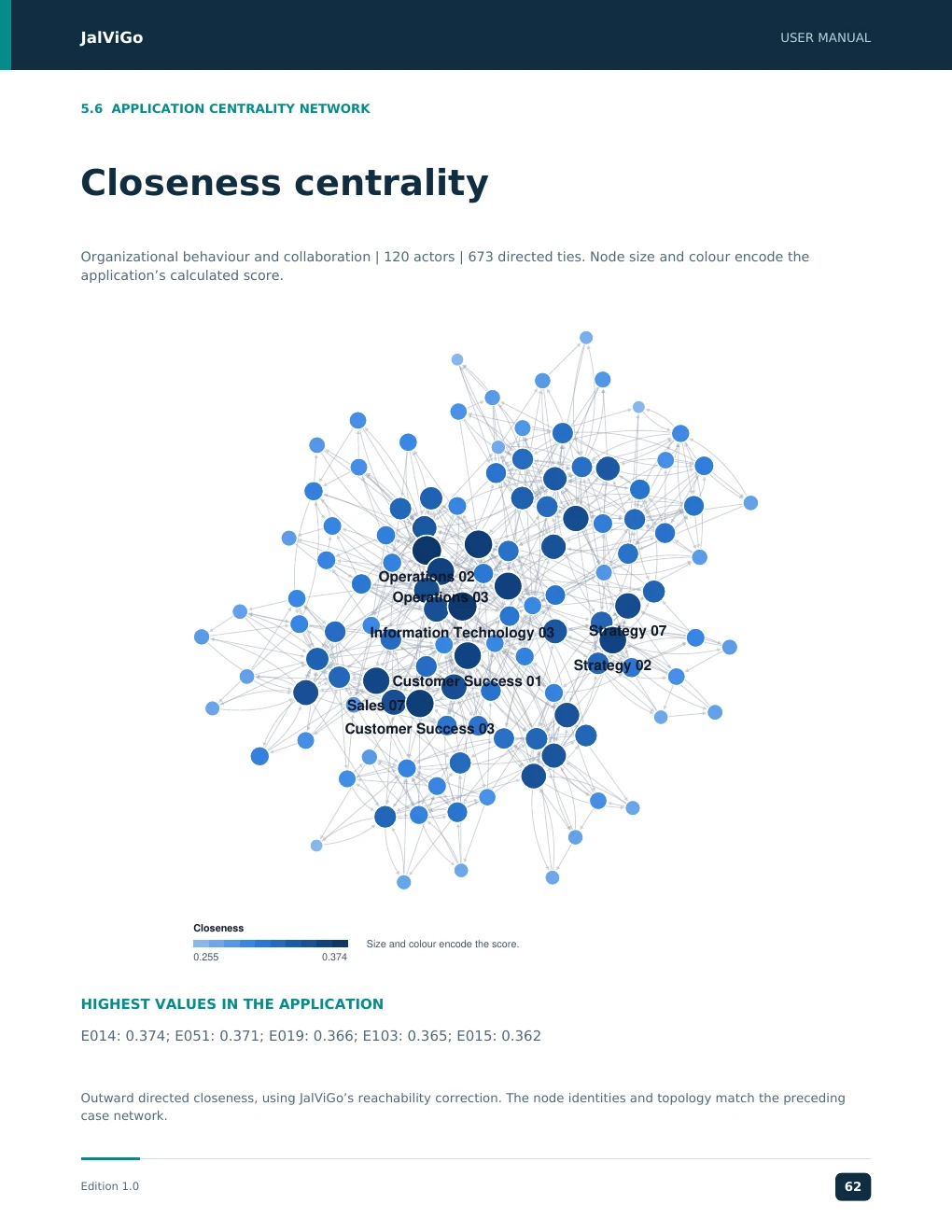
JalViGo USER MANUAL 5.6 APPLICATION CENTRALITY NETWORK Closeness centrality Organizational behaviour and collaboration | 120 actors | 673 directed ties. Node size and colour encode the application’s calculated score. Operations 02 Operations 03 Information Technology 03 Strategy 07 Strategy 02 Customer Success 01 Sales 07 Customer Success 03 Closeness Size and colour encode the score. 0.255 0.374 HIGHEST VALUES IN THE APPLICATION E014: 0.374; E051: 0.371; E019: 0.366; E103: 0.365; E015: 0.362 Outward directed closeness, using JalViGo’s reachability correction. The node identities and topology match the preceding case network. Edition 1.0 62
JJJJaaaallllVVVViiiiGGGGoooo UUUUSSSSEEEERRRR MMMMAAAANNNNUUUUAAAALLLL JalViGo User Manual 6.1 OUTPUTS Save export and share Retain inputs and settings as well as the final figure. A published image alone cannot reproduce the scenario, manufacturing assumptions or employee evaluation criteria. Output Use Session JSON Portable restoration of network and analysis inputs; preferred analysis backup. Browser save Convenient localStorage save in the current browser; restore through Export. Edge list or adjacency matrix Transfer the graph to other tools; specialist observations are not represented by ordinary graph formats. Actor and distance CSV Analyze rankings or pairwise distances using the exported conventions. Manufacturing or employee CSV Retain the specialist measures and their relevant inputs. Full results JSON Machine-readable results for traceability and further inspection. SVG or PNG figure Network illustration for reports, presentations and publication. Prepare a publication figure Choose SVG for scalable lines and labels, or PNG at the required output size and resolution. The figure dialog offers widths of 3.5, 7 or 10 inches and PNG resolutions of 300, 600 or 1200 DPI. Review font size, label visibility, legend, grayscale and background settings at the final printed size. The figure exporter captures the network; do not assume it exports the manufacturing charts. Protect and reproduce the analysis Browser saves are tied to the browser and can be lost when its storage is cleared. Export session JSON before switching devices. Undo retains up to 25 network snapshots, but not every parameter-edit history. A share link contains encoded session data, including any embedded employee observations. Anyone receiving the link can access that content. Share only an appropriately prepared dataset; long sessions may exceed the approximately 60,000-character limit. Calculations in the documented workflows run in the browser. External fonts and the optional Excel reader can still generate network requests. A local launch is not an assurance of fully offline operation. The inspected application does not provide user accounts or role-based access controls. Edition 1.0 23 EEEEddddiiiittttiiiioooonnnn 1111....0000 23363193
JJJJaaaallllVVVViiiiGGGGoooo UUUUSSSSEEEERRRR MMMMAAAANNNNUUUUAAAALLLL JalViGo User Manual 6.2 SUPPORT Troubleshooting and practical limits Symptom Check and corrective action Page does not open locally Keep the local server running and verify the port. If 8766 is occupied, use an available port and the matching URL. Import has fewer ties Inspect warnings for duplicate pairs, self-loops and zero weights. Confirm source/target mapping and direction. No path exists Check arrow direction and disconnected actors. Reverse reachability is a separate question. Manufacturing is blocked Restore required route stations and consecutive arcs. Check times, quantities and release settings. Mix is infeasible Check minimum demand against station capacities, and planned quantities against demand bounds. Mix is feasible but not optimal The search limit was reached. Preserve that status; a feasible result is not a proof of optimality. Employee outcome unavailable Load an OB outcome case or supply observations; check positive hours and raw wellbeing totals from 0 to 25. Outcome stays unchanged after Recorded employee observations are retained independently of network removal scenarios. This is not a forecast of intervention effects. Share or export is too large Use a session file rather than a share link and respect matrix and distance-export limits. Limits to record in an analysis Network import supports up to 5,000 actors and 150,000 ties. Matrix export is bounded at 3,000 actors and distance export at 2,000. Report displays the first 500 actor rows. Betweenness uses sampled sources above 2,000 actors. Manufacturing accepts quantities up to 10,000 subject to an operation limit of two million; chart previews are smaller than full calculations. If a result seems implausible, save the session and reproduce it on a small network with known expected results. Record the browser, case, exact input, action sequence and displayed error when requesting support through your software provider. No dedicated support address is specified in this edition. Edition 1.0 24 EEEEddddiiiittttiiiioooonnnn 1111....0000 23464204
JJJJaaaallllVVVViiiiGGGGoooo UUUUSSSSEEEERRRR MMMMAAAANNNNUUUUAAAALLLL JalViGo User Manual 6.3 METHODS Calculation reference Definitions below describe the inspected code. For n actors, m is the number of directed ties, d(i,j) is the shortest directed distance, and unreachable pairs are excluded only where explicitly stated. Indicator Implementation convention Density m / [n(n - 1)] for distinct actor pairs. Global efficiency Sum of 1/d(i,j) over reachable distinct ordered pairs, divided by n(n - 1); unreachable pairs contribute zero. Z1 Robustness Number of unique undirected links divided by n - 1. Reciprocal arcs collapse to one link for this projection. Z2 Resilience Minimum degree in the undirected projection; distinct from the failure-combination resilience analysis. Z3 Flexibility (Reachable distinct ordered pairs + n) / n². The diagonal is included. Z4 Efficiency Sum of finite directed distances divided by n(n - 1). Unreachable pairs contribute no distance; this is not global efficiency. Z5 Centralization Let v(i) = 2 × undirected degree and vmax be its maximum. Sum [vmax - v(i)] divided by 2(n - 1)(n - 2). Small or degenerate graphs require the implementation’s edge-case handling. Do not extrapolate formulas through a zero denominator. The Z indicators draw on [3], but matching a published table requires matching direction, projection and normalization. This edition does not claim replication of every numerical example in that study. Edition 1.0 25 EEEEddddiiiittttiiiioooonnnn 1111....0000 23465315

JalViGo USER MANUAL 6.4 AUTHORS About the Authors Prof. Manupati Vijay Kumar Indian Institute of Management Mumbai, India Prof. Manupati Vijay Kumar is an Associate Professor in Operations and Supply Chain Management at the Indian Institute of Management Mumbai. He earned his PhD in Industrial and Systems Engineering from IIT Kharagpur. His research examines supply chain resilience, viability and reconfigurability, multimodal logistics, reverse logistics and distributed manufacturing. His work also covers integrated process planning and scheduling, and healthcare supply chains. His teaching interests include AI, machine learning, generative AI and agentic AI in supply chain management. Prof. Goran Putnik University of Minho, Portugal Prof. Goran Putnik is a production and systems engineering scholar associated with the University of Minho, Portugal, and Centro ALGORITMI. He joined the University of Minho in 1993 and has served as a full professor in its Department of Production and Systems, School of Engineering. He received his DrSci (PhD) in mechanical engineering from the University of Belgrade in 1993. His research and teaching interests include production systems, automata and formal theory. His published work explores virtual, cloud and ubiquitous manufacturing, advanced manufacturing architectures and enterprise integration. His academic career includes coordination of international projects and contributions to scholarly books and journals. Edition 1.0 66
JJJJaaaallllVVVViiiiGGGGoooo UUUUSSSSEEEERRRR MMMMAAAANNNNUUUUAAAALLLL JalViGo User Manual 6.5 REFERENCE References The references support method interpretation. They do not imply that their authors or publishers endorse JalViGo. The network figures use the bundled case data and JalViGo’s native figure renderer from the uploaded application. [1] Brandes, U. (2001). A faster algorithm for betweenness centrality. Journal of Mathematical Sociology, 25(2), 163-177. Read source. [2] Kim, Y., Chen, Y.-S., and Linderman, K. (2015). Supply network disruption and resilience: A network structural perspective. Journal of Operations Management, 33-34, 43-59. Read source. [3] Karanam, M., Krishnanand, L., and Manupati, V. K. (2025). Quantifying performance indicators in perishable food supply chain networks: Assessing dynamic performance under ripple effects. Computers & Industrial Engineering, 201, 110873. Read source. [4] AMPL. Production model. An example of contribution maximization with capacity and demand constraints. Read source. [5] Lean Enterprise Institute. Cycle Time. Lean Lexicon. Read source. [6] World Health Organization (2024). The World Health Organization-Five Well-Being Index (WHO-5). Official instrument and scoring source. Read source. Edition 1.0 26 EEEEddddiiiittttiiiioooonnnn 1111....0000 2346664267